USE OF MASTERADJUST SOFTWARE
6 September 2008 / MasterBus - USB interface / EN
4 USE OF MASTERADJUST SOFTWARE
MasterAdjust software can be used for monitoring
and control of devices that are connected to the
MasterBus network. This software is available as
free to download software on the Mastervolt website
(www.mastervolt.com). Features:
• System configuration: to adjust the entire
MasterBus network and all connected devices in
accordance with your personal preferences,
including programming of Event-based
commands
• System Monitor: complete actual overview of
your entire electrical installation
• System logger: data logging of system data
during a longer period for analysis later on.
IMPORTANT: Invalid adjustment of the MasterAdjust
software may lead to disturbed operation of your
electrical installation. Therefore changes at the
Configuration menu may only be carried out by
qualified installers.
NOTE: As every configuration of the
MasterBus network differs from the other
the displayed data may differ from the
illustrations below. This user’s manual
can not give any specific instructions for
any particular connected device or
electrical installation. Refer to the user’s
manual of the connected device for an
overview of all available readouts and
settings
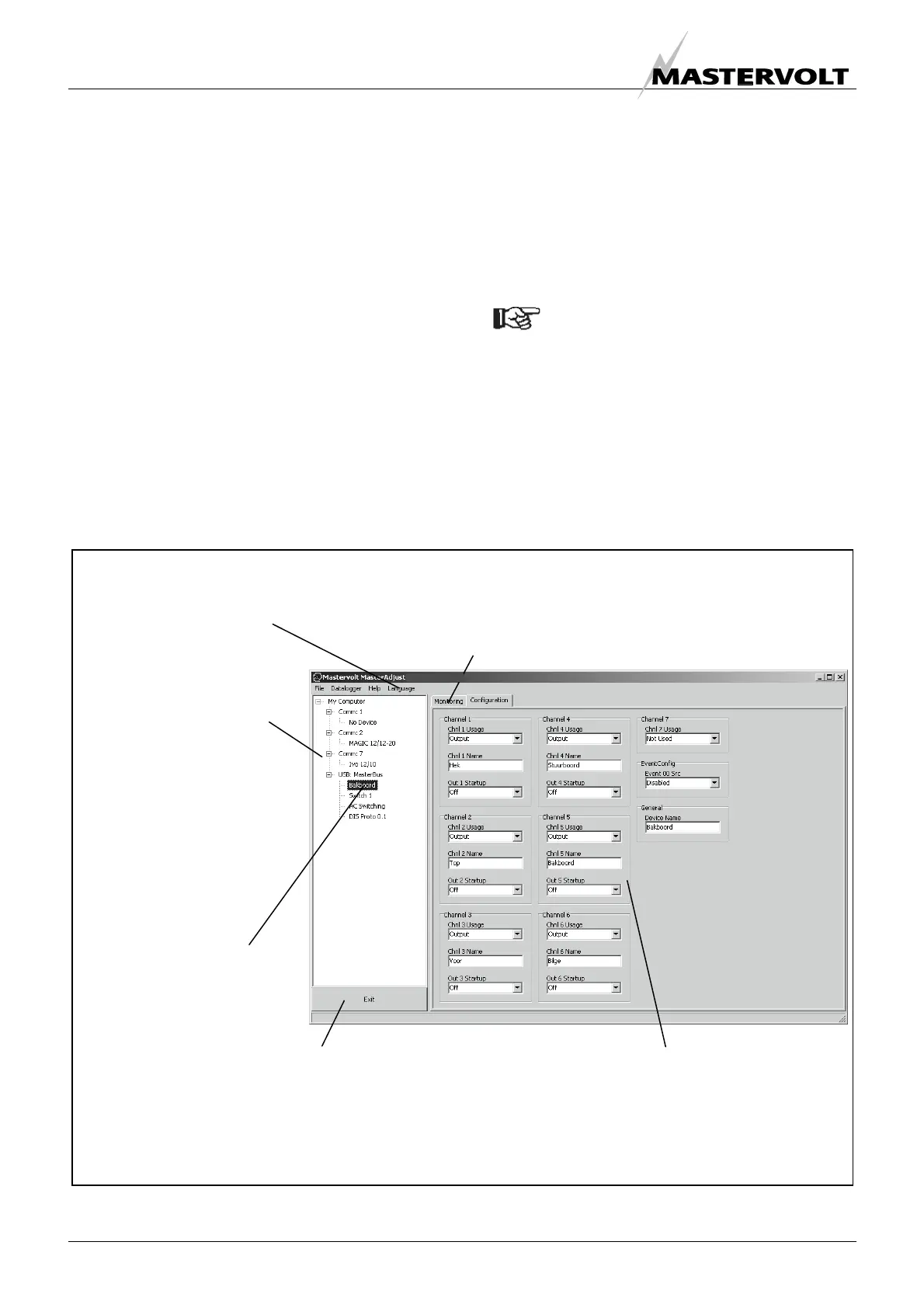
4.1 GENERAL
The tree view gives an
overview of the
connected devices.
The MasterAdjust
software may also
recognize other serial
connected devices
(non-MasterBus)
Click on the desired
device to show
detailed information
Detailed information of
the selected device
Click here to close the MasterAdjust software.
Settings are stored in the memory of the selected device.
This means that closing the MasterAdjust software does not affect
the operation of the connected devices
Click here to change the
displayed language
Detailed information may include the following data
Monitoring, Alarm, History or Configuration
(availability depends on the connected device)
Figure 7


 To Next Page
 Loading...