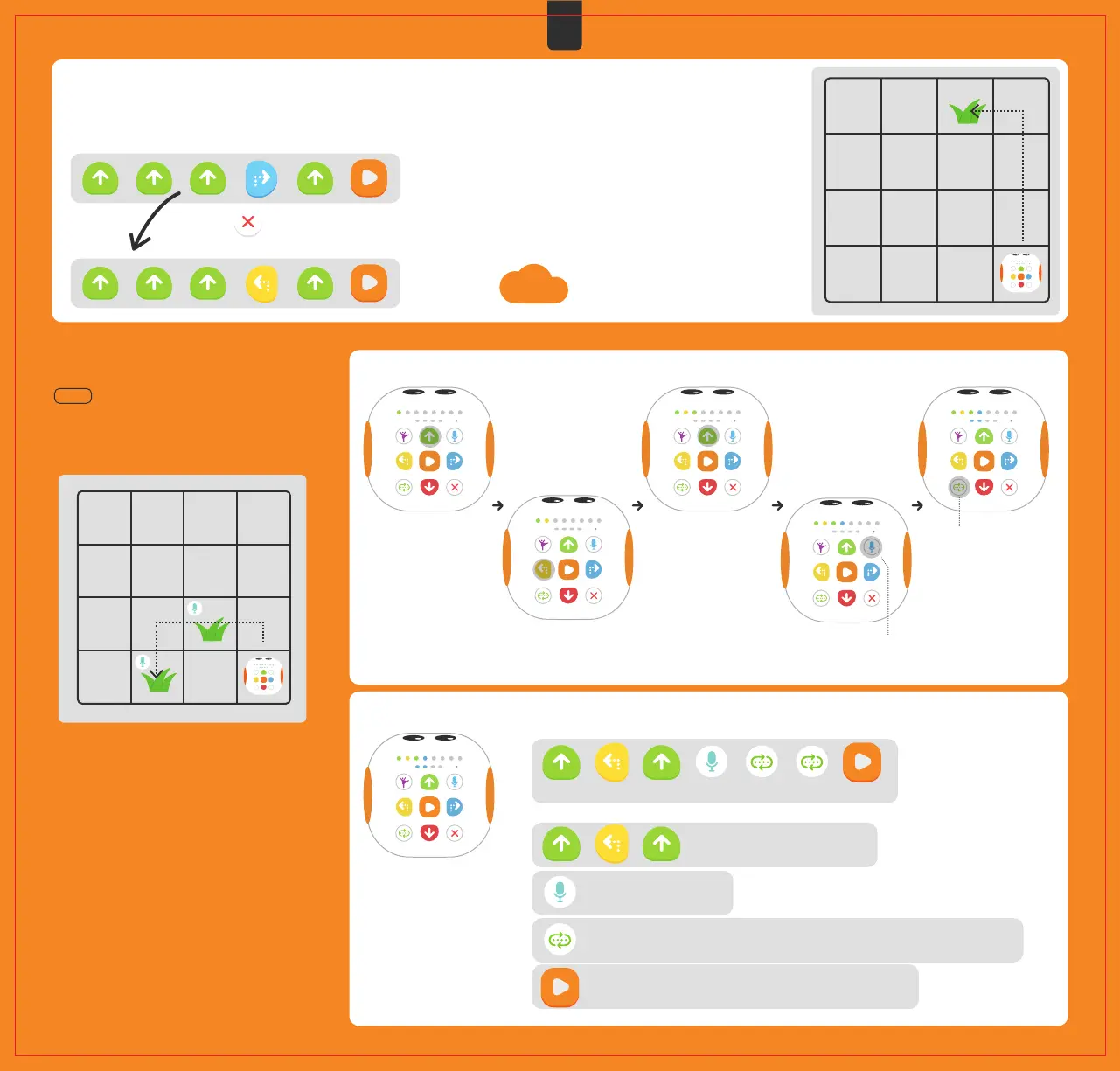
Press the twice to delete the last two commands,
then enter the corrected commands.
The command below cannot help Tale-Bot Pro eat grass, please fix it~
07 Coding example
Let's play a game with Tale-Bot Pro now!
Task
Help Tale-Bot Pro walk along the path planned in
the picture below by coding commands to eat the
two blades of grass, and make Tale-Bot Pro say
“Grass eaten!” every time it eats one!
①Enter commands as per the path planned in the picture.
How can we correct the program by pressing
and holding the Clear button?
Press the Record button and speak into the microphone:
Grass eaten! Then release the Record button.
06 Special note
Command deletion corresponds to DEBUGGING in computer programming, which is a process that involves identifying and removing
faults in a program. Faults found should be removed in order to correct the program.
Reflection
Press twice
②Press the Play button to start the robot.
Combination of commands (for reference):
Command description:
Grass eaten!
Tale-Bot Pro walks to the first grass.
Record a voice: Grass eaten!
Press this button twice to repeat the execution of previous two sets of commands twice.
Press the Play button to execute the above command combination.
EN
09



 To Next Page