Rev. Descrizione Redatto/Gestito Approvato Cod.Ident. Pagine Data Em.
0.6 Manuale Istruzioni GN UTEC B041.M01.EN 27/47 07/2014
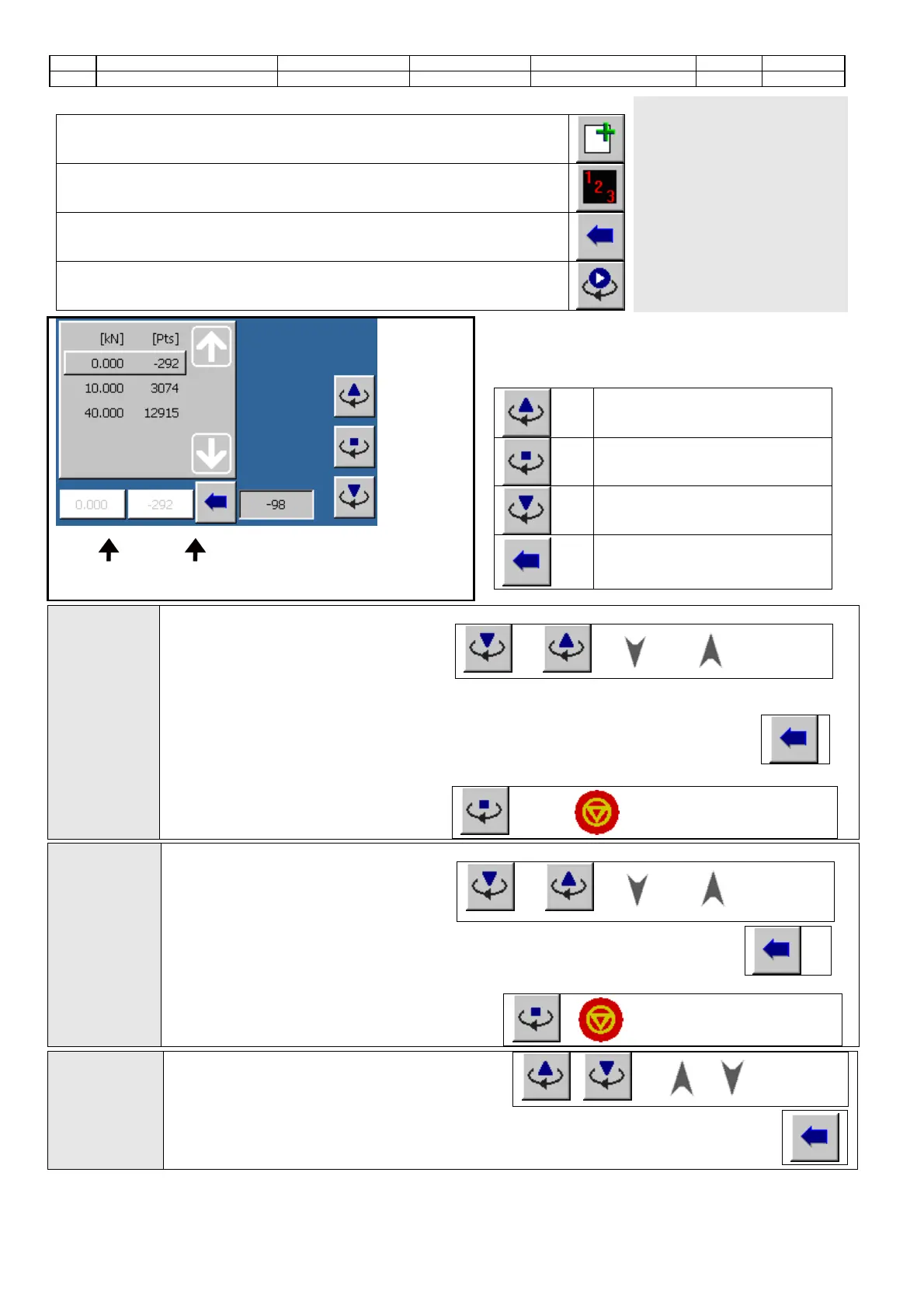
To calibrate the analog channels proceed as follows:
Add the desired number of steps to the calibration table by means of this button.
Set manually the displacement values (or load values) of the steps included in
the calibration table or enter the default values (to be calculated according to
the number of steps and the full scale in order to obtain equidistant values).
Set manually the points correspond to the displacement values (or load values)
or upload them through this button.
Or start the manual activation by means of this button.
When the manual activation
is started, the machine:
• enters immediately the
manual mode (in case of
calibration of the gyration
angle channel or of the
specimen height channel);
• moves the piston downwards
until it touches the standard
cell previously positioned into
the machine (in case of
calibration of the applied load
channel).
he calibration screen will change as follows:
Commands
To move the piston upwards
To stop the manual activation
To move the piston downwards
To copy the points value into
the calibration step
Channel value of
the selected step
Channel points of
the selected step
Calibration
of the
gyration
angle
channel:
1. Position the mould.
2. Press these buttons to move the
piston upwards and downwards until
it touches the mould:
and or ( and key-pad)
3. Perform a manual rotation until the minimum position is reached.
4. Position the distance piece in accordance with the calibration step.
5.
Touch
this button to obtain the points’ number read of the calibration step
selected..
6. Repeat the operations of points 4 and 5 until all the calibration steps are set.
7. Stop the manual activation by
means of button
or button key-pad.
Calibration
of the
specimen
height
channel:
1. Position the distance piece in accordance with the calibration step.
2. Press these buttons to move the
piston downwards/upwards until it
rests on the distance piece:
and or ( and key-pad)
Touch this button to obtain the points’ number read of the calibration step
selected.
4. Repeat the operations of points 2 and 3 until all the calibration steps are set.
5. Stop the manual activation by means of
button
or key-pad.
Calibration
of the
applied load
channel:
1. Increase/decrease the load applied to the
standard cell until the first calibration step is
reached. Press the buttons
/ (or / key-pad).
2.
Touch
this button to obtain the points’ number read of the calibration step selected
3. Repeat the operations described in the previous two points until all the calibration
steps are set.


 To Next Page