Rev. Descrizione Redatto/Gestito Approvato Cod.Ident. Pagine Data Em.
0.6 Manuale Istruzioni GN UTEC B041.M01.EN 28/47 07/2014
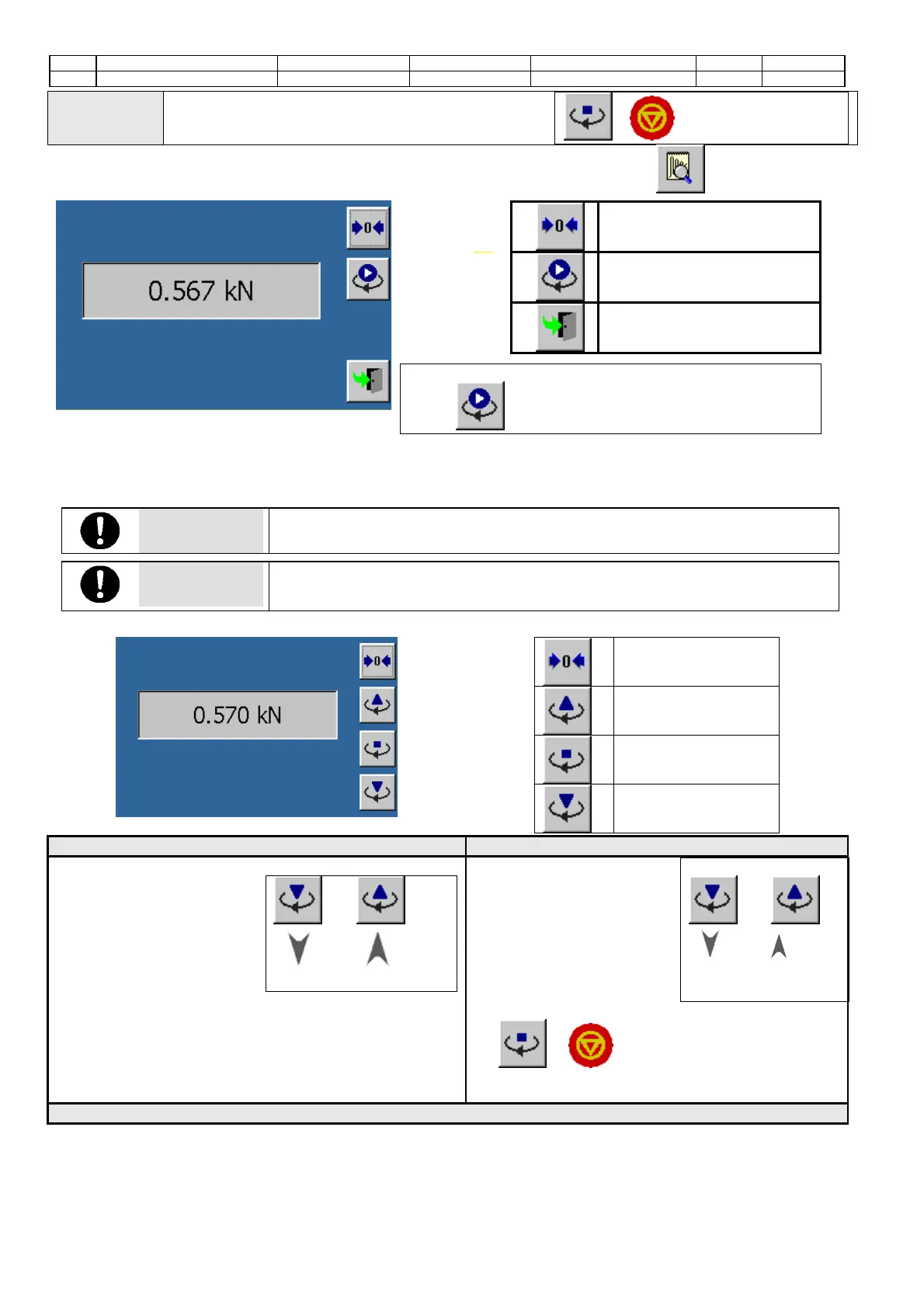
4. Stop the manual activation by pressing the button
or key-pad.
It is also possible to check the correct calibration of the analog channel using the button .
Commands
Readout zeroing
Start the manual
activation
Screen closure
When the manual activation is started (by pressing the
button ) the machine:
• enters immediately the manual mode (in case of calibration of the gyration angle channel or of the specimen
height channel);
• moves the piston downwards until it touches the standard cell previously positioned into the machine (in case
of calibration of the applied load channel).
ATTENTION
The manual activation function must be activated only by professional and experienced
staff, as this operation may damage/break the machine.
ATTENTION
The manual activation for the control of the gyration angle channel and applied load
channel calibration, can be activated only if the specimen height channel has been
previously set and calibrated.
The screen of the calibration check will be as follows:
Readout zeroing
To move the piston
upwards
To stop the manual
activation
Tomove the piston
downwards
Calibration of the gyration angle channel: Calibration of the specimen height channel:
1. Position the mould.
2. Press these buttons to
move the piston upwards
and downwards until it
touches the mould
and or
( and key-
pad)
3. Perform a manual rotation until the minimum
positioned is reached.
4. Position the distance pieces of different dimensions
and check the corresponding readouts.
5.
Repeat the operations described at points 3 and 4
until all the calibration steps are set.
1. Press these buttons to
move the piston
downwards/upwards until
it rests on the distance
pieces of different
dimensions; then check
the corresponding
readouts.
and or
( and when
using the key-pad)
2. Stop the manual activation by pressing the button
or when using the key-pad.
Calibration of the applied load channel:


 To Next Page