Rev. Descrizione Redatto/Gestito Approvato Cod.Ident. Pagine Data Em.
0.6 Manuale Istruzioni GN UTEC B041.M01.EN 33/47 07/2014
next
page
former
page
print
4. to close the screen of the test results printing and
storage.
Switching the appliance on
GYRATORY COMPACTION
ATTENTION
The gyratory compaction can be performed only purchasing the
appropriate licence.
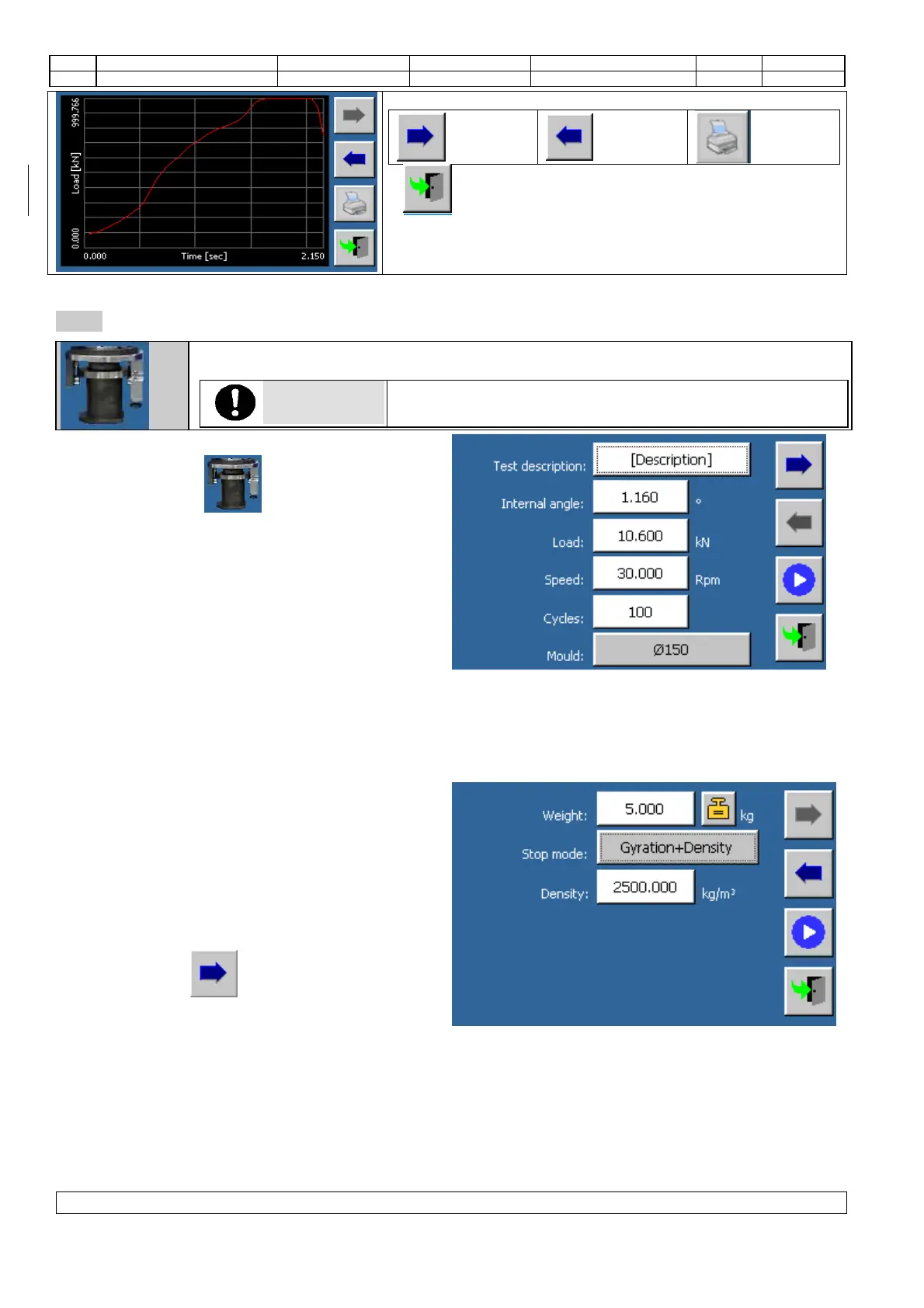
1. Touch the icon from the main menu to
enter the gyratory compaction test.
2. The parameters’ screens will be displayed.
3. Change the “test description” parameter; enter a
name suitable for the compaction identification as
well as for the automatic creation of the file name
where the test results will be saved.
4. If necessary, change the “internal angle” parameter. The value must correspond to the mechanical setting of
the gyration angle.
5. If necessary, change the “load” parameter”. This value will be used to apply the load and to check its
conservation during the compaction phase.
6. If necessary, change the gyration speed.
7. If necessary, change the number of cycles. The
test execution could finish before the number of
cycles set by the operator have been reached; this
depends on which type of “stop mode” has been
selected (this parameter is included in the second
screen of the parameters section) and on the
progress of the compaction phase.
8. If necessary, select the “mould type” to be used
during the test.
9. Touch the icon to enter the next screen.
10. You will enter the second screen to set the
parameters.
11. If necessary, change the “weight” parameter. This value will be used to calculate the density of the material
poured into the mould.
12. Select the compaction “stop mode”. The compaction phase will stop when one of the following conditions is
reached: number of cycles (stop mode: cycles), specimen height (stop mode: cycles + height), specimen
density (stop mode: cycles + density). If the specimen height or density set by the operator is not reached,
the machine will stop the compaction phase at the set number of cycles.
13. Once the stop mode has been selected, insert the height or density value if requested.
OPTIONAL: The value of the weight of the sample can be acquired by reading the value from the


 To Next Page