Rev. Descrizione Redatto/Gestito Approvato Cod.Ident. Pagine Data Em.
0.6 Manuale Istruzioni GN UTEC B041.M01.EN 34/47 07/2014
analog channel.
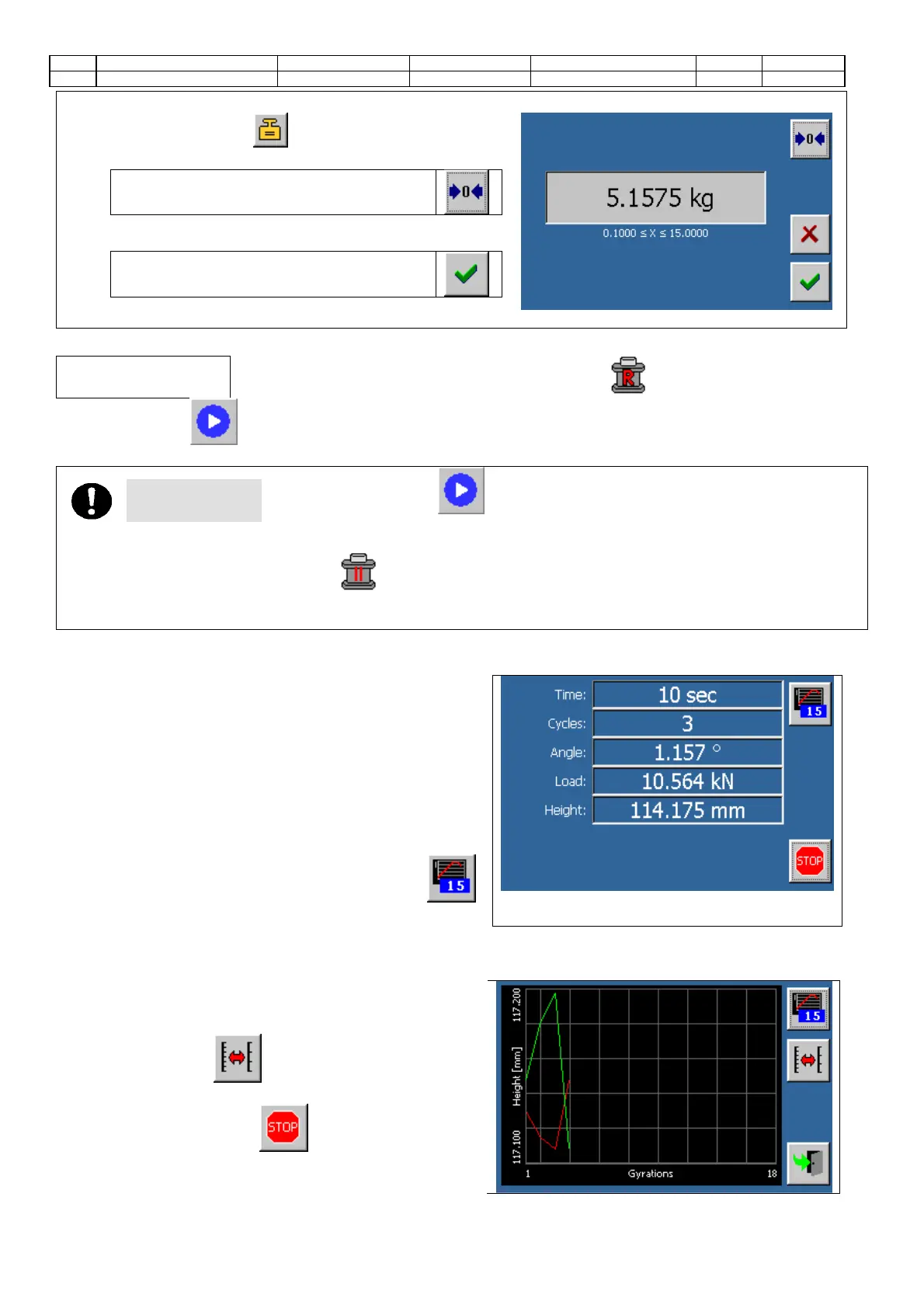
• Press the button to access the screen on.
• Place the mold on the scale
Press the button to tare.
Pour the material into the mold and wait for the reading to
stabilize.
Confirm the value
Test execution
14. Make sure that the machine is in ready state (icon in the status bar).
15. Touch the icon to start the gyratory compaction.
ATTENTION
After touching the icon the piston will start moving downwards. If the mould
has not been positioned correctly, the piston will not be able to complete its travel.
The machine will detect this condition and makeautomatically another attempt. If this secondattempt fails, the
“pause” function will be activated (icon: displayed on the status bar) and the operator has to open the safety
door and adjust the mould (the execution of the test is not interrupted). When the safety door is closed, the machine
will give a third try and, in case of error, will stop the test with an acoustic alarm.
16. The screen of the compaction will be displayed (numeric
visualizazion); the screen will report the values of the
external angle, of the load and of the specimen height
at every single rotation.
If the compaction is not performed properly, the load
value could be shown in red. This occurs if the load value
does not respect, even for one single rotation, the
tolerance values set in the parameters configuration
screen.
Touch the button to alternate the numeric
visualization with the graphic one, and vice
versa, during the compaction phase.
18. The graphical display modes are displayed on a single
graph, trends, lap by lap, height (track RED) and density
(track GREEN) of the specimen.
19. Touch the button to alternate on the y-axis the
visualization of the scale of the three lines
20. Press anytime the button to stop the test.


 To Next Page