10 11
CHAPTER 5: Overlay description / enGineerinG mode
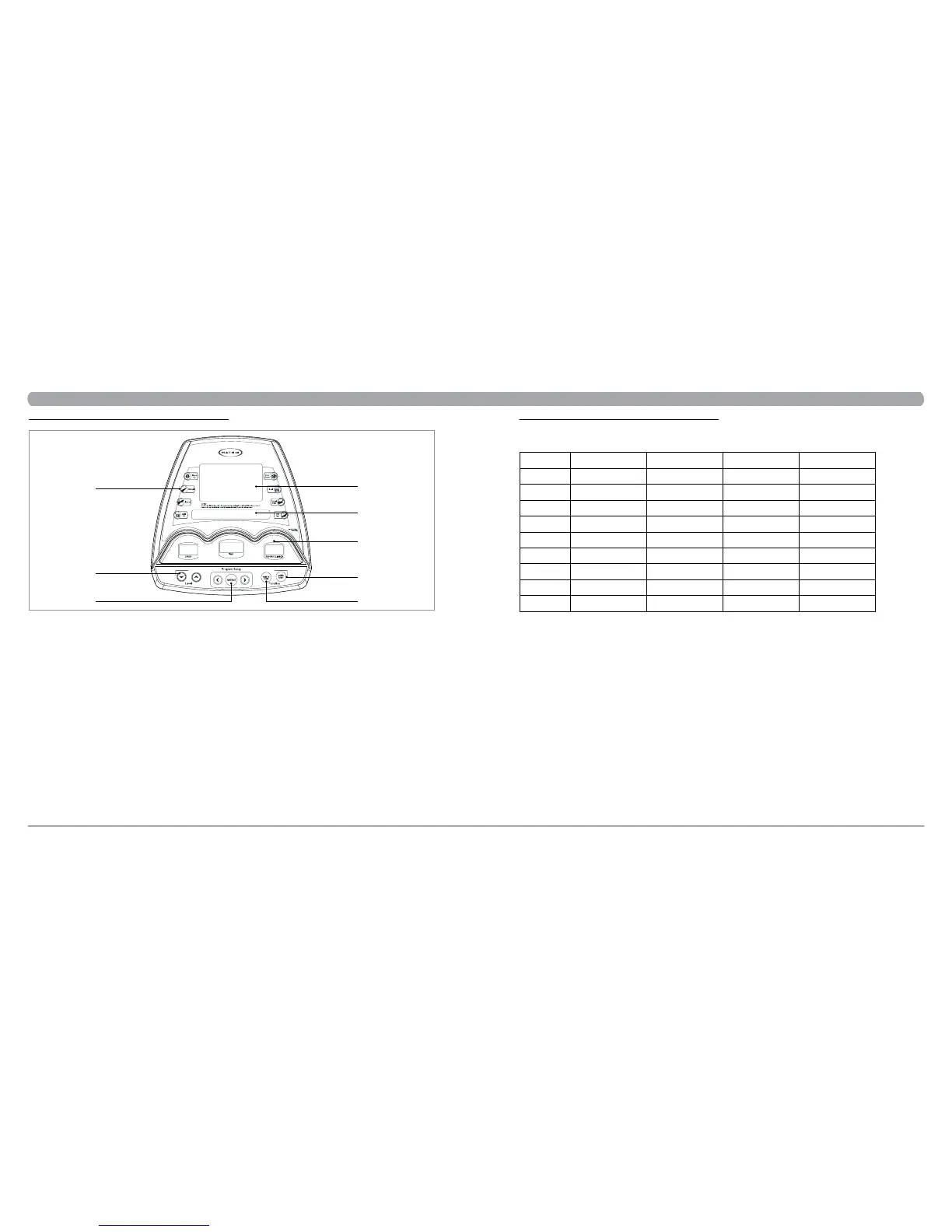
A) WORKOUT PROFILE WINDOW:
During a workout, this window displays shapes, made of triangle columns of lights, which represent the levels of intensity in a workout-in-progress. The
height of the furthest column is proportional to the current level of the intensity. Information will cycle every 30 seconds.
B) INSTURCTION CENTER:
This window displays step-by-step instructions for setting up a workout.
C) INFORMATIONAL DISPLAY:
During a workout, three sets of numbers, including Speed, Time and Floors Climbed, display statistics about the progress of the workout.
D) PROGRAM PLUS™ KEYS
Press the key to select one of the workouts. The program key with a symbol of plus “+” represents additional workout options. Press this key repeatedly for
similar workout options.
E) LEVEL ARROW KEYS
During a workout, pressing the UP or DOWN arrow can adjust intensity levels.
F) RIGHT / LEFT ARROW KEYS
A pair of RIGHT and LEFT arrows is located on the side of SELECT. Use arrows, when setting up a workout, to change workout parameters displayed on
the LCD console, such as length of workout, weight, age, heart rate, and intensity level. In addition, the pair of RIGHT and LEFT arrows is corresponding
to the arrows in the LCD display.
G) QUICK START
Press QUICK START to begin your workout immediately, without having to select a workout program.
H) RESET
PAUSE: If you need to PAUSE your program during a workout, stop pedaling. It will PAUSE your program for 30 seconds. Pressing START will return you
to your workout. NOTE: Pause time is only available for ellipticals equipped with the battery.
RESET: If you need to RESET the console during your workout, you can do so by holding down the RESET button for three seconds, or until the
display resets.
5.1 CONSOLE DISPLAY
A
B
C
E
F
G
H
D
5.2 WORKOUT PARAMETER PROMPTS
CHAPTER 5: Overlay description / enGineerinG mode
PROMPT DEFAULT MINIMUM MAXIMUM UNIT
TIME
LEVEL
WEIGHT
AGE
DISTANCE
CALORIES
WATTS
Heart Rate
GENDER
20
1
68 / 150
30
5 / 3
500
150
n/a
MALE
5
1
34 / 75
10
1 / 1
50
50
52
MALE
99
20
182 / 400
99
80 / 50
5000
350
200
FEMALE
minute
kg / lbs
years old
km / mile
cal.
watt
beat
This section lists the default value and value range of workout parameters appeared in the PROMPT AREA, located in the bottom of WORKOUT
PROFILE WINDOW. Before an exercise session, each parameter prompt will appear here depending on different programs.
NOTE: The workout time is a “countdown” display according to the default time or the maximum time that a user inputs. When the workout time is
inputted as “0”, the time will count up from a zero to the maximum time.


 To Next Page