10
ENGLISH
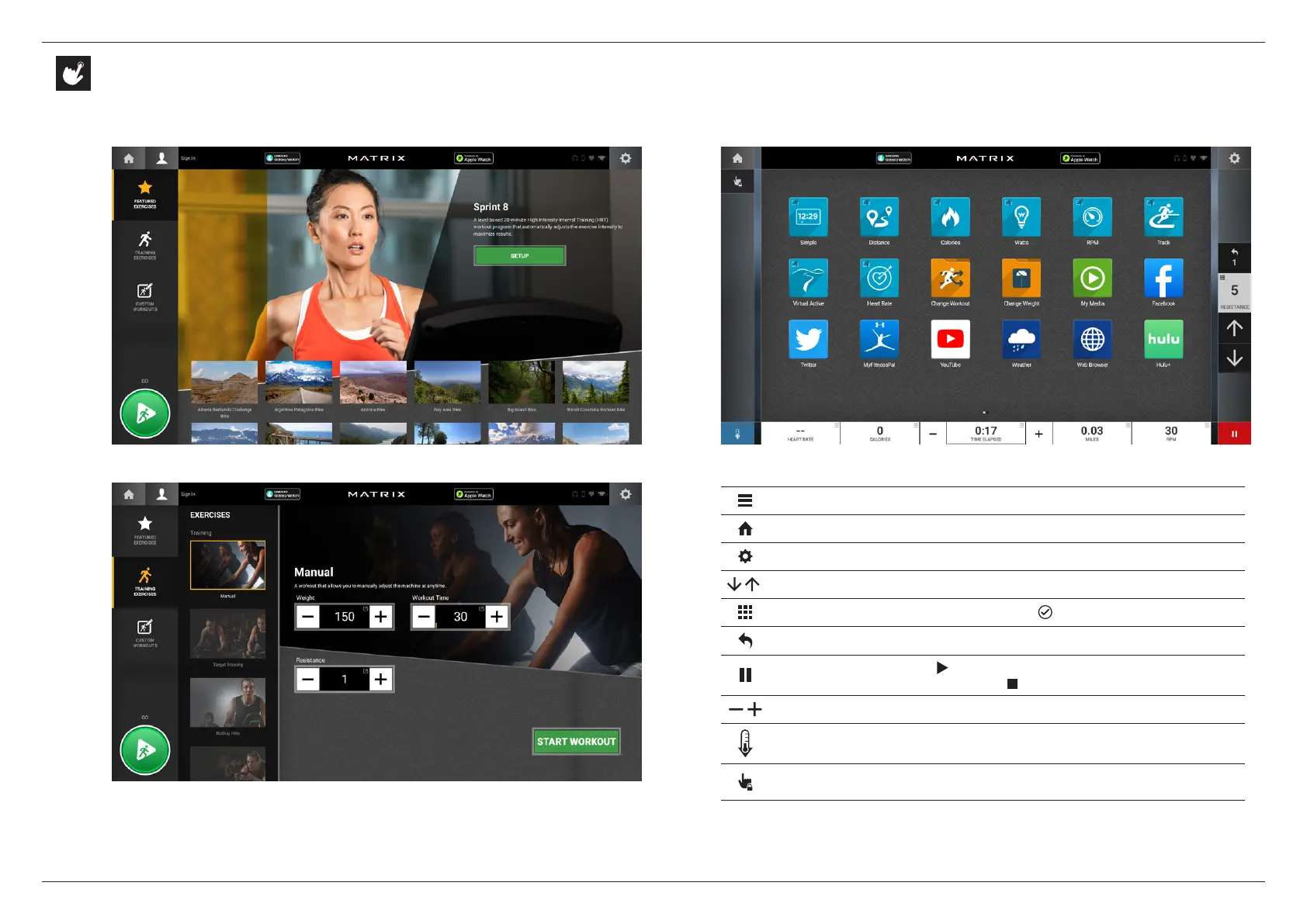
GO SCREEN
HOME SCREEN
Change WORKOUT STATISTICS displayed at the bottom of the screen
Return to the home screen whenever you’re using an app
Adjust VOLUME and pair a BLUETOOTH device and/or ANT+ device
Increase or decrease the resistance level
Use the keypad to set resistance level. Press to confirm change
Change resistance level back to previous setting
Pause your workout. Touch to resume. After resuming, resistance
level will be reset. While paused, touch to end workout
Increase or decrease the duration of your workout
Enter cool down mode. Cool down lasts for a few minutes while reducing
the workout intensity, allowing your body to recover from your workout
Lock the screen in order to prevent accidental screen touches from being
implemented. Touch it again to unlock the screen and allow screen touches
HOME SCREEN
PROGRAM SETUP
Note: Workouts and features vary based on model type,
console configurations and software versions.
CONSOLE OPERATION


 To Next Page