12 Matrox D-Series – User Guide
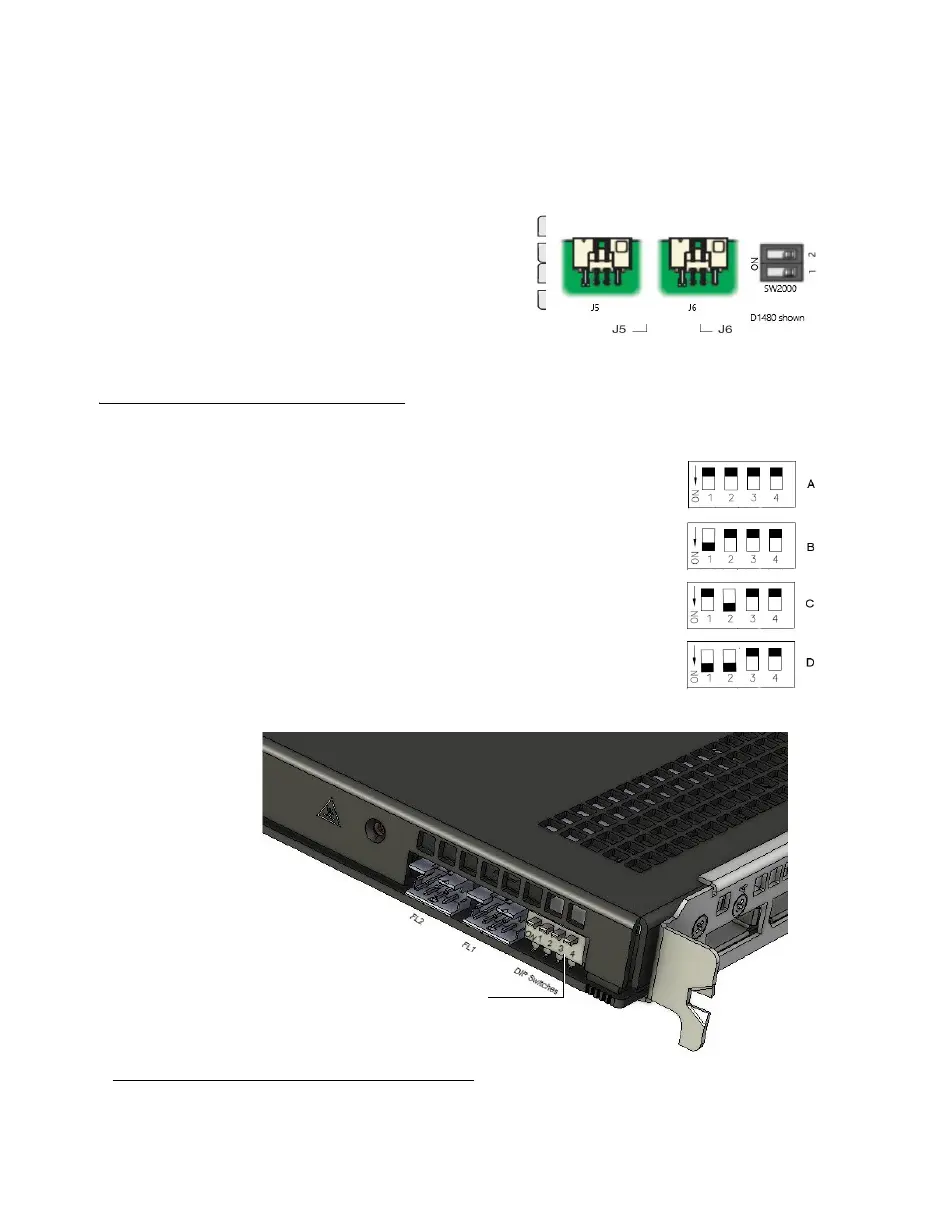
You can identify the location of the DIP switch by silkscreen ‘SW1000’ on your Matrox
D1450 and ‘SW2000’ on your Matrox D1480 cards. To set the DIP switches on your
cards, use the tip of a pen or pencil to flip the switch positions. We recommend setting
your card order as illustrated in the diagram, starting with the first card identified by
PowerDesk as A
*
.
Setting the order for multiple D2450 or D2480 cards
The DIP switches on your D-Series output cards are used to
control the order in which the GPUs of your cards are used.
Setting the DIP switches is useful if you’re setting up a large
display wall layout that uses multiple cards.
Ordering the output connectors enables PowerDesk software
to properly lay out the outputs of your display wall and avoids
you having to manually set up your multi-display layout.
The default position of the DIP switch on your D-Series card
is as shown in A in the diagram.
The location of the DIP switches is shown in the image below.
*The DIP switches use binary counting to set the card order.
DIP switches on D2450
or D2480 cards











 To Next Page