12
Connecting MXO2 Mini to your computer
Connecting MXO2 Mini to your computer
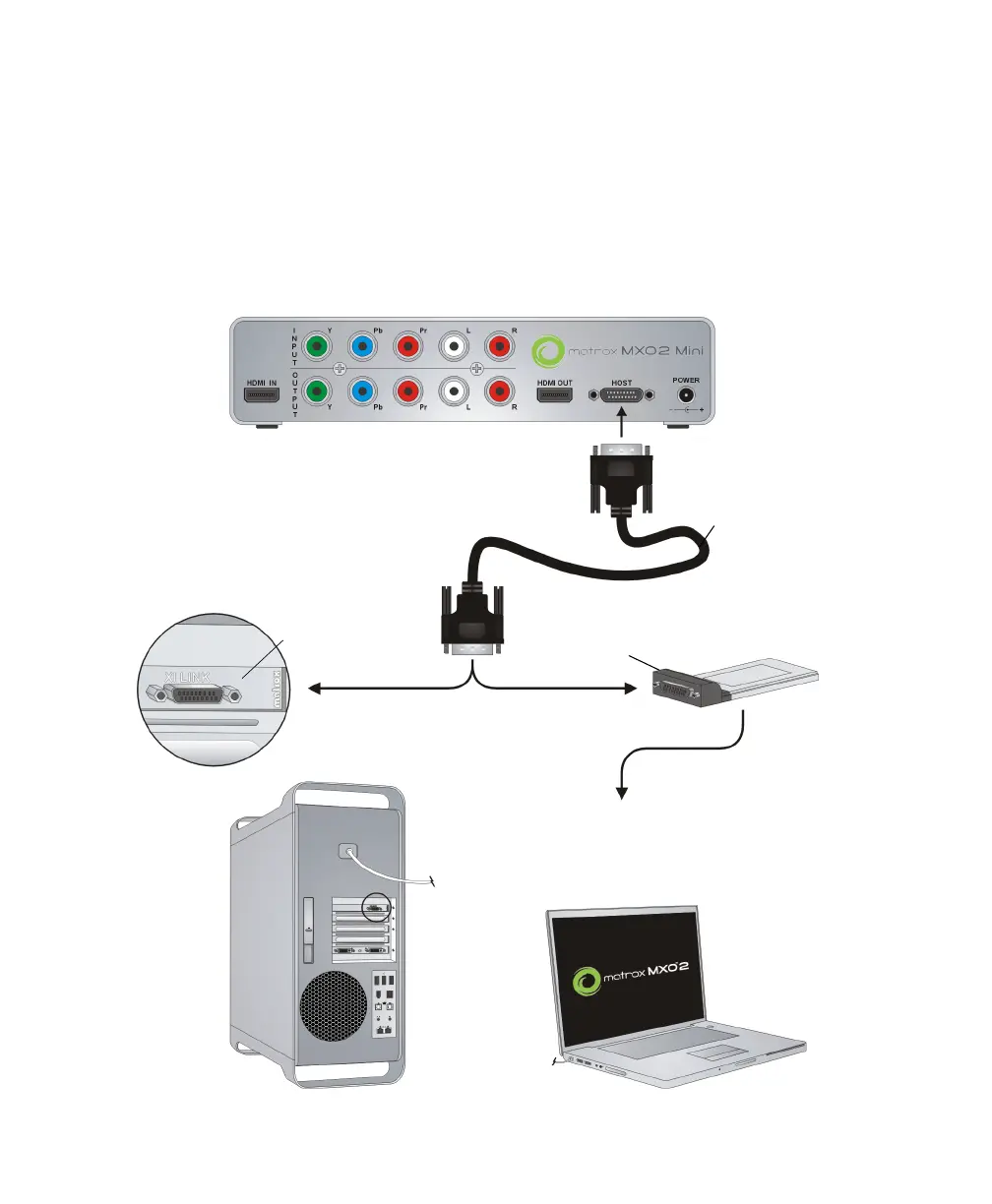
Connect MXO2 Mini to your computer using the Matrox PCIe cable. For MXO2
Mini to be detected on a desktop computer, power must be supplied to MXO2 Mini,
and it must be connected to your system before starting your computer.
¡ Important Do not disconnect the Matrox PCIe cable from the adapter, or MXO2
Mini, when your computer is running. To safely remove the Matrox PCIe host
Expresscard/34 adapter, see “Installing and removing your PCIe host ExpressCard/34
adapter (for laptops)” on page 2.
OR
A
A
Matrox PCIe host
ExpressCard/34
adapter
Matrox PCIe
host adapter
PCIe cable
²Caution Ensure proper orientation
when connecting the PCIe cable to avoid
damaging the cable or host connector.
To your laptop’s ExpressCard/34
slot (see “Installing and removing
your PCIe host ExpressCard/34
adapter (for laptops)” on page 2).
MXO2 Mini



 To Next Page