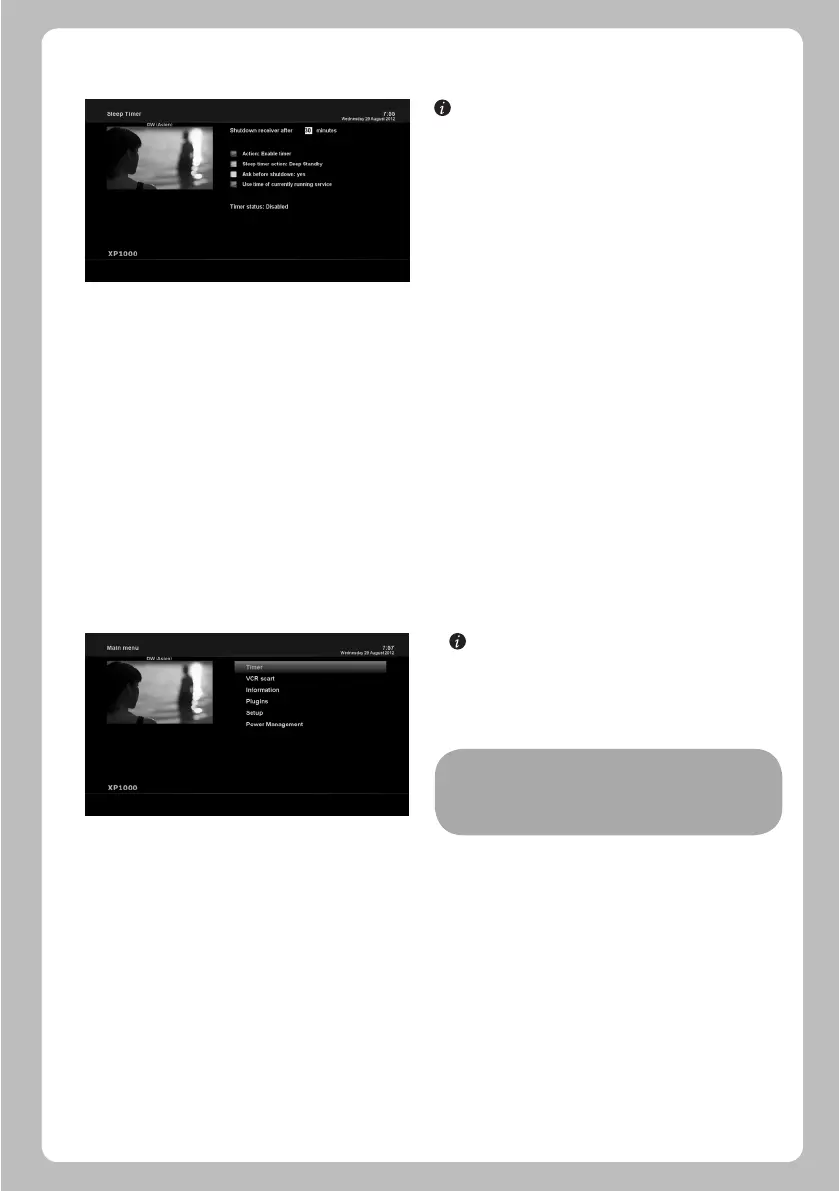
[ : MENU > Power Management > Sleep Timer]
You can set a specific time when your XP1000 goes into Standby
mode or Deep Standby mode, using this menu. Three colour keys
are used to set up this sleep timer.
1 RED
This option is used to enable or disable Sleep Timer.
2 GREEN
This option is used to choose between Standby mode and Deep
Standby mode.
3 YELLOW
This option is used to choose whether to be asked of confirmation
before system shutdown.
3 BLUE
This option is used to use time of currently running service.
XP1000 is a very sophisticated device designed to allow users a variety of System Settings options as detailed as possible. You can
fine-tune your XP1000 to be your OWN system to fit your taste. This chapter will guide you through the entire menu of system
configuration.
[ : Press MENU]
The main menu of XP1000 consists of the following sub menus.
- Timer
Enables you to reserve program watching and recording.
- VCR scart
Switches to VCR scart connection.
4.15 Sleep Timer
5.1 TOP Main
NOTE: If your XP1000 is not connected to VCR scart, the
screen will go black. In this state, just press EXIT to
return to the previous state.
5. MENU
19
- Information
Has two sub menus for Service / About. Service menu provides the detailed information of the current channel. About menu
provides the detailed information of the H/W and S/W system of your XP1000. For more information, please refer to the Information
section.
- Plugins
Activates Plugin browser of XP1000. Using this browser, you can log onto the designated website and you can download a variety
of new plug-ins.
- Setup
Provides all of the System Settings. For more information, please refer to the next section.
- Power Management
Provides options for power on/off and sleep timer. For more information, please refer to the Power On/Off section.


 To Next Page