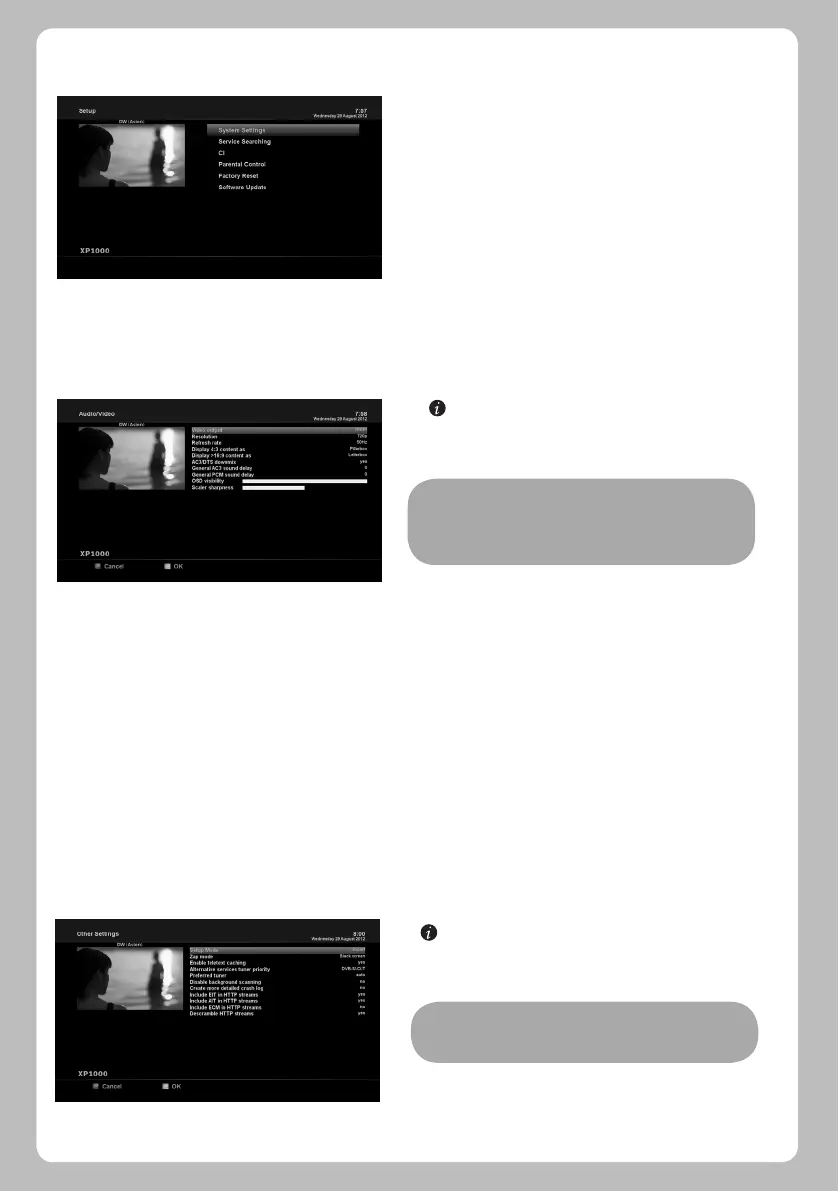
[ : MENU > Setup > System Settings > Other Settings]
In this menu you will find various customization options and
this menu can be displayed in three different
formats: Simple, Intermediate, and Expert.
Amongst the options given in this menu, the following ones
are generally what you may need to know.
5.2.1.2 Other settings
Setup menu consists of the following sub-menus.
1 System Settings
2 Service Searching
3 Common Interface
4 Parental Control
5 Factory Reset
6 Software Update
[ : MENU > Setup > System Settings > Audio/Video]
Here you will find options necessary to set up the audio and
video configuration of your XP1000.
5.2 Setup
5.2.1 System Settings
5.2.1.1 Audio/Video
Amongst the parameters given in this menu, the following ones are generally what you need to decide for the audio and video.
1 Video output
Here you need to decide which video output you want to use between your TV and XP1000 . The available options are as below.
• HDMI
• SCART
2 Resolution
You need to decide which resolution to use.
3 Downmix
YES is used when you want to set the audio output to be down-mixed to Stereo. NO is used when you do not want to set the audio
output to be down-mixed to Stereo. This option is recommended when you are using S/PDIF connection.
NOTE: RED is for cancel and GREEN is for OK. OK key of
RCU is not working in this mode.
20
NOTE: RED is for cancel and GREEN is for OK. OK key of
RCU is not working in this mode.


 To Next Page