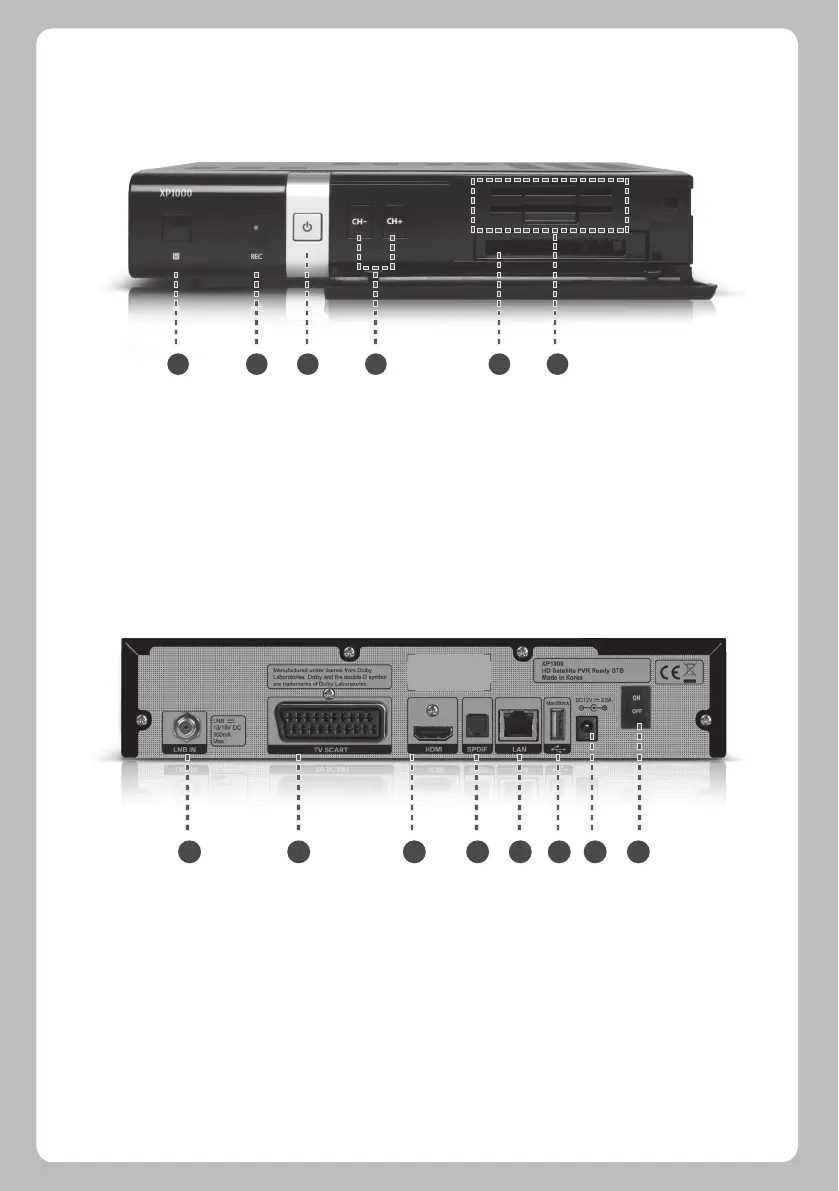
1. IR Receiver: Receive the IR signal from remote controller.
2. Recording Indicator: Display the current recording status of STB.
3. On/Off button and Indicator: Display the current power status of STB. Using this button, you can power on and off your STB.
4. Channel up/down: Using the channel up and down buttons, you can switch the channels directly on your STB.
5. CI Module slot: One CI module slot is provided.
6. Smartcard reader slot: Two Smartcard slots are provided
1. LNB 1 IN: One Satellite cable can be connected.
2. SCART: One SCART connector is provided for TV using SCART cable.
3. HDMI: Connect to TV using an HDMI cable for both audio and video signals.
4. S/PDIF: Connect to a digital audio system using S/PDIF cable.
5. Ethernet: Connect Network.
6. USB: Connect the USB memory stick or external HDD.
7.DC Power Jack: Connect the provided AC/DC adapter (2.5A@12V).
8. DC power On/Off Switch: Power on/off.
Front Panel
Rear Panel
1.3 Product Descriptions
1 2 3 4 5 6
1 2 3 4 5 6 7 8
04


 To Next Page