6 max mobility
®
e power assist can ALWAYS be deactivated by turning power assist OFF / wirelessly disconnecting it from the
SmartDrive. If you have thumb throttle buttons, pressing and releasing either button will also deactivate the motor
if driving.
Serious care should always be taken on hills, inclines, ramps, in crowded / conned areas, etc.
Tapping force does not need to be excessive or “hard”. Gentle, sti wrist taps at a reasonable speed (i.e. one half (0.5)
second between taps) is sucient.
While the PushTracker is designed to sense the tap / impact of your PushTracker wearing hand, other movements done
with your hands while the motor is driving can possibly cause activation / deactivation. Whenever power assist is be-
ing provided, it is recommended to position your hands over your handrims for steering, then a sti wrist tap then brake
when desired to deactivate and slow down.
Always turn OFF the power assist [via PushTracker] when parked, before transferring in or out of your wheelchair, taking
the PushTracker o of your wrist and / or SmartDrive o of your chair to prevent accidental activation.
EZ-ON Power Assist Ready
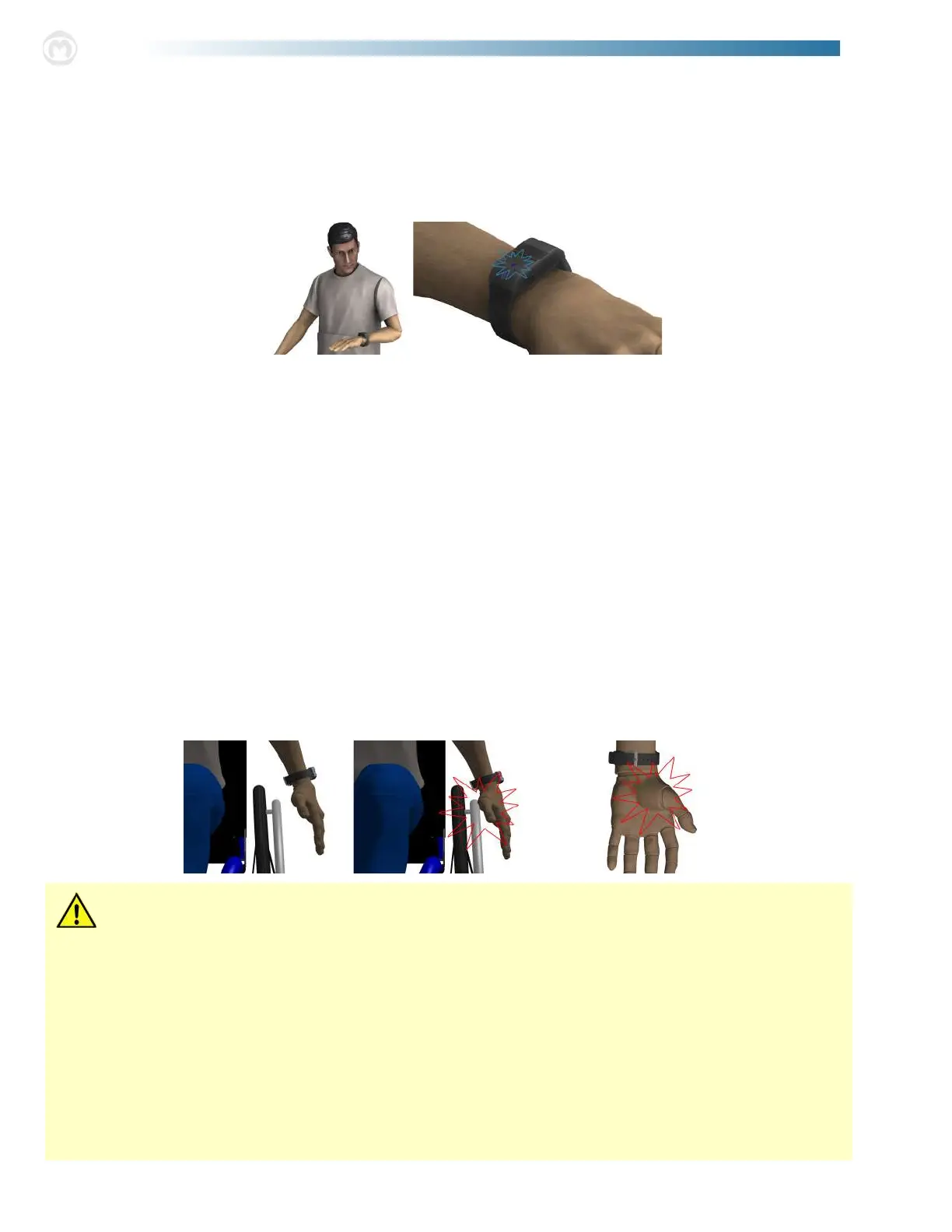
With EZ-ON activated [see “SmartDrive Settings” in the PushTracker User’s Manual], hold your arm so the PushTracker
is completely horizontal [parllel to the ground]. When oriented correctly, the charging LED will illuminate blue [see graph-
ics below], at which DOUBLE tapping down on the PushTracker screen will turn power assist ON. Repeat these actions in
order to turn power assist OFF. is is a great feature if you have limited nger function that makes pressing the Power Assist
Button dicult.
Power Assist Deactivation
ere are dierent ways to deactivate the power assist depending on which Control Mode you are operating in [see dier-
ent “Control Mode” sections]. e safest and therefore preferred way of deactivation is to perform a hitting motion with your
PushTracker wearing arm. Motion sensors in the PushTracker sense this hitting motion / tap [see graphics below] and then
deactivate the motor. Ideally, the deactivation motion will be performed by hitting your hand against the handrims with a sti
wrist prior to braking. Sucient deactivation motion is indicated by the LED on the PushTracker illuminating red. is indi-
cation is given even when the motor is not driving, so practice and familiarity should be done prior to use. Depending on your
current Control Mode, a SINGLE tap or a DOUBLE tap may be required [see dierent Control Modes]. e sensitivity of
this tap, or force / impact required, is also changeable depending on your needs [see the separate PushTracker User’s Manual
provided]. For best response, use the lower portion of your palm to perform the tap.
Whenever the motor is deactivated, the PushTracker will vibrate in addition to its LED being illuminated red as indication
that power assist is no longer being provided.
e nal way to deactivate the motor is to press and release the Power Assist Button on the PushTracker. is means of deac-
tivation a red LED indication, vibration and notication on the PushTracker Display before it disconnects wirelessly from the
SmartDrive.
If any malfunctions or push detection / braking / thumb throttle button issues are experienced with the SmartDrive, cease use
of the device and contact Max Mobility for assistance.


 To Next Page
 Loading...