ON
*
*
Authorised
combinations
1 2 3
4 5 6
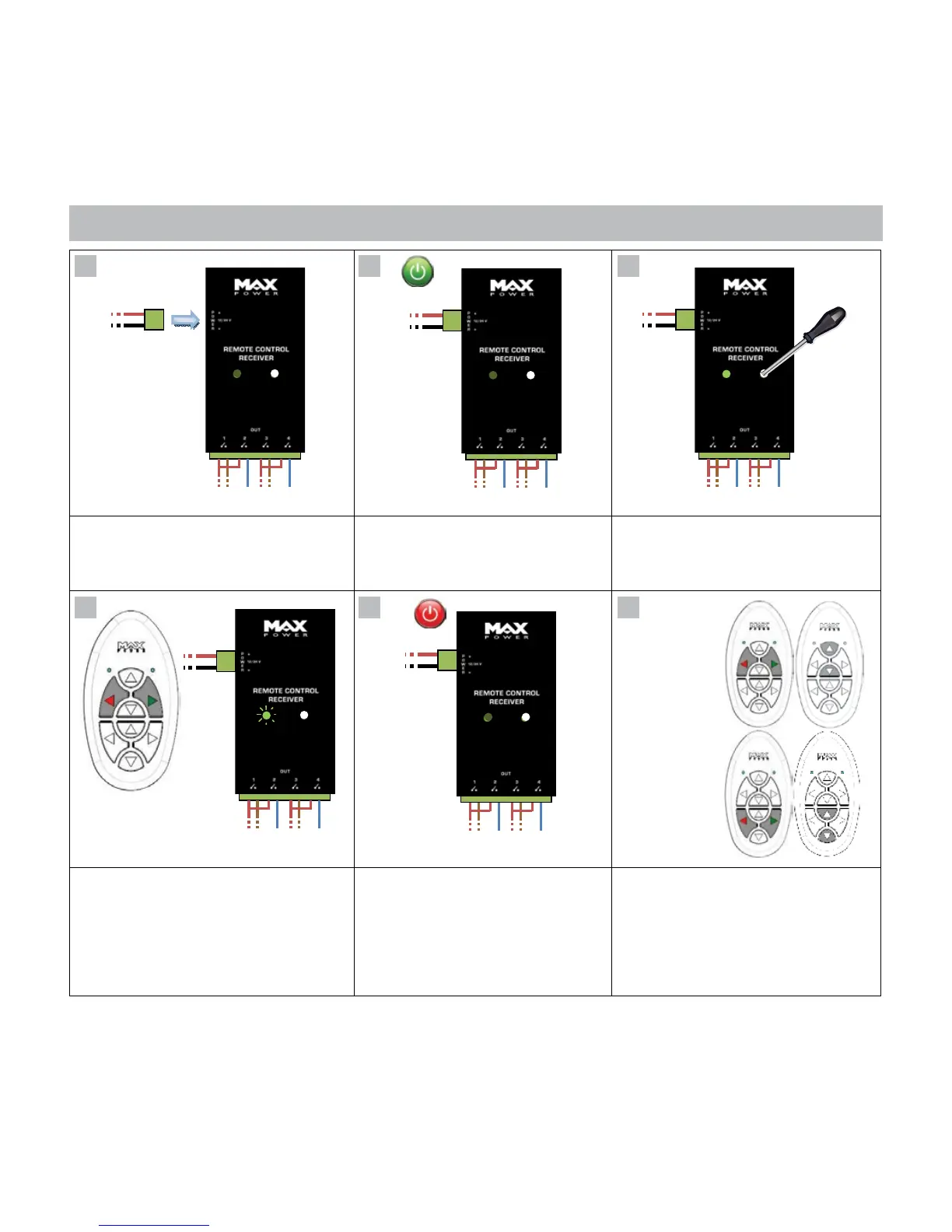
7- SET-UP
Connect the receiver to the power supply
12/24V
To activate 2 commands simultaneously
press the 2 buttons* to be activated
Æ The LED will ash.
These commands are now activated
and paired to outputs 1 & 2
Turn the power supply ON
Æ The LED ashes once
Turn the receiver OFF (for 5 seconds)
To activate other commands return
to step 2.
Outputs will be activated in their
numerical order in pairs.
Gently press the SYNC button (just once)
using a small screwdriver
Æ The LED lights up
Note: Each receiver can handle a maximum of 4 channels: 2 sets of 2 buttons corresponding to receiver outputs (1, 2, 3 and 4).
Should the full 8 channels of the transmitter be required, a second receiver is needed: 312971 (EU) or 312972 (US).
7



 To Next Page