-12-
STAPLING PAPER
FIXING STAPLE JAM
* Make sure to remove the batteries and disconnect the power cord from the outlet before working.
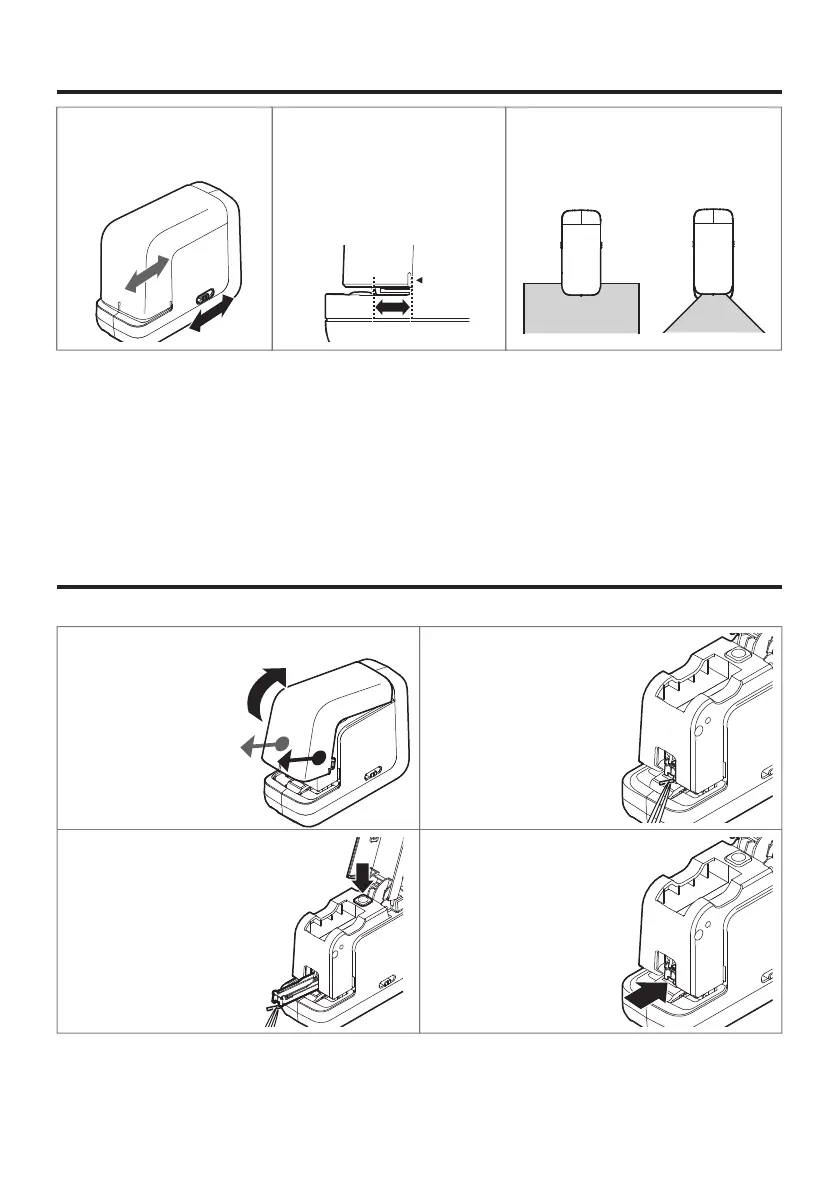
①Pull the front cover towards you
while pushing both sides
of the cover inward,
then lift it up.
②Remove free staples which are
jammed in the clincher area
using tweezers etc.
③Press the magazine open
button, slide the magazine out,
and remove deformed
staples from the magazine.
④Retract the magazine and
re-close the front cover.
①Adjust the stapling depth.
Push the right and left
depth control buttons at the
same time and slide them to
adjust.
②
The staple depth can be adjusted
within the range of:
・Approx. 3 to 15
(1/8" to 19/32") mm for
parallel stapling
・Approx. 18 to 30 mm
(23/32" to 1-25/32") for
corner stapling
③When paper is inserted and touches
the stapling position sensor, the
machine starts operating.
Caution:
・To prevent a paper jam or stapling failure, wait until the magazine comes back to the original position
before pulling out the paper.
・When the battery level is low, the device could stop during the operation.
Replace with new batteries or connect the AC adapter.
・There is one stapling position sensor on the right side. Insert paper in a way that the paper touches
the sensor.
〈
parallel stapling
〉〈
corner stapling
〉
Two to forty (2-40) sheets of PPC paper (64 g/㎡) can be stapled.
❶
❷


 To Next Page