- 9 -
SETTING MACHINE MODE, PAY CLOSING DATE, 60 or 100
SCALE AND DAILY TOTAL TIME (MODE 1)
General Operating Procedure
1.
Insert the “Key-Card.” The symbol appears on the display to indicate the setting mode
is on.
2. Press the “IN1” key. The
symbol appears at “MODE 1” on the display.
3. Press the
or key to change the items.
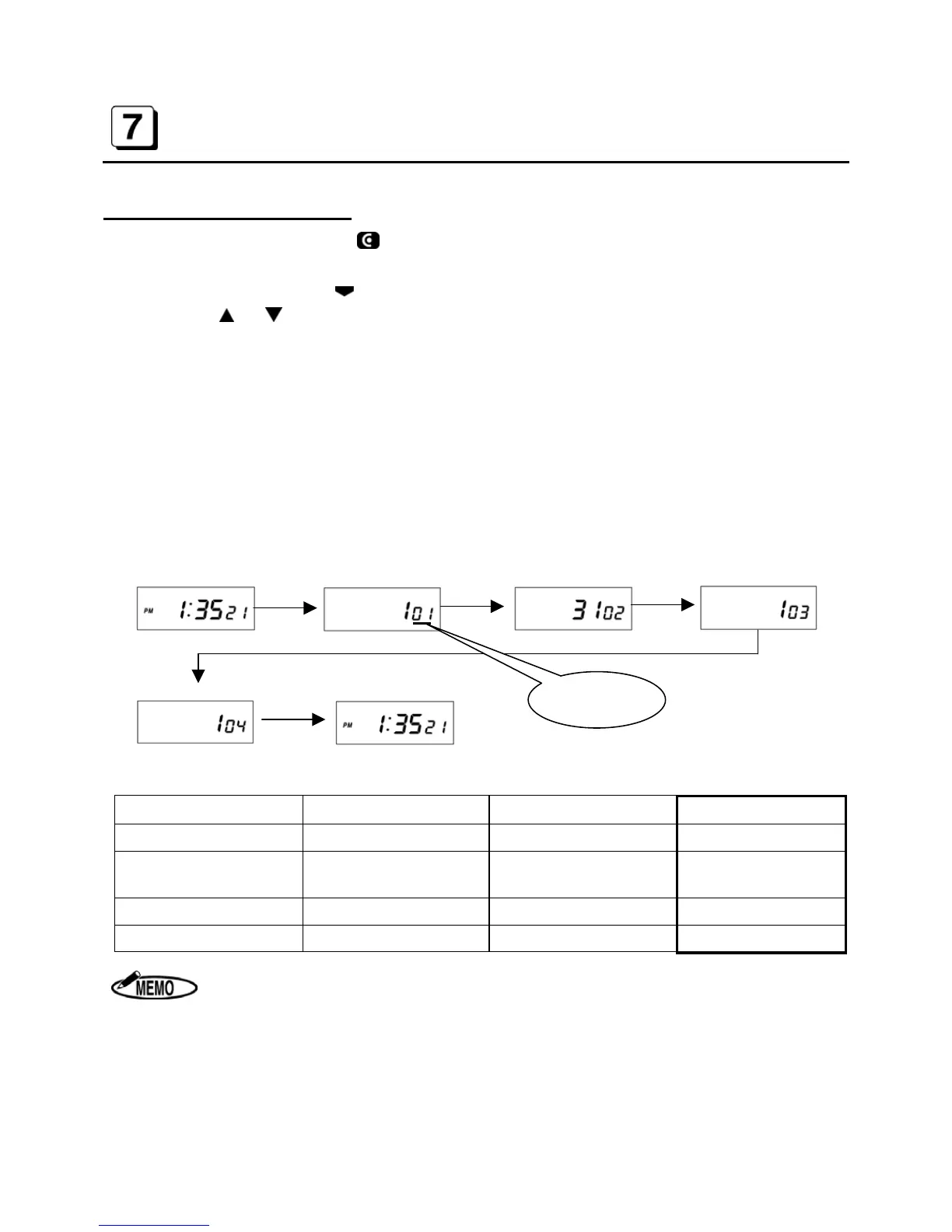
4. Press the “SET” key after changing each item. The display will move to next item in the
order of Machine Mode, Pay Closing Date, 60 or 100 Scale and Daily Total Time. When the
“SET” key is pressed at the end, the buzzer beeps twice and the display returns to the start of
the setting mode.
“C-05” may be displayed after setting the Daily Total Time and pressing the “SET” key.
When the “SET” key is pressed, all time data is deleted and the revised data is set.
When the “CANCEL” key is pressed, the revision is canceled without deleting time data.
[The start of setting mode]
[Machine Mode]
[Pay Closing Date]
[60 or 100 scale]
[Daily Total Time]
[The start of setting mode]
Items (MODE 1) Initial data Setting range Code No.
Machine Mode
1
1 to 6 01
Pay Closing Date
31
Depends on Machine
Mode Number
02
60 or 100 Scale
1
1 to 5 03
Daily Total Time
1
1 or 2 04
1. If 1 or 2 is selected for Code No.3 (60 or 100 scale), the machine doesn’t print
the Daily Total Time and so Code No. 04 (Daily Total Time) is not shown on the
display.
2. ER-1500E does not have the option of the setting of Daily Total Time(Code 04).
3. If the “CANCEL” key is pressed while setting data, the display returns to the start
of the setting mode without registering the changes.
Code No.



 To Next Page