- 18 -
REPLACING THE INK RIBBON CASSETTE
Use only ER-IR100 or ER-IR100E ink ribbon cassettes.
Replace the ink ribbon cassette using the following procedure, if the printing is too light.
CAUTION
Never touch the printer head. It is very hot just after printing and you could
get burned.
Disconnect the power cord from the plug socket.
Wash your hands/body immediately with soap if the ink ribbon rubs off on
them.
Procedure
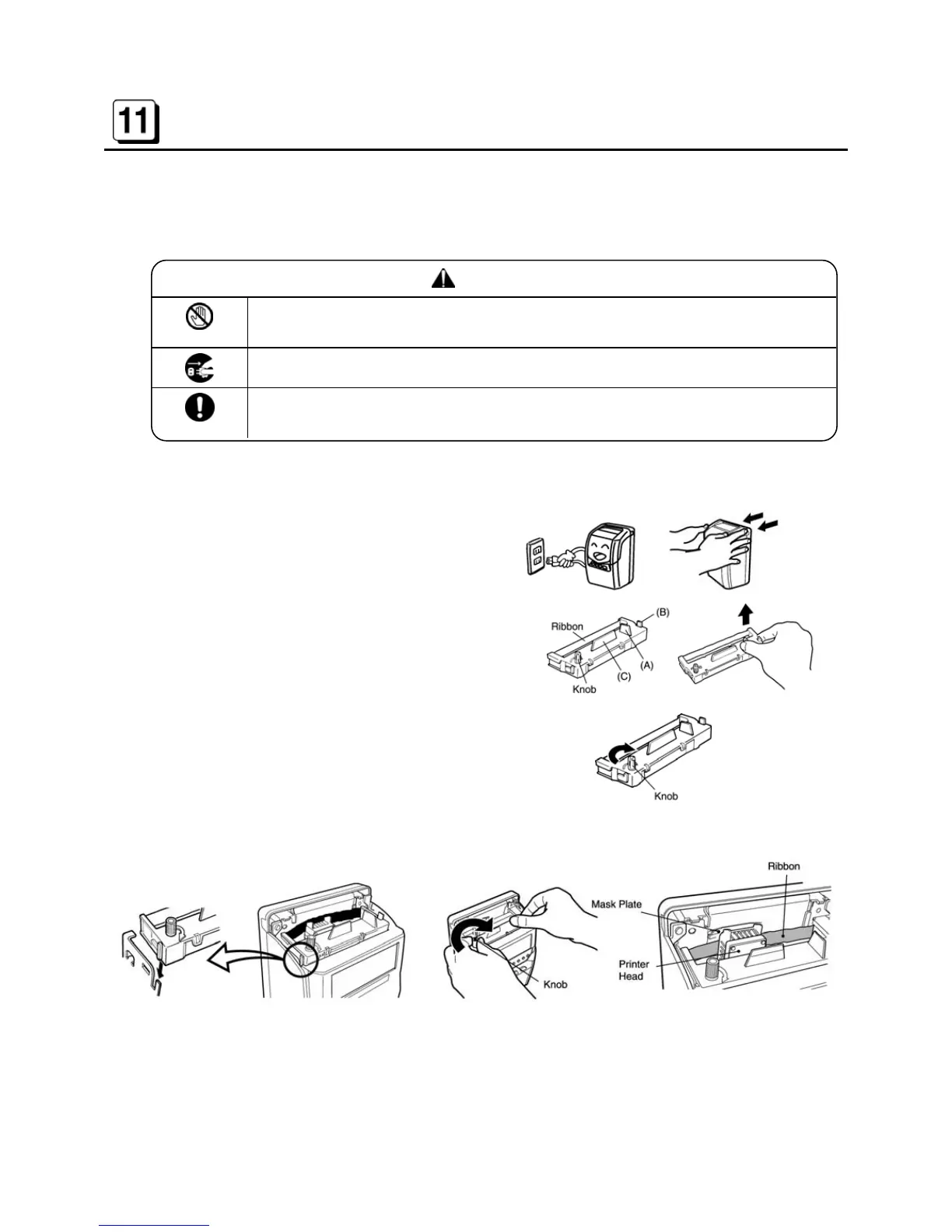
1. Disconnect the power cord from the plug
socket.
Open and remove the front cover.
2. Holding (A), (B) and (C) as shown, lift the
cassette out.
3. Turn the knob of the new ink ribbon
cassette in the direction indicated by the
arrow to remove any slack in the ribbon.
4. Insert the cassette properly as illustrated so that ribbon tape is set between the “Mask Plate”
and the “Printer Head.” Then turn the knob again to remove the slack in the ribbon.
5. Close the front cover and connect the power cord.



 To Next Page