EasyManua.ls Logo

Maxell MXSP-SB3000 - User Manual

Maxell MXSP-SB3000
16 pages
Print Icon
To Next Page IconTo Next Page
Loading...
EN-1
EN
Contents
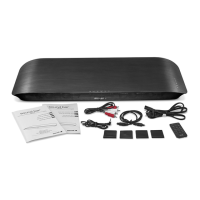
What’s in the Box ........................................................................................................2
Important Safety Instructions ....................................................................................3
Identifying the Parts ...................................................................................................6
Main Unit ................................................................................................................................ 6
Smart Remote Control ......................................................................................................... 7
Getting Started ...........................................................................................................8
Prepare the Smart Remote Control .................................................................................... 8
Precautions Concerning Batteries ...................................................................................... 8
Connections ...............................................................................................................9
Place TV on top .................................................................................................................... 9
Connect to Power ................................................................................................................ 9
USB DC 5V Charge ............................................................................................................... 9
Connect to TV .......................................................................................................................9
Connect to a Bluetooth Device ....................................................................................... 12
Connect to an External Audio Device ............................................................................. 13
Basic Operation........................................................................................................14
Turn On/Off .......................................................................................................................... 14
Adjust Volume Level ........................................................................................................... 14
Mute Sound ......................................................................................................................... 14
Bass Boost ............................................................................................................................14
Select SRS Sound ................................................................................................................. 14
Program Smart Remote Control to Control TV ................................................................ 14
Troubleshooting ........................................................................................................15
Specications ...........................................................................................................16

Questions and Answers

  • L
    lucas80Aug 15, 2025
    What to do if Maxell Smart Remote control does not work?
    • L
      Lynn BuckleyAug 15, 2025
      If your Maxell Smart Remote control isn't working, it might be due to no or low battery power. Remove the transparent film at the bottom of the Smart Remote control. Then, insert or replace the remote control battery with a CR2025 battery.
  • M
    mmontesAug 18, 2025
    What to do if Maxell unit does not respond to the remote control?
    • M
      Mrs. Jennifer Ramirez MDAug 18, 2025
      If your Maxell unit isn't responding to the remote control, it could be due to a weak signal. Try reducing the distance between the Smart Remote control and the unit, and make sure to aim the Smart Remote control directly at the sensor on the front of the unit. If the unit responds but there's no sound, first select the correct source before pressing any function button. You may also want to consult the troubleshooting steps for the 'No Sound' symptom.
  • M
    Melvin FaulknerAug 21, 2025
    What to do if Maxell Speakers suddenly have no sound?
    • S
      Shawn GeorgeAug 21, 2025
      If your Maxell speakers suddenly stop producing sound, it might be due to the auto-off function being triggered. To resolve this, increase the volume of the source (e.g., TV, MP3 player) and then readjust the sound on the unit to trigger the auto-on function. You can also refer to the troubleshooting steps for the 'No Sound' symptom.
  • D
    Doris GomezAug 25, 2025
    Why do Maxell Speakers have no sound when connected to power?
    • C
      Courtney JonesAug 26, 2025
      If your Maxell speakers are connected to a working power source but still have no sound, it could be due to a few reasons. First, the auto-on function might not be triggering, so try increasing the volume of the source input signal. Another possibility is that the speaker power cable is faulty or not properly connected. Try re-seating the power cable at both ends or substituting it with a known-good power cable. If none of the above helps, the fuse might be blown, and you should contact your manufacturer for repair.
  • A
    alisha97Aug 28, 2025
    How to fix Maxell Speakers when there is no sound but the speaker comes on?
    • J
      James BryantAug 28, 2025
      If your Maxell speaker turns on but produces no sound, the issue might be with faulty cables and connections. Try disconnecting and re-seating the signal cables, ensuring they are fully plugged in. If that doesn't work, replace the suspected cable with a known-good one.
  • H
    Harry MartinAug 31, 2025
    How to stop noise or hiss from Maxell MXSP-SB3000 Speakers output?
    • J
      Joseph RobinsonSep 1, 2025
      If you hear noise or hiss from your Maxell speakers, it could be due to faulty cables and connections. Try disconnecting and re-seating the signal cables, ensuring they are completely plugged in. You can also replace the suspected cable with a known-good cable. Alternatively, the noise might be coming from a noisy source device. Disconnect the devices connected to your speaker one at a time. If the noise disappears, the problem lies with the source or its connecting cable.
  • J
    Jose DavisSep 3, 2025
    How to stop hum or buzz in Maxell Speakers?
    • J
      Jessica SmithSep 4, 2025
      If you're experiencing a hum or buzz that changes when multiple sources input signal to your Maxell unit simultaneously, it could be due to internal interference. Try disconnecting or muting the other channels to resolve the issue. It could also be a faulty cable between the source equipment and the unit. Try substituting the suspected faulty cable with a known-good one.
  • E
    Erica LeblancSep 7, 2025
    How to resolve HDMI ARC/CEC ERROR with Maxell Speakers when there is no sound?
    • T
      tonya65Sep 7, 2025
      If you're encountering an HDMI ARC/CEC error with your Maxell speakers resulting in no sound or an error message on your TV, it might be due to incompatibility between the TV's CEC function and the unit's CEC function. Check your TV's user manual for CEC function and compatibility information. You can try disabling the TV's CEC/ARC function or use other suggested connections.
  • B
    Brittany GrahamSep 12, 2025
    How to fix HDMI ARC/CEC ERROR when both TV and Maxell unit has sound?
    • T
      tortizSep 12, 2025
      If both your TV and Maxell unit are producing sound when using HDMI ARC/CEC, it indicates a partial incompatibility between the TV's CEC function and the unit's CEC function. Check the TV's user manual for CEC function and compatibility information. Select the speaker option in the TV manual to output sound from the Unit only.

Summary

Important Safety Instructions

General Warnings and Cautions

Alerts users to risks of electric shock, injury, or damage.

Safety Precautions and Prohibitions

Usage Prohibitions

Lists actions to avoid, like repairing, disassembling, or using in wet conditions.

Environmental and Usage Guidelines

Covers placement, volume, and connection precautions for safe operation.

Safety Guidelines and Compliance

General Usage Rules

Essential instructions for safe and proper operation of the product.

Servicing and Electrical Safety

Guidelines for maintenance, electrical safety, and product classification.

Getting Started

Battery Handling Precautions

Safety guidelines for handling and replacing remote control batteries.

Connections

Audio and Video Connections

External Device Audio Connections

Connect to a Bluetooth Device

External Audio and Auto-Off

Basic Operation

Turning the System On;Off

How to power the unit on and off using the unit or remote.

Adjusting Volume Level

Methods for controlling the sound volume using the unit or remote.

Troubleshooting

No Sound Issues

Diagnosing and resolving problems related to no sound output.

Remote Control Malfunctions

Troubleshooting steps for a non-functional remote control.

HDMI ARC;CEC Errors

Addressing issues related to HDMI ARC and CEC compatibility.

Maxell MXSP-SB3000 Specifications

Power IconPower
power requirementsAC 220-240V~50/60Hz
output power front speakers30W x 2
output power woofer100W
Audio IconAudio
total harmonic distortion1% (1kHz, 1W)
audio input sensitivity600mV
audio input impedance47kΩ
frequency response50Hz - 20kHz
Speaker Specifications IconSpeaker Specifications
front speaker impedance3 Ω
front speaker rated power30W
woofer impedance6 Ω
woofer rated power100W
Remote IconRemote
remote distance6m
remote angle30O
Digital Signal IconDigital Signal
digital sampling frequency48kHz
HDMI signal formatPCM
Weight and Dimensions IconWeight and Dimensions
unit dimensions (W x H x D)929 x 390 x 78mm
net weight8.4kg

Related product manuals