1
Contents
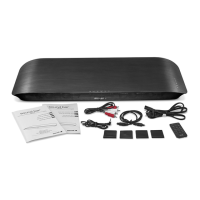
What’s in the Box ........................................................................................................2
Important Safety Instructions ....................................................................................3
Identifying the Parts ...................................................................................................6
Main Unit: Top View ............................................................................................................. 6
Rear View .............................................................................................................................. 6
Smart Remote Control ......................................................................................................... 6
Getting Started ...........................................................................................................7
Prepare the Smart Remote Control .................................................................................... 7
Precautions Concerning Batteries ...................................................................................... 7
Connections ...............................................................................................................8
Place TV on top .................................................................................................................... 8
Connect to Power ................................................................................................................ 8
Connect to TV ....................................................................................................................... 8
Connect to an External Audio Device ............................................................................. 10
Basic Operations ......................................................................................................11
Turn On/Off .......................................................................................................................... 11
Select Sources ..................................................................................................................... 11
Adjust Volume Level ........................................................................................................... 11
Mute Sound ......................................................................................................................... 12
Bass Boost ............................................................................................................................ 12
Select SRS Sound ................................................................................................................. 12
Program Smart Remote Control to Control TV ................................................................ 12
Troubleshooting ........................................................................................................ 13
Specications ...........................................................................................................14
1
Contents
What’s in the Box ........................................................................................................2
Important Safety Instructions ....................................................................................3
Identifying the Parts ...................................................................................................6
Main Unit: Top View ............................................................................................................. 6
Rear View .............................................................................................................................. 6
Smart Remote Control ......................................................................................................... 6
Getting Started ...........................................................................................................7
Prepare the Smart Remote Control .................................................................................... 7
Precautions Concerning Batteries ...................................................................................... 7
Connections ...............................................................................................................8
Place TV on top .................................................................................................................... 8
Connect Power ..................................................................................................................... 8
Connect to TV ....................................................................................................................... 8
Connect to an External Audio Device ............................................................................... 9
Basic Operations ......................................................................................................10
Turn On/Off .......................................................................................................................... 10
Select Sources ..................................................................................................................... 10
Adjust Volume Level ........................................................................................................... 10
Bass Boost ............................................................................................................................ 10
Mute Sound ......................................................................................................................... 10
Program Smart Remote Control to Control TV ................................................................ 11
Troubleshooting ........................................................................................................ 12
Specifi cations ...........................................................................................................13


 To Next Page
 Need help?

 General