12
Mute Sound
Press the MUTE button on the remote
control to mute. Press this button again or
VOL+/VOL- buttons on the remote control
or on the unit to resume the sound. The
light indicator on the unit will blink until
sound resumes.
Bass Boost
Either,
1) Press BASS button on the remote control;
or
2) Press BASS/SRS button on the unit,
to turn on the bass. Press this button again to
switch to level 2 or to turn it off.
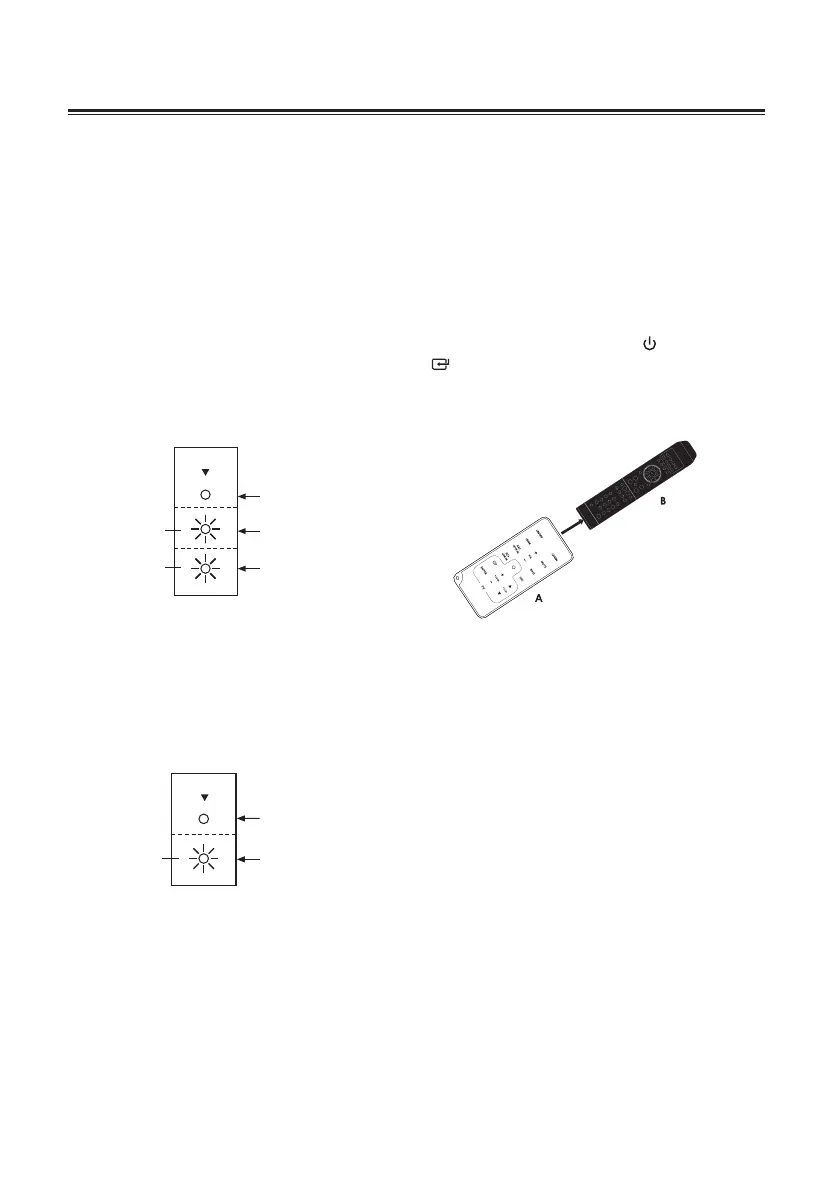
BASS
Bass off
Bass 1Amber
Bass 2White
Select SRS Sound
Either,
1) Press SRS button on the remote control; or
2) Press and HOLD BASS/SRS button on
the unit for 3 seconds,
to select SRS WOW HD effect. Press this
button again to cancel the effect.
SRS
OFF
OPEN
Amber
Program Smart Remote Control to
Control TV
You can store a total of up to seven of
your most frequently used TV functions in
the TV learning zone of the Smart Remote
Control. This feature enables you to use
only one remote control to operate the
unit together with your TV.
The remote control codes of a TV are stored
in the Smart Remote Control. The available
preset buttons are ON/OFF , FUNCTION
, ENTER, TV VOL+/VOL-, TV CH+/CH-.
NOTE:
During the learning process, the normal
remote control functions are disabled.
1 Place the Smart Remote Control (A)
within a 5mm-50mm distance from the
TV remote control (B), pointer to pointer
as shown above.
2 Press and hold the LEARN button for 2
seconds to activate the learning mode.
A red indicator on the Smart Remote
Control (A) will light up.
3 Press one of the TV learning zone buttons
on the Smart Remote Control (A), the
red indicator ashes.
4 Press the button on the TV remote
control (B) that is to be stored on the
Smart Remote Control (A). When the
code is received successfully, the red
indicator will quickly ash for 3 times, If
the code is not successfully received,
the red indicator will keep on ashing.
5 Repeat steps 3-4 to program more
functions onto the Smart Remote Control
(A).
6 Press the LEARN button to save the
setting and to exit the learning mode.
Red indicator will turn off immediately.
Basic Operation


 To Next Page