8
Connections
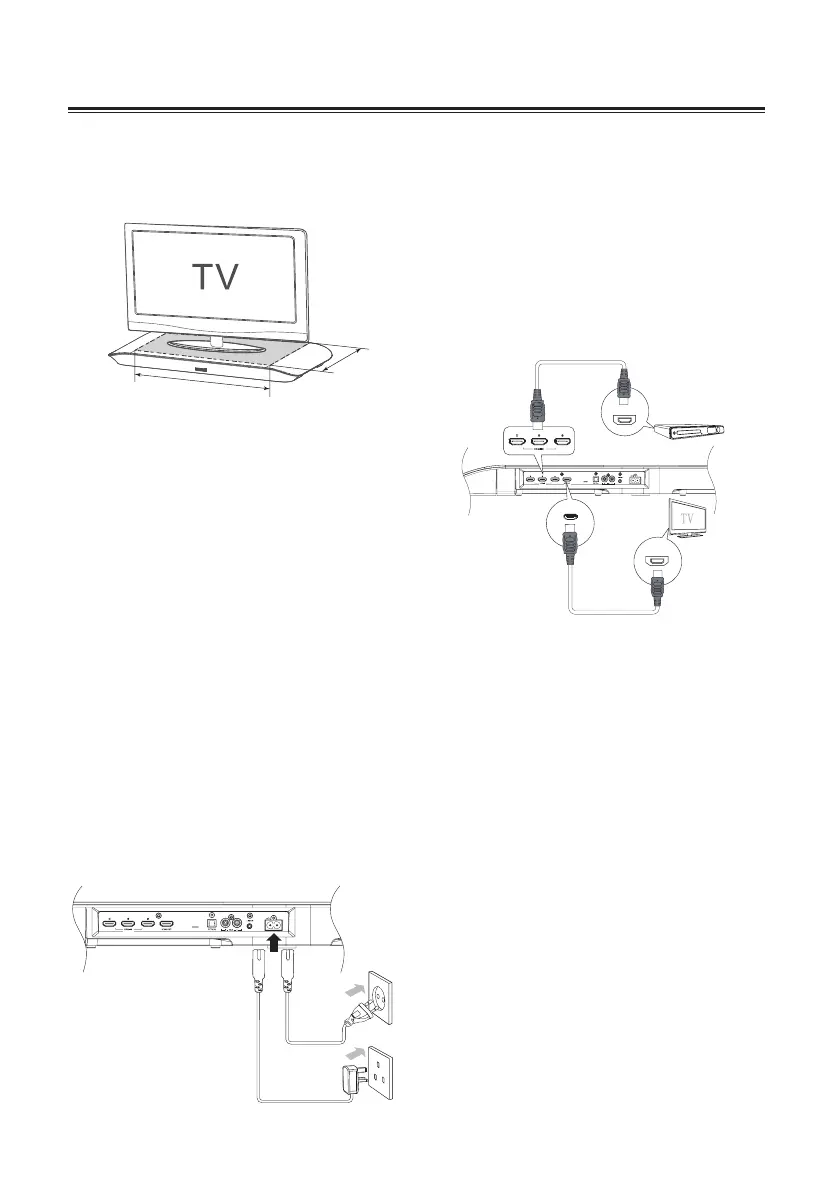
Place TV on top
Please read the DOs and DON’Ts Leaet
provided for proper installation position of
the unit.
53cm
30cm
Warning:
Please turn down the volume of the TV,
or other sources before connection. Loud
sound might be suddenly produced.
Connect to Power
Caution:
Risk of product damage!
- Ensure that the power supply voltage
corresponds to the voltage printed on
the back or the underside of the unit.
- Risk of electric shock! When you unplug
the AC power, always pull the plug from
the socket. Never pull the cord.
- Ensure the correct power cord is
matched the main power socket. Using
a wrong power cord might damage
the power plug and the socket.
Connect the AC power cord to:
- the AC~ socket on this unit.
- the wall socket. (British 3 pin plug to
3-hole socket or European 2 pin plug to
2-hole socket)
Connect to TV
Using HDMI socket
Connect HDMI(High Denition Multimedia
Interface), DVI(Digital Visual Interface), or
HDCP(High-bandwidth Digital Contents
Protection)-compliant TVs through HDMI
for the best picture quality. This connection
transmits both video and audio signals.
Note:
Some TVs do not support HDMI audio
transmission.
HDMI OUT
HDMI IN
HDMI OUT
AV equipment
e.g. Blu-ray Player
(Cable not supplied)
(Cable not supplied)
1 Watch movie from blu-ray player
a) Connect a HDMI cable (not supplied)
to the HDMI OUT socket on the AV
equipment and HDMI IN 1, HDMI IN 2 or
HDMI IN 3 socket on the unit.
b) Connect another HDMI cable( not
supplied) from the HDMI OUT socket on
the unit to the HDMI IN socket on the
TV.
Note:
If your TV has only a DVI connector,
connecting through a HDMI-to-DVI adapter is
necessary. Extra optical audio connection
might be needed to complete this
connection.


 To Next Page