EN-7
EN
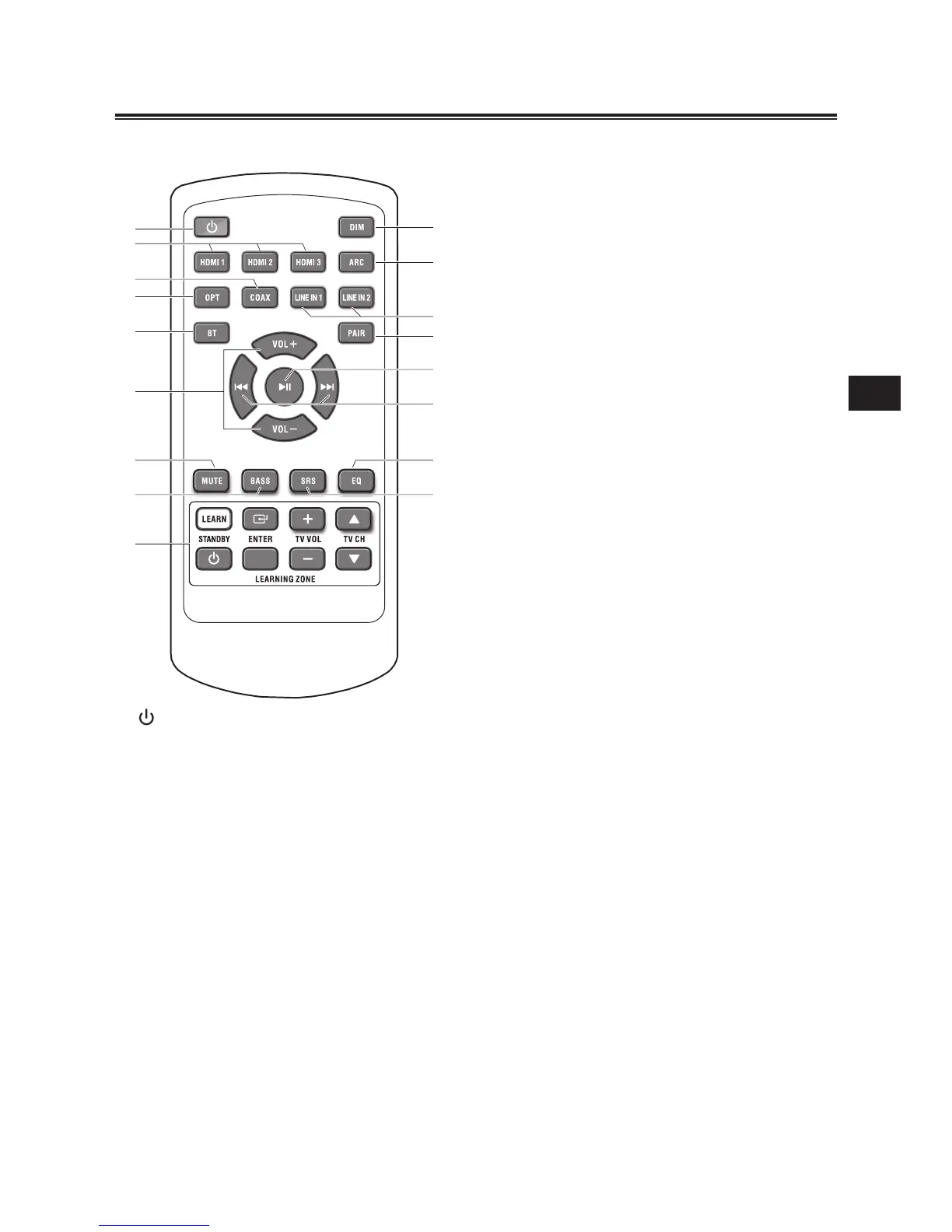
Smart Remote Control
1
- Turn on or turn off the unit.
2 HDMI
- Select an HDMI audio input source
from HDMI 1, 2 and 3.
3 COAX
Select COAXIAL source.
4 OPT
- Select OPTICAL source.
5 BT
select bluetooth source.
6 VOL+/- (Volume)
- Adjust sound volume level
7 MUTE
- Mute or resume sound from the unit.
8 BASS
- Select Bass boost level 1,2 or no Bass
boost effect.
9 LEARN
- Activate learning mode to setup
commands from the TV remote
control, to control some TV functions.
10 DIM
Adjust brightness level of display panel.
11 ARC
- Activate Audio Return Channel (ARC)
function.
12 LINE IN 1,2
- Select LINE IN 1 source from RCA.
- Select LINE IN 2 source from LINE IN.
13 PAIR
Pair with bluetooth-enabled device.
14
BF
In Bluetooth mode:
Start or pause playback.
15
H
/
G
In Bluetooth mode:
Skip to previous/next track.
16 EQ
Select a preset sound effect:
cinema, speech, music, sport, standard.
17 SRS
- Switch on or turn off SRS WOW HD
effect.
Identifying the Parts



 To Next Page