26
M-70
Using LCD Display
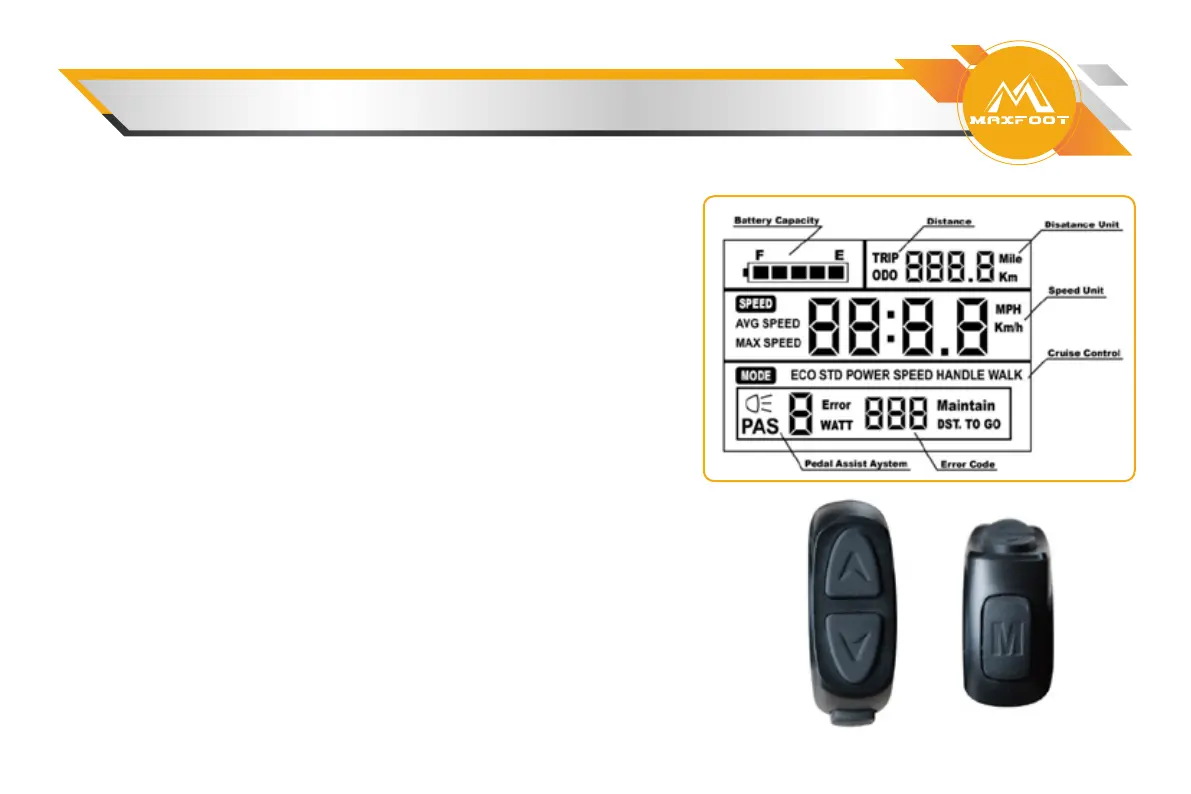
Information on Display
• Battery Charge Indicator
• Distance (Odometer, Trip Odometer)
• Distance Unit (kilometers (Km), miles (Mile))
• Speed Unit (miles per hour (MPH), kilometers
• per hour (Km/h))
• Operation Mode
• Watt Meter, Error Code Indicator
• Pedal Assist Level
LCD Display Controls
The display is controlled using the 3-button LCD display
remote mounted on the left side
of the handlebar. The top button shows an arrow pointing UP
the below button shows an arrow pointing DOWN and the M
button means MODE.
Reference the LCD Display Operations table in this manual
for instructions on how to perform various operations using
these buttons and, when applicable, other components of
the bike.


 To Next Page