19
ENGLISH
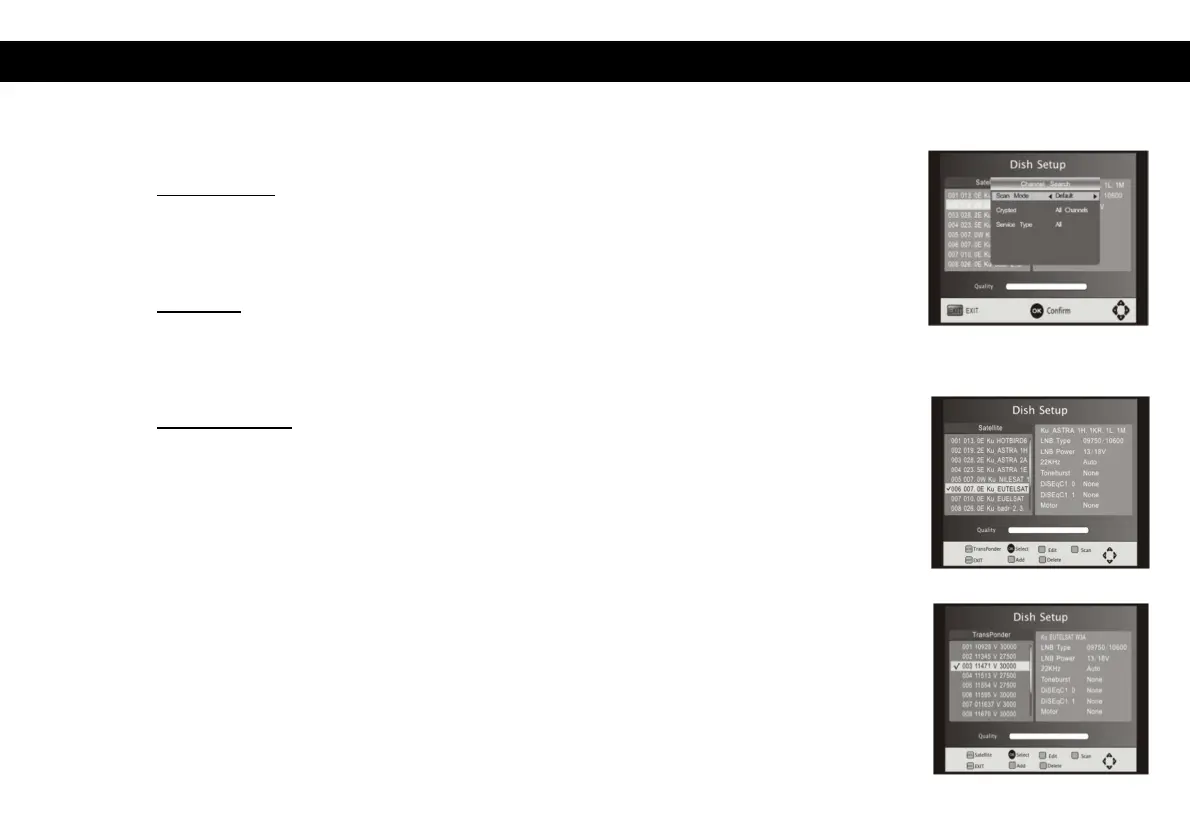
Single Satellite Scan: Press Blue to enter the channel search menu.
Scan Mode: Press Left/Right to select between default and Network.
Networks scan will searched by NIT table. Default scan will search for
channels from pre-programmed transponder list.
Crypted: Press Left/Right to select ‘All Channels’ or ‘FTA Channels’. All
channels will search for free to air and encrypted channels. FTA channels
will only search for free to air channels.
Service Type: Press Left/Right to select ‘ALL’, ‘DTV’ or ‘Radio’. All will
search for both radio and TV channels, DTV will search for only TV
channels and Radio will search for only radio channels.
Press OK to start scanning with the above settings.
Multi-Satellites Scan: Press OK to select satellites with the mark" “, then press
blue to enter the scanning setting menu. – This menu contains the same settings
as the single satellite scan menu (see previous paragraph).
Press OK to start the multi-satellites scan.


 To Next Page