14 / 20
© 2019 Mertik Maxitrol GmbH & Co. KG, All Rights Reserved.
GENERAL NOTES
Radio Frequency Handset
433.92 MHz for Europe; 315 MHz for U.S. and for Canada..
This device complies with part 15 of the FCC Rules. Op-
eration is subject to the following two conditions: (1) This
device may not cause harmful interference, and (2) This
device must accept any interference received, including in-
terference that may cause undesired operation. Changes or
modications not expressly approved by the party respon-
sible for compliance could void the user’s authority to oper-
ate the equipment.
Wiring of valve and receiver must be completed before
starting ignition. Failure to do so could damage the elec-
tronics.
Batteries – Handset
▪ 1 x 9 V (alkaline recommended).
▪ Low battery indicator on handsets with display.
▪ Handsets without display: the red LED gets darker.
▪ Battery replacement is recommended after 2 years.
Batteries – Receiver
▪ 4 x 1.5 V “AA” (alkaline recommended).
▪ Low battery indication: frequent beeps for 3 seconds when
motor turns.
▪ An AC Mains Adapter may be used instead of batteries.
▪ The module for fan speed control and light/dimmer in-
cludes mains power together with batteries in the receiver
for automatic backup in case of power outage.
▪ Without using a mains adapter, battery replacement is rec-
ommended at the beginning of each heating season.
Only the Mertik Maxitrol AC Mains Adapter or one
preapproved by Mertik Maxitrol can be used. Use of other
adaptors can render the system inoperable.
The handsets, receivers, wall switches, switch panels and
touchpads are not interchangeable with previous electron-
ics (see gure 24).
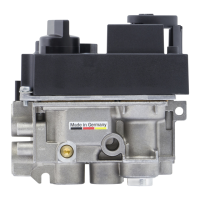
Figure 24: Receiver Reset Button
Replacement handsets for CSA models also must have
the same part number (see label).
SETTING THE ELECTRONICS CODE
(First time use only.)
Radio Frequency Handset
A code is selected automatically for all Mertik Maxitrol elec-
tronics from among 65,000 random codes available. The re-
ceiver has to learn the code of the handset:
▪ Press and hold the receiver’s reset button (see gure 24)
until you hear two (2) beeps. The rst beep is short and the
second beep is long. After the second beep, release the
reset button.
▪ Within the subsequent 20 seconds press the
(small
ame) button on the handset until you hear two additional
short beeps conrming the code is set. If you hear one long
beep, this indicates the code learning sequence has failed
or the wiring is incorrect.
NOTE: This is a one time setting only, and is not required
after changing the batteries of the handset or re-
ceiver.
OPERATING INSTRUCTIONS FOR OEM USE ONLY
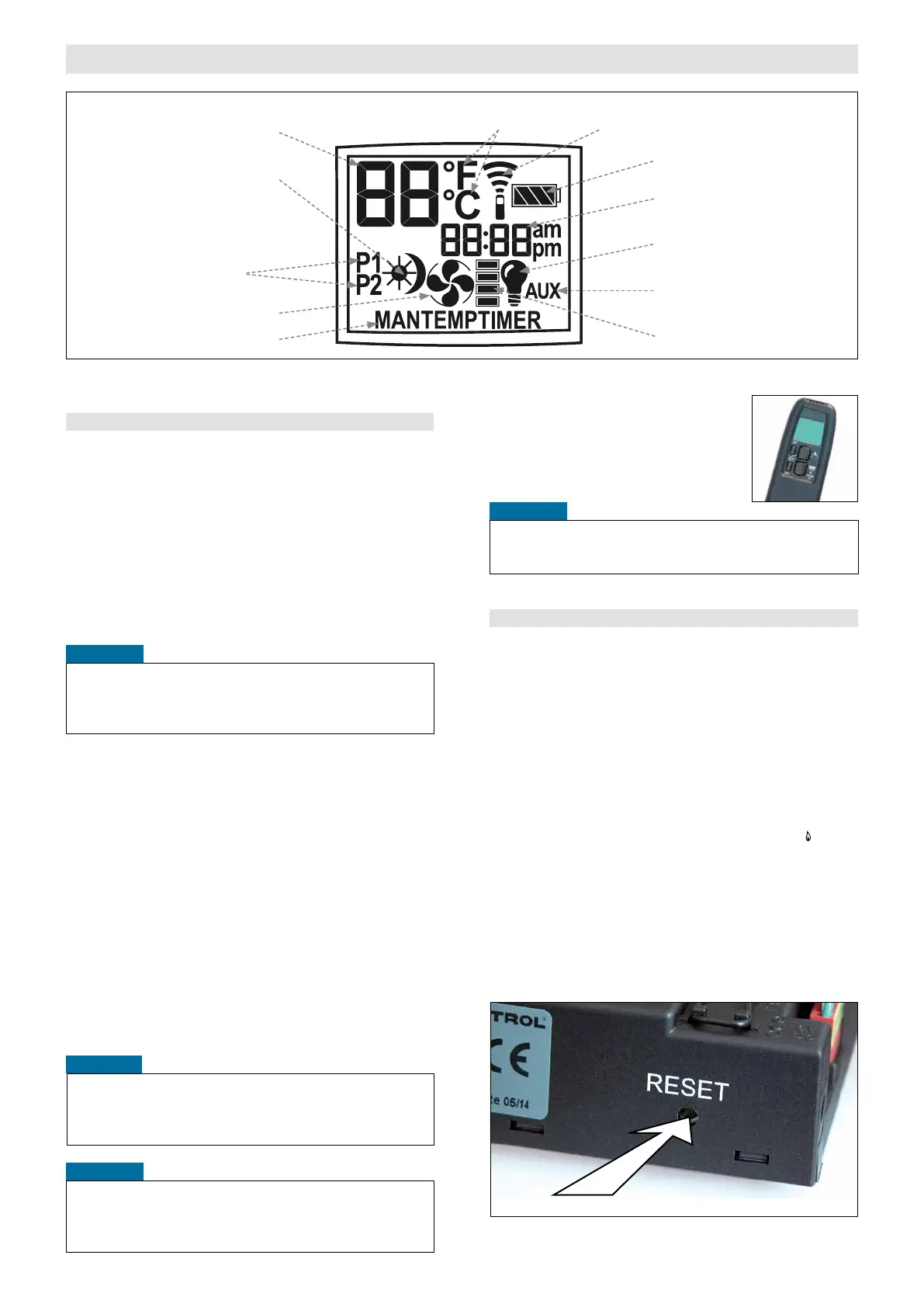
Figure 23: Previous handset
Light/Dimmer operation
Fan operation
Time setting
Program timer setting
Temperature
°C/24 hour or °F/12 hour Clock setting
Fan level icon
Solenoid Valve/Burner
OPEN and CLOSE
ON/OFF Temperatures setting
Battery status
Signal indicator
Modes of operation
Figure 22: Handset display


 To Next Page