16 / 20
© 2019 Mertik Maxitrol GmbH & Co. KG, All Rights Reserved.
TO OPEN AND CLOSE SOLENOID VALVE/BURNER
NOTE: The latching solenoid valve cannot operate manu-
ally. If the battery runs down it will remain in the last
operating position. During normal operation the sole-
noid valve will be reset to the ON position when the
GV60 is switched OFF remotely.
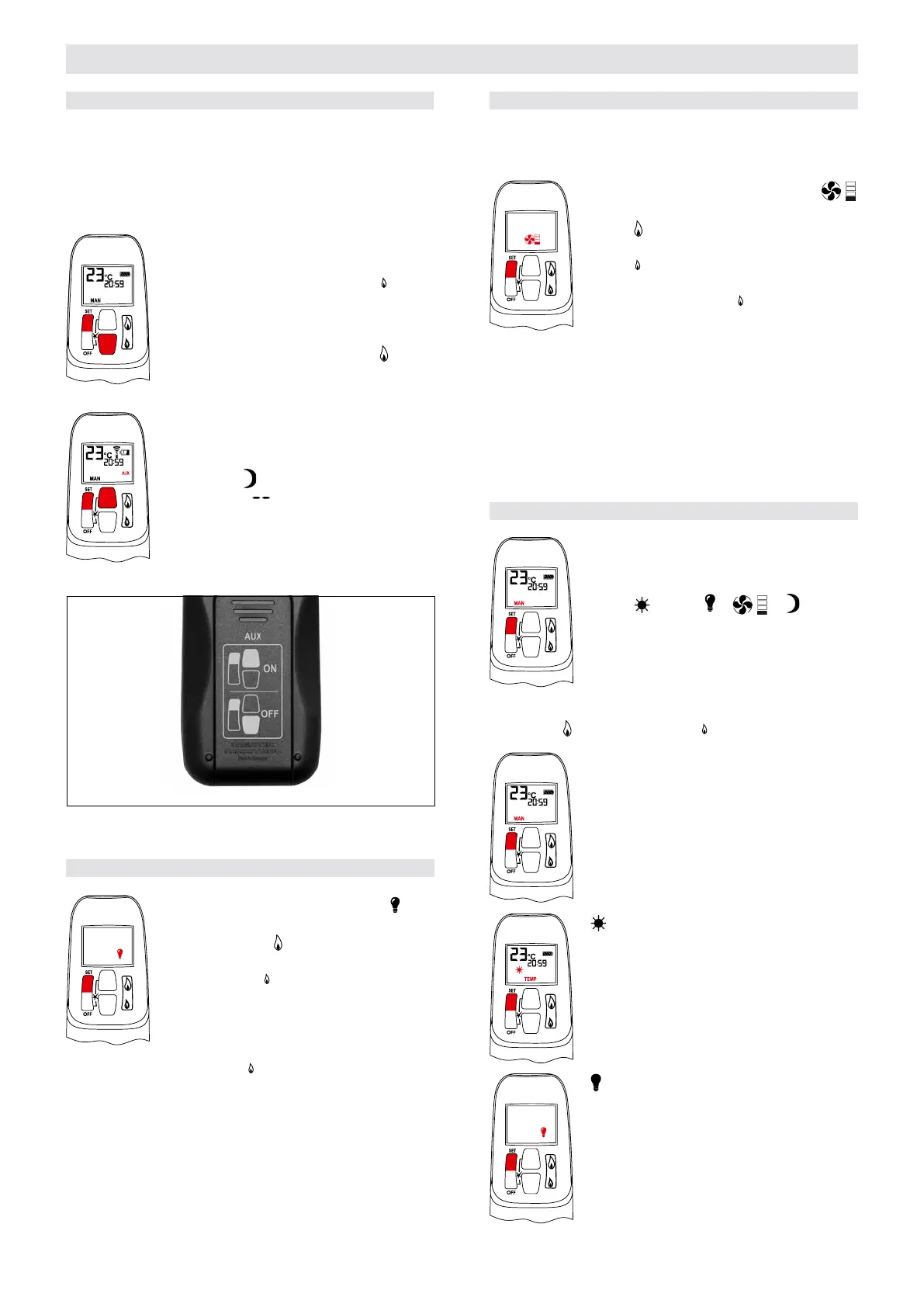
▪ Upon ignition Main Burner and Decorative
Burner are ON.
▪ Simultaneously press SET and
(small
ame) buttons to switch the Burner OFF.
Printed instructions are on the battery cover
(see gure 26).
▪ Simultaneously press SET and
(large
ame) buttons to switch Burner ON. (The
AUX symbol on the display indicates the so-
lenoid valve is OPEN.)
NOTE: The operation of the AUX is blocked
in timer OFF mode, when the setting
of the
Nighttime Setback Tempera-
ture is “
”.
Figure 26: Instructions for Latching Solenoid Valve (on battery cover)
Burner OFF
Burner ON
LIGHT/DIMMER OPERATION
▪ Briey press SET button to scroll to (light
bulb) mode. Light bulb icon ashes.
▪ Press and hold
(large ame) button to
turn ON the light or increase brightness.
▪ Press and hold
(small ame) button to de-
crease brightness.
▪ In the Light/Dimmer mode, the OFF button
shuts OFF the light.
▪ If you want the light ON but no ame, press
and hold the
(small ame) button and turn
to pilot ame.
NOTE: The light bulb icon is displayed during light/dim-
mer setting only. 8 seconds after the light/dimmer
has been set, the handset will automatically go into
temperature control mode (CSA version) or manual
mode (CE version).
OPERATING INSTRUCTIONS FOR OEM USE ONLY
CIRCULATING FAN OPERATION
The circulating fan has 4 speed levels from low (1 bar) to
high (4 bars).
▪ Briey press SET button to scroll to
(fan) mode. Fan and Level icons ash.
▪ Press
(large ame) button to switch ON
and increase fan speed.
▪ Press
(small ame) button to decrease
fan speed.
▪ To turn OFF fan, press
(small ame) but-
ton until all 4 speed level bars disappear.
NOTE: 8 seconds after the fan has been set, the handset
will automatically go into temperature control mode
(CSA version) or manual mode (CE version). The
fan starts 4 minutes after the gas opens (from OFF
or from pilot) at maximum speed and goes to the
displayed level after 10 seconds. The fan stops 10
minutes after the gas is OFF or at pilot.
MODES OF OPERATION
▪ Briey pressing the SET button changes the
mode of operation in the following order:
MAN→
TEMP→ → → TEMP →
TIMER→back to the beginning
NOTE: Manual mode can also be reached by pressing either
the
(large ame) or the (small ame) button.
▪ MAN – Manual Mode
Manual ame height adjustment.
▪ – Daytime Temperature Mode
(Appliance must be in standby mode; pilot
ignited)
The room temperature is measured and
compared to the set temperature. The
ame height is then automatically adjusted
to achieve the Daytime Set Temperature.
▪ – Light/Dimmer Setting Mode
Turns light/dimmer ON and OFF and ad-
justs brightness.


 To Next Page
 Loading...