150Mbps Wireless N-Lite PCI-E Adapter
18
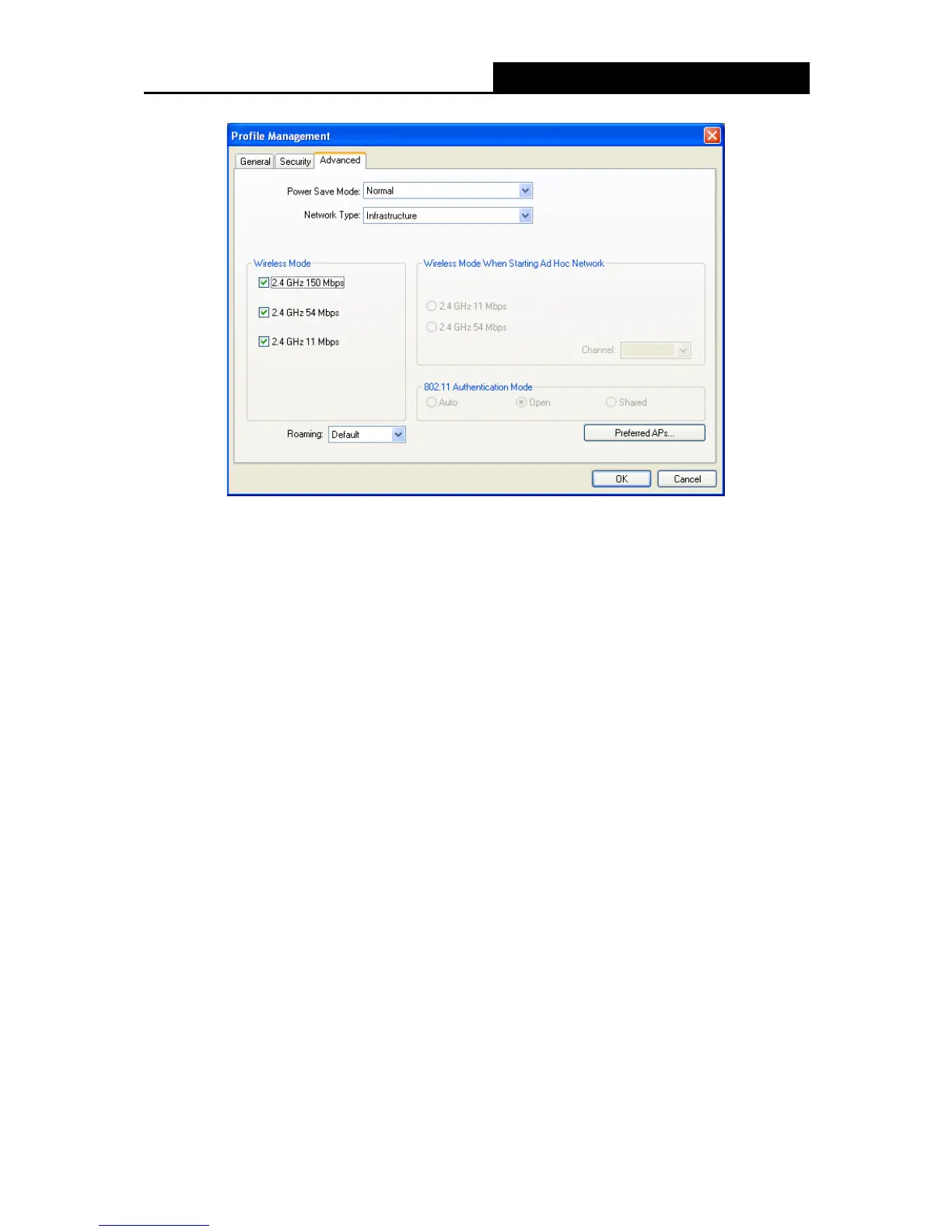
Figure 3-6
Power Save Mode - Please select the power save mode in the drop-down list.
Maximum - Selects maximum mode to let the access point buffer incoming messages for
the Adapter. The Adapter will detect the access point if any messages are waiting
periodically.
Normal - Normal mode uses maximum when retrieving a large number of packets, then
switches back to power save mode after retrieving the packets.
Off - Turns power saving off, thus powering up the Wireless PCI-E Adapter continuously
for a short message response time.
Network Type: There are basically two modes of networking:
Infrastructure - All wireless clients will connect to an access point or wireless router.
Ad-Hoc - Directly connecting to another computer, for peer-to-peer communication,
using wireless network adapters on each computer, such as two or more WP 8800 - 1N
wireless adapters.
Note:
1) An Infrastructure network contains an Access Point or wireless router. All the wireless devices
or clients will connect to the wireless router or access point.
2) An Ad-Hoc network contains only clients, such as laptops with wireless desktop adapters. All
the adapters must be in Ad-Hoc mode to communicate.


 To Next Page