150Mbps Wireless N-Lite PCI-E Adapter
20
3.2.2 Remove a profile
1. Go to the Profile Management tab (shown in XFigure 3-2X).
2. Select the profile name in the Profiles List.
3. Click Remove.
Note:
The profile being used can‟t be removed.
3.2.3 Switch another Profile
1. Go to the Profile Management screen (shown in XFigure 3-2X).
2. Select the profile name required in the Profiles List.
3. Click Activate.
3.2.4 Export a Profile
1. From the Profile Management screen (shown in XFigure 3-2X), highlight the profile to export.
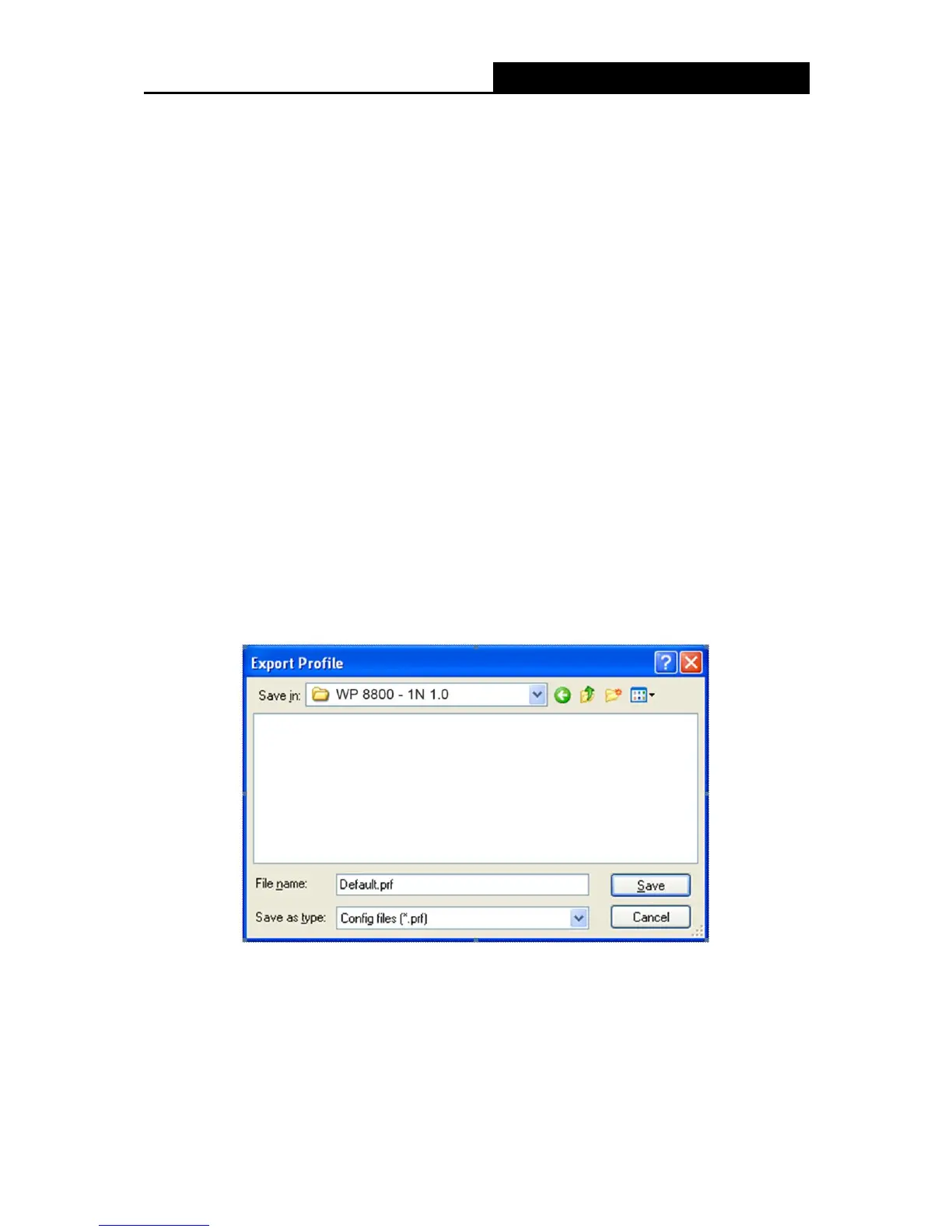
2. Click Export…, the Export Profile window will then appear below.
3. Browse the directory to export the profile to.
4. Click Save. The profile should then be exported to the specified location.
Figure 3-8
3.2.5 Import a Profile
1. From the Profile Management screen (shown in XFigure 3-2), click Import…. Then the Import
Profile will appear below.
2. Browse to the directory where the profile is located.


 To Next Page