basis and are routinely revised every one to three
hours, or more frequently if needed.
During severe weather, the routine weather broad-
casts will be interrupted with special weather
warning messages.
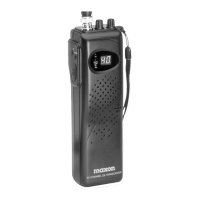
The MCB-45W is designed to receive all of these
special weather frequencies plus three international
marine frequencies. A NOAA Weather Radio
Network Frequency card is enclosed to identify
the frequencies specifically broadcast for your
geographical area. The MCB-45W receives CB,
National Weather Service and international marine
weather broadcast frequencies as listed:
CB Channels 1 - 40 (26.965 - 27.405 MHz)
Weather Channel 01 WX 162.550 MHz
02 WX 162.400 MHz
03 WX 162.475 MHz
04 WX 162.425 MHz
05 WX 162.450 MHz
06 WX 162.500 MHz
07 WX 162.525 MHz
Int'l Marine 08 WX 161.650 MHz
09 WX 161.775 MHz
00 WX 163.275 MHz
To Operate: Turn the off/on-volume control clock-
wise and press the weather button. The "WX" icon
will be displayed.
Use the weather frequency card to select the proper
frequency for your area. Select the weather channel
by using the channel up/down buttons. Re-adjust the
volume if necessary.
To return to CB operation, simply press the weather
button again; the "WX" icon will disappear and the
unit will return to the last CB channel displayed.
13


 To Next Page