02
02
2.9 DSP function
In【all applications】interface touch【 DSP 】icon to enter the DSP setting
interface.
The DSP Setting contains EQ, listening position, output and frequency
division; the GUl is as following; ln order to prevent the speaker equipment
from being damaged, DSP related settings should under the guidance of
professionals.
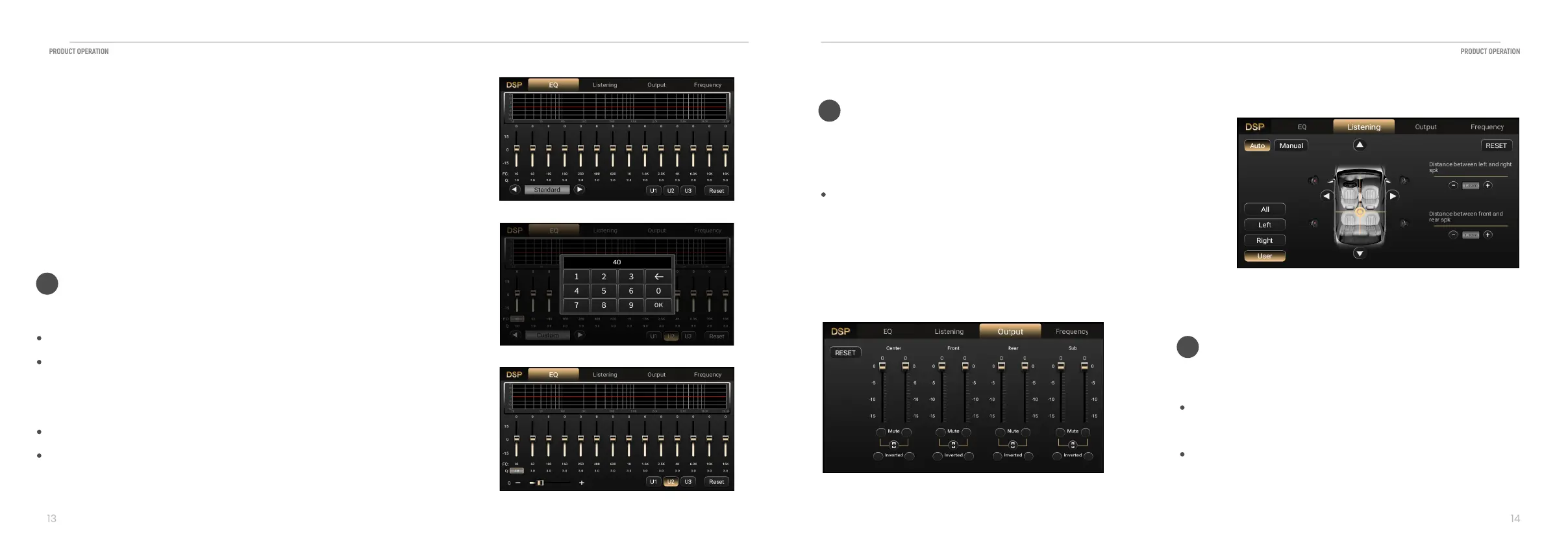
You can adjust EQ, Q value, frequency and user mode saving;
Touch [left arrow] or [righ arrow] to select EQ type, as shown in Figure 1.
Touch [U1,U2,U3 button] to select EQ type of the user mode, and long
touch [U1,U2,U3 button] to save current adjustment.
Drag the gain bar into user defined mode.
Touch FC per band EQ to adjust frequency, as shown in Figure 2.
Touch Q button per band to adjust Q value, as shown in Figure 3.
EQ
01
Figure 1
Figure 2
Figure 3
This part contains two Listening positioning mode, for example
auto and manual mode;
Touch [ms] or [cm] to select mode for making adjustments.
Each time you touch the button mode changes and Listening
position changes as you drag the reference center position.
Royal Music Mode
02
Drag the gain bar for each speaker to adjust the gain value.
Touch [Invert] for each speaker to phase invert or not
invert.
Touch [Mute] for each speaker to mute or not mute.
Volume Output adjust GUI
03


 To Next Page