02
02
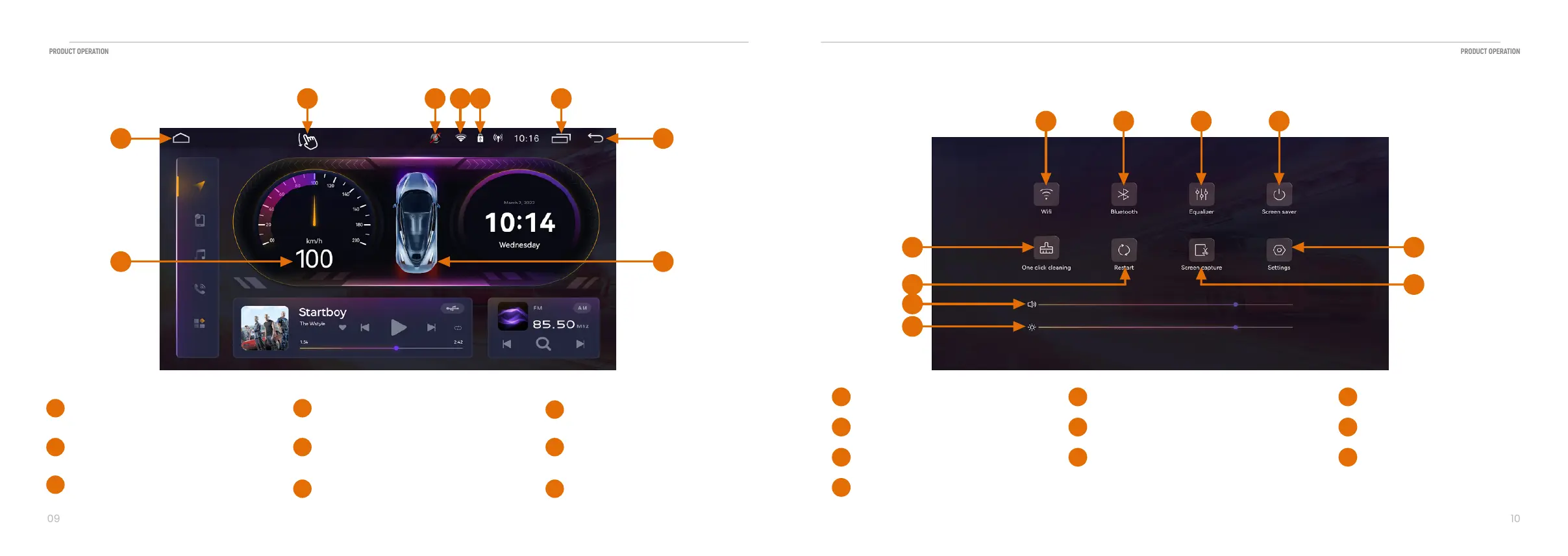
2.5 Navigating the Menus
01
Main menu
Touch to return to the Main screen
02
Touch to return to the previous menu
Return key
04
Wi-Fi connection
05
DVR camera station
06
USB connection
May different from your original guage
07
Speed
Show the lamp and the door station
08
Car station
Hidden setting function
S1ide the screen
09
03
Touch to see recently opened APP
in the background
Damon Icon
2.6 Front operation
Touch to connect the Wi-Fi
01
Touch to connect the Bluetooth®
02
Toch to set DSP
03
Touch to turn off screen
04
Touch to clean system
05
Touch to restart
06
Touch to screen capture
07
Touch to control the light
10
Touch to enter setting function
08
Touch to control the volume
09
01
05
09
10
06
07
08
02 03 04
01 02
08
03060405
07
09


 To Next Page