02
02
02
1. When the phone is paired with audio for the first time, shall look at the steps.
Pair and connect
2. Search by mobile Bluetooth® device or search for Bluetooth® devices through the host, and connect.
3. Is displayed on the phone screen a message, enter the password (0000) on your phone, then press (ENTER).
Open the phone Bluetooth® feature.
2.12 Phone call
Telephony features
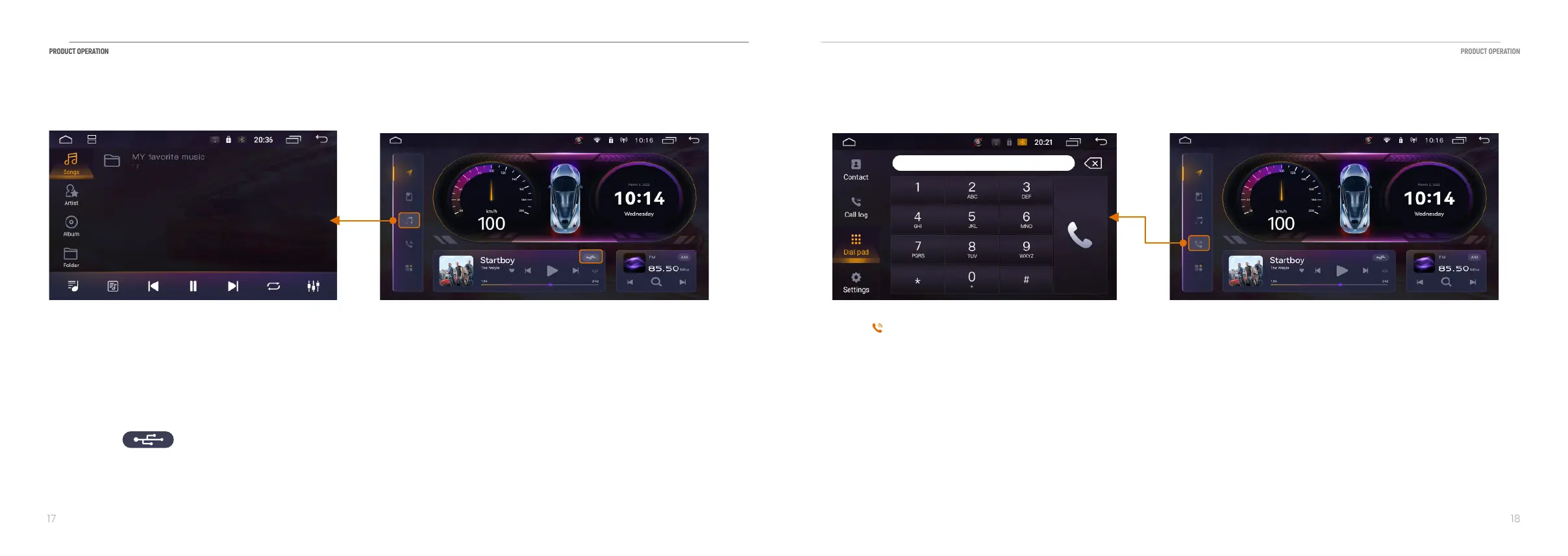
Touch 【 】 icon to enter the following interface:
This function can play music by connecting USB or built-in hard disk.
The product supports music file formats including MP3, M4A, WAV, AMR, WMA, OGG, ACC, MID and so on; does not
support music playback. And it may be prompted "format does not support/ can not be played'' in the [main
interface], you can touch [music] icon to enter the following interface.
2.11 Music play
Touch this【 】 to change from local music to BT music.


 To Next Page