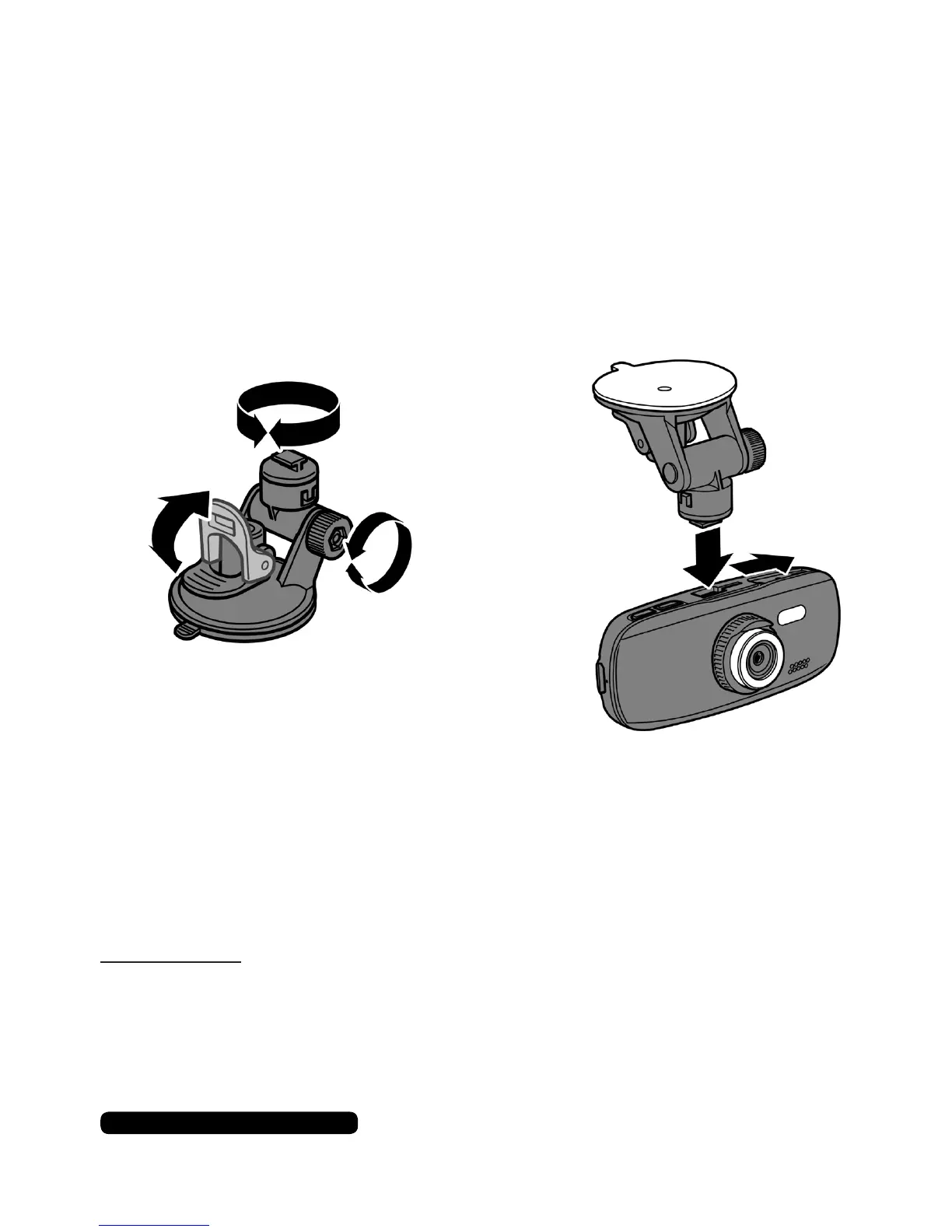
Mounting The Camera
Attachthecameramounttothecamerausingeitherofthettings
onthetopofthecamerabody.Dampthesuckercupwithwaterand
placeitonthewindowscreen.Presstheleaverdowntosecureitin
place.Toreleaselifttheleaverupandremovethemountfromthe
window screen.
6
After Sales Support
UK/N.IRELAND HELPLINE N
O
:
REP.IRELAND HELPLINE N
O
:
WEBSITE:
EMAIL:
01270 508538
1800 995 036
www.quesh.co.uk
enquiries@quesh.co.uk
Assembling
Lock Position
Release
Position
(Pleaseseelegalrequirementsonpage27beforetting)
Place the mount
into the slot and
slide across to
lockintoposition.
Tiltthecameraintoyourpreferredpositionandtightenthelocking
screwsoitisngertight.Turnthecameratopanitintothecorrect
position.Theratchetstylemountwillholdthechosenhorizontal
positioninplace.
Please Note:
Somewindowscreenhaveacoatingthatmaynotallowthesuction
cuptostick.



 To Next Page