INSTALLATION
4 – 10
3 If the BIOS was set to AUTO DETECT, follow the instructions in Section 7 to prepare the hard drive using the MaxBlast installation software.
If other BIOS settings were used, access the system BIOS SETUP program and set the parameters to a User Definable Type with 4,092 cylinders, 16 heads and 63
sectors per track for the Maxtor hard drive. Then follow the instructions for setting the BIOS in Section 7 then Section 8 to prepare the hard drive with MaxBlast software.
9
System Hangs During Boot
If the system hangs during the boot process after installing the Maxtor hard drive – either before or after setting the system BIOS – the system many have a
BIOS with a cylinder limitation. This may occur for hard drives that exceed 2.1 GB. If this happens,
do the following:
1 Turn the system OFF.
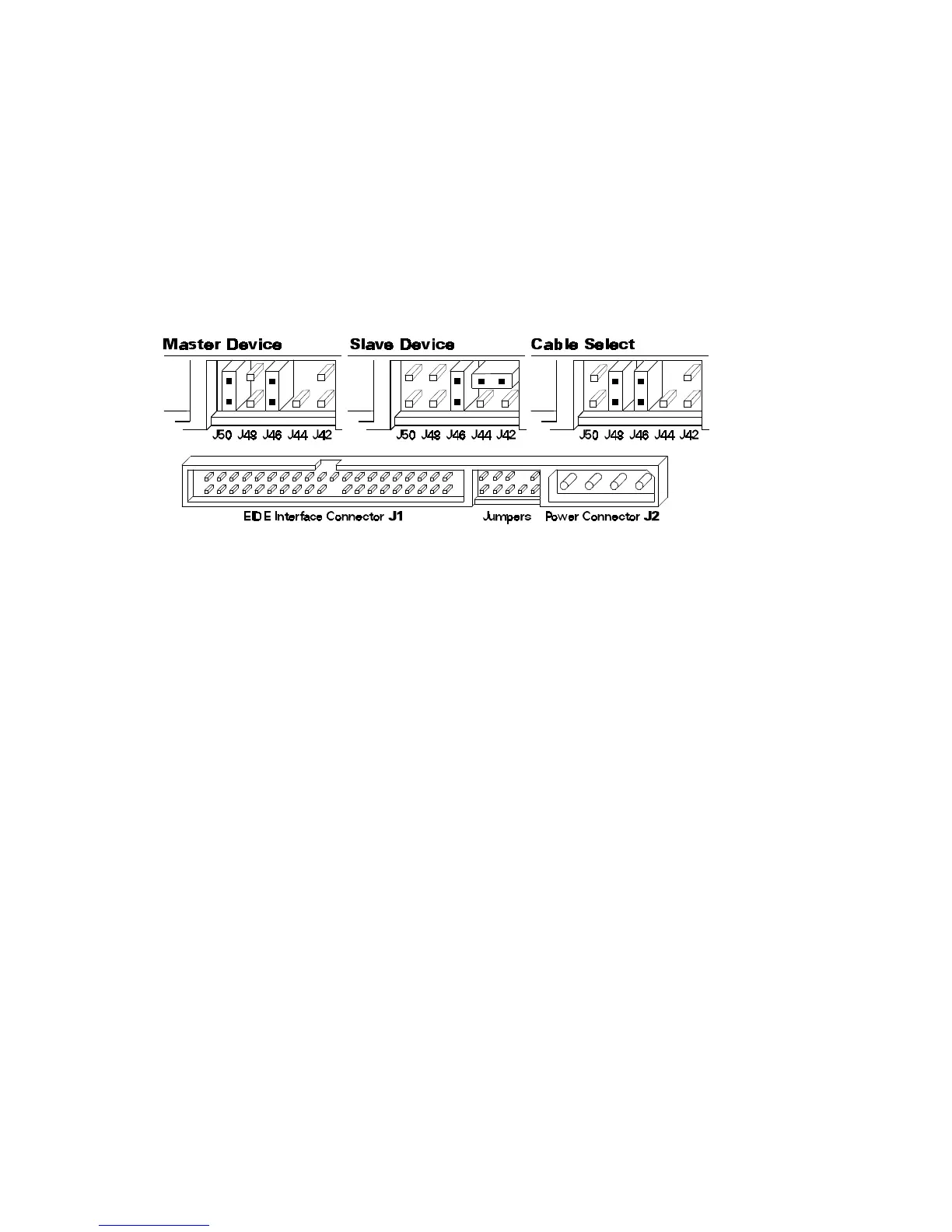
2 Install the cylinder limitation jumper (J46) on the drive. The figure below shows the Maxtor hard drive configured as a Master or Slave device with the
cylinder limitation jumper installed.
IMPORTANT: When the Cylinder Limitation jumper (J46) is installed, the Maxtor hard drive must be prepared using MaxBlast installation software.











 To Next Page