PAGE
2
MAXTOR ONETOUCH III TURBO EDITION
MACINTOSH INSTALLATION
Components
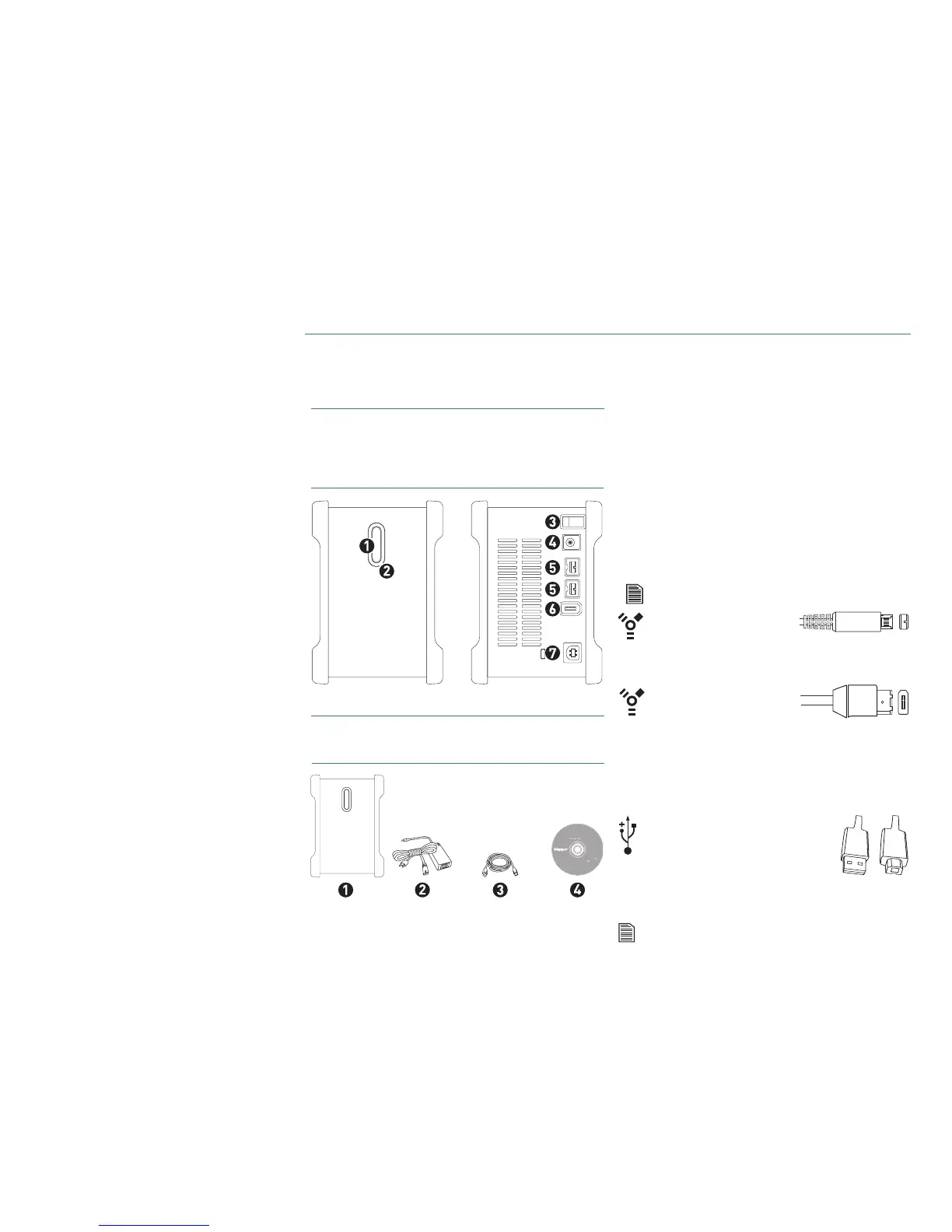
Before installing, review the solution features in Figure 1.
FIGURE 1
SOLUTION FEATURES
1. OneTouch Button
2. Status Light
3. Power Switch
4. Power Connector
5. FireWire 800 Port
6. FireWire 400 Port
7. USB 2.0 Port
FIGURE 2
INCLUDED
IN PACKAGE
1. Backup Solution
2. Power Adapter
3. FireWire 800 Cable
4. Quick Start CD
System Requirements
– FireWire 800 requires Mac OS X 10.2.8 or higher and
FireWire 800 (9-pin) equipped computer
– Apple G4 processor or greater
– Mac OS X (10.2.8 or later)
– 128MB RAM (256 recommended) or more as required
by operating system
– Internet connection (for system updates)
– CD-ROM drive
Interface Requirements
– FireWire 800 or FireWire 400 port
– USB 2.0 or 1.1 port
USB 1.1 is slower than USB 2 or FireWire.
Includes:
– EMC
®
Retrospect
®
Express HD (Win)
– EMC
®
Retrospect
®
Express (Mac)
– Maxtor OneTouch Drivers
– Maxtor OneTouch Manager
– Maxtor OneTouch
User Guide (English)
© 2005 Maxtor Corporation and its Licensors. Maxtor and the stylized
Maxtor logo are registered trademarks, and Maxtor OneTouch is
a trademark, of Maxtor Corporation. EMC and Retrospect are
registered trademarks of EMC Corporation. U.S. patents
5,150,473 and 5,966,730. Other patents pending. Other
trademarks are the property of their respective
holders. All rights reserved.10/05 PN: 20310900
WINDOWS
English
Français
Deutsch
Español
Italiano
MACINTOSH
English
Français
Deutsch
Installation Software
Maxtor OneTouch
™
III
Logiciel d’installation, Installationssoftware,
Software di installazione, Installationsprogram,
Software de instalación, Installatiesoftware,
Asennusohjelma, Software de Instalação,
FireWire 400
6-pin to 6-pin
FireWire 400 (1394a) cable.
A FireWire 400 cable is not included with this kit but can be pur-
chased from your local computer store.
Many laptop computers, have a smaller 4-pin FireWire port requiring a special
4-pin to 6-pin FireWire cable. This is not included, but can be purchased from
your local computer store.
USB 2.0 A’ to B’ USB cable.
A USB 2.0 cable is not included with
this kit but can be purchased from
your local computer store.
The ‘A’ connector, typically, plugs into your computer and the ‘B’
connector plugs into your drive. If your computer has a different type of USB connection, you
can purchase the correct type of cable from your local computer store.
‘A’ ‘B’











 To Next Page