Power inverter Power inverter
06 07
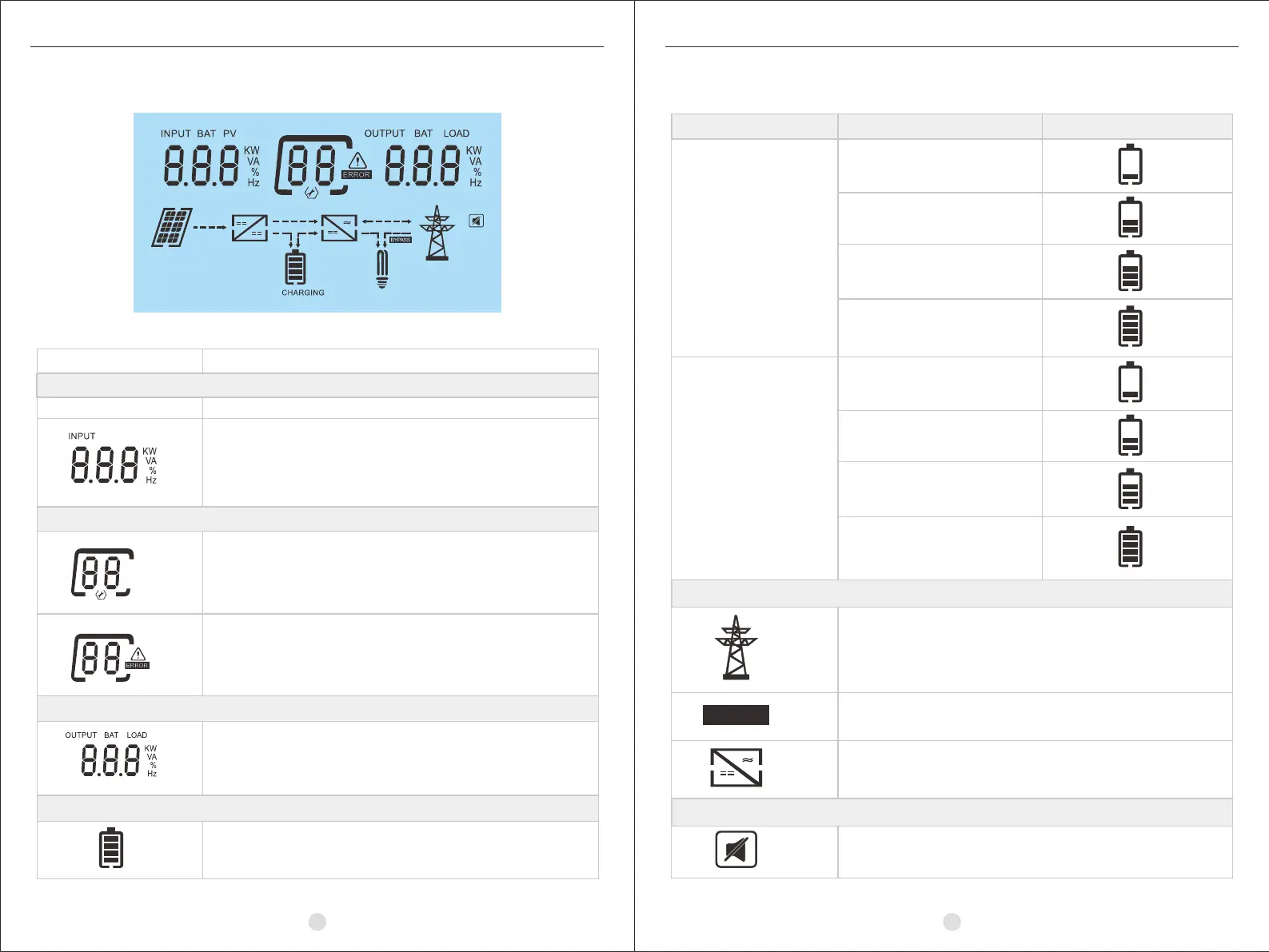
LCD Display Icons
In battery mode, it will present battery capacity.
Load Percentage Battery Voltage LCD Display
Load >50%
< 11.1V/PCS
11.1~ 11.6V/PCS
11.6V ~ 12.1V/PCS
> 12.1V/PCS
Load < 50%
< 11.3V/PCS
11.3 ~ 11.8V/PCS
11.8 ~ 12.3V/PCS
> 12.3V/PCS
Mode Operation Information
Indicates the utility.
Indicates load is supplied by utility directly.
Indicates the inverter / charger is working.
BYPASS
Mute Operation
The alarm is disabled.
Function description
Indicates the AC input.
Indicate input voltage, input frequency,
battery voltage.
Indicates the setting programs.
Indicates the warning and fault codes.
Warning: flashing with warning code.
Fault: lighting with fault code
Indicate output voltage, output frequency,
load percent, load in VA, load in Watt.
Indicates battery level by 0-24%, 25-49%,
50-74% and 75-100%.
Icon
INPUT
Battery Information
Input Source Information
Configuration Program and Fault Information
Output Information


 To Next Page