Power inverter Power inverter
08 09
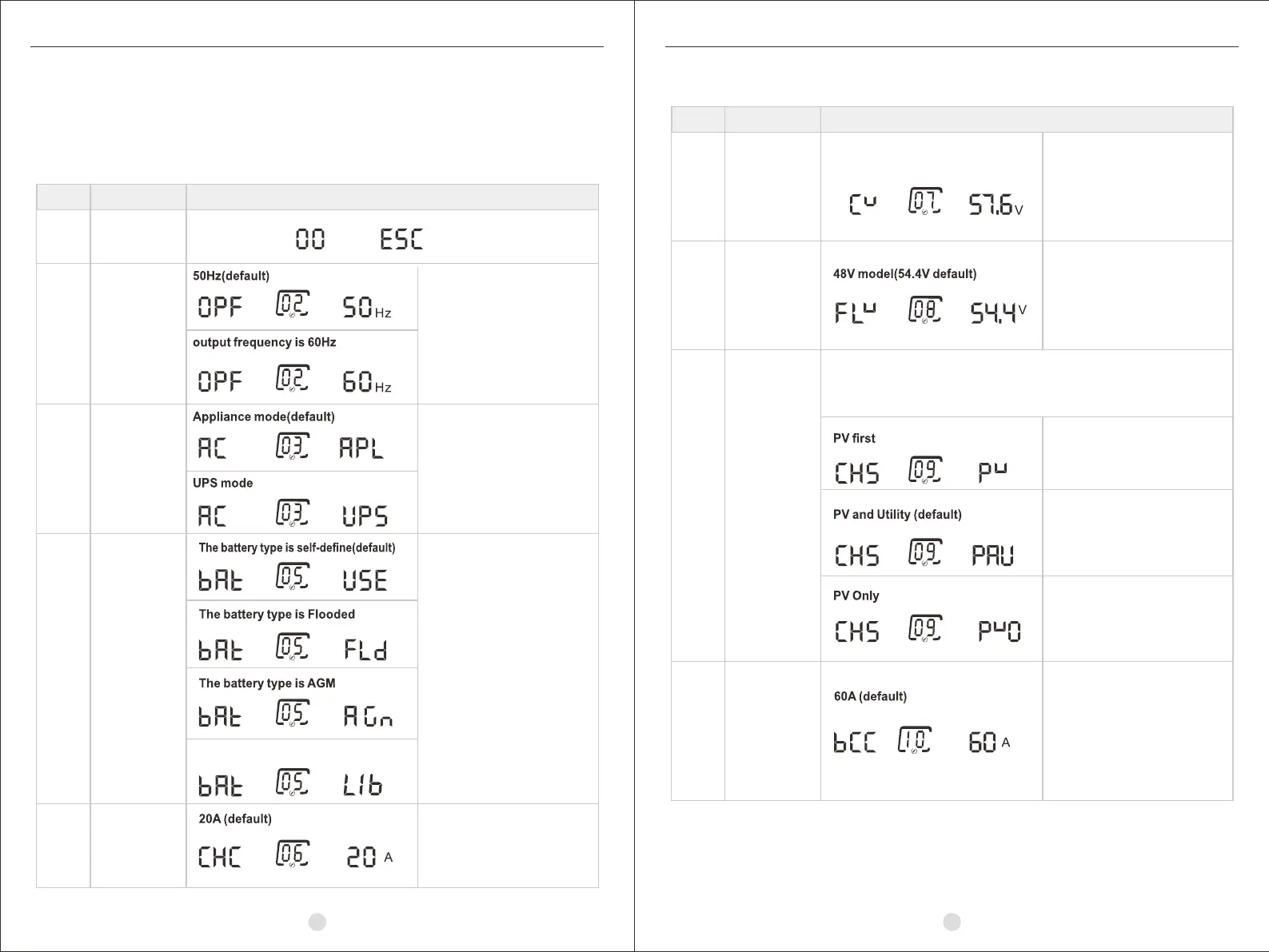
Setting itemsLCD Setting
After pressing and holding the ENTER button for 3 seconds, the unit will enter settings mode.
Press “SCROLL” button to select setting program. Then, press “ENTER” to
confirm the selection or ESC button to exit.
Setting items
Selectable option
If self-defined is selected in
program 05, this program is
enable. Setting range is from
48.0V to 61.0V. Increment of
each click is 0.1V.
If self-defined is selected in
program 5, this program is
enable. Setting range is from
48.0V to 61.0V. Increment of
each click is 0.1V.
PV will charge battery first.
Utility will charge battery only
when PV is unavailable.
If inverter is working in utility mode, charge priority can be set as
below. However, when inverter is working in Battery mode, only
PV can charge battery.
PV and utility will charge
battery together.
Only PV can charge the battery.
Setting range is from 10 to 200A.
Program
Description
Bulk charging
voltage setting
(C.V voltage)
07
Floating
charging
voltage
08
Charger priority.
09
10
Max charging
current
(Max charging
current = utility
charging current
+ PV charging
current)
48V model(57.6V default)
Program
Description
Exit setting00
Output
frequency
setting
Battery
type
setting
Utility
input
range
setting
02
03
05
Selectable option
Output frequency configuration
APL should be selected, when
The utility is not up to standard.
If “Self-defined” is selected,
battery charge voltage and
low DC cut-off voltage can
be set up in program 07,
08 and 11.
Max utility
charging
current
setting
06
5000VA:
Setting range is from 0 to 50A
7500VA:
Setting range is from 0 to 60A
10000VA:
Setting range is from 0 to 80A
The battery type is LIb


 To Next Page