Power inverter Power inverter
10 11
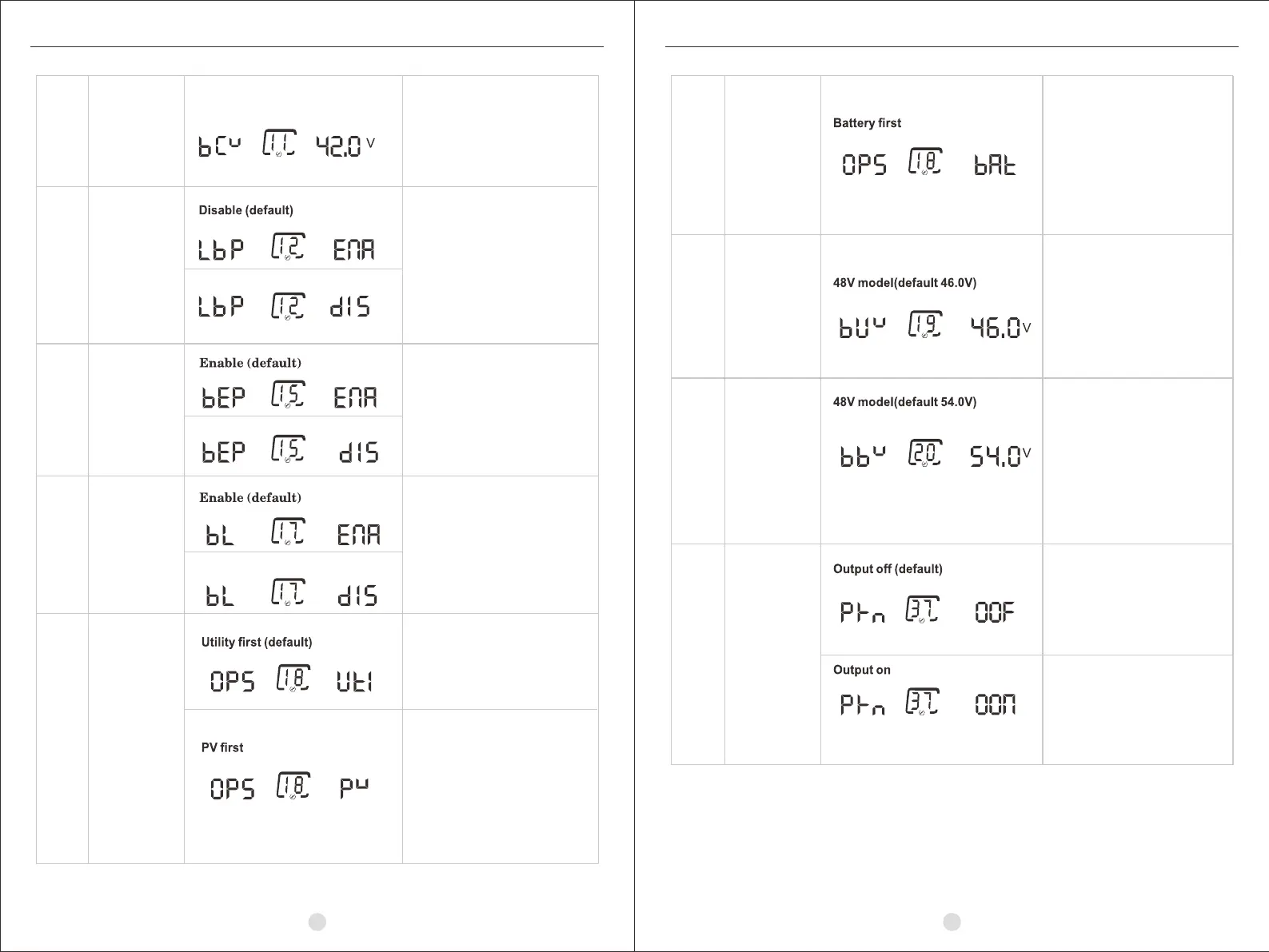
If self-defined is selected in
program 5, this program is
enable. Setting range is from
42.0V to 48.0V. Increment of
each click is 0.1V.
If it is enabled, the inverter
will switch to utility mode if
overload happens in battery
mode.
enabled:LCD backlight stays on.
disabled: LCD backlight will turn
off after inactivity of 60 seconds
Low DC cut-off
voltage
11
Overload bypass
function
12
Buzzer Alarm
15
17
Back light
of LCD
18
Output source
priority
Utility will provide power to the
loads first, battery will provide
power to the loads only when
utility power is not available.
PV provides power to the loads
first. If PV energy is not sufficient,
battery will feed power to the loads.
Utility provides power to the loads
only when any one condition
happens:
(1) PV is unavailable;
(2)Battery voltage drops to low-level
warning voltage or the setting point
in program 19.
48V model(42V default)
battery provides power to the
loads first, utility provides power to
the loads only when battery voltage
drops to either low-level warning
voltage or the setting point in
program 19. And when battery
voltage return to the setting point in
program 20, the inverter will switch
to battery mode;
Setting range is from 44.0V to
51.0V. Increment of each click
is 1V.
Setting range is from 48.0V to
58.0V. Increment of each click is
1V. “FUL” means the battery
should be charged to float mode;
When power key is off and utility
is charging to battery, Output is off.
When power key is off and utility
is charging to battery, Output is on.
18
Output source
priority
19
Setting battery
voltage point
back to utility
when selecting
“BAT priority”
in program 18.
20
Setting battery
voltage point
back to battery
mode when
selecting “BAT
priority”in
program 18.
37
Power Key
Mode


 To Next Page