
 Need help?
Do you have a question about the MAXXO CD03 and is the answer not in the manual?
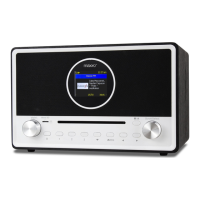
The Maxxo CD03 is a versatile internet radio with a wide range of audio playback options, including DAB+/DAB, FM radio, Bluetooth, CD, USB, and Micro SD card playback. It also features alarm and sleep timer functions, and can be controlled remotely via a PC or smartphone.
The Maxxo CD03 serves as a comprehensive audio entertainment system, offering access to thousands of internet radio stations worldwide through its Skytune service. Users can filter stations by region, music genre, or talks, and quickly access local stations. In addition to internet radio, it supports Digital Audio Broadcasting (DAB+) and DAB radio signals where available, providing clear digital radio without an internet connection. For traditional radio listening, it also receives ordinary FM radio stations.
The device functions as a Media Centre, allowing users to browse and stream music from their network via UPnP or DLNA compatible devices. This means music files stored on network hard drives or PCs can be played directly through the radio.
For personal audio playback, the Maxxo CD03 includes a CD player for standard audio CDs, a USB port for playing music from USB thumb drives, and a Micro SD card slot for music stored on memory cards. Bluetooth connectivity enables wireless streaming of audio content from other Bluetooth-enabled devices like smartphones or tablets, acting as a receiver. An AUX-IN jack provides a wired connection for external media devices or smartphones using a 3.5mm audio cable.
Beyond entertainment, the radio incorporates practical features such as an alarm clock with two independent settings, allowing users to wake up to a tone, a favorite internet radio station, FM radio, DAB radio, or other media players. A sleep timer function allows the radio to automatically switch to standby after a user-defined period, ranging from 15 to 180 minutes.
The Maxxo CD03 is designed for user-friendly operation through both on-device controls and a remote control.
The remote control provides comprehensive access to all functions, including power, mute, numerical input for presets or WiFi passwords, cursor navigation, alarm settings, sleep timer, mode switching (Internet Radio/DAB/FM/Bluetooth/Media Center), favorite list recall, volume control, equalizer, track navigation, play/pause, dimmer for display brightness, and quick access to network and system information.
The radio connects to the internet via Wi-Fi (IEEE 802.11b/g/n) and supports WEP/WPA/WPA2 encryption. The initial setup involves a network wizard to connect to your Wi-Fi network, requiring the input of the Wi-Fi password. The device supports SmartConfig for easy setup via a smartphone app (Esptouch).
Access to Skytune allows browsing thousands of stations. Users can save up to 99 favorite stations and quickly recall them. The radio also keeps a history of up to 99 recently listened stations.
Supports UPnP/DLNA for streaming music from network devices. Users can create custom playlists.
Automatic scanning finds available stations. Stations can be added to favorites. Manual tuning is available for FM.
Easy pairing with Bluetooth-enabled devices for audio streaming.
Simple insertion of media automatically starts playback. Navigation includes skipping tracks, fast forwarding/rewinding, and pause/play.
Two independent alarms can be set with various sound sources and repeat options. The sleep timer allows the radio to enter standby after a set duration.
The radio can be controlled via a web browser (Internet Explorer, Google Chrome) on a PC or smartphone connected to the same Wi-Fi network. Users can browse internet radio channels, search for specific stations, and manage their favorite lists through the www.skytune.net interface. This includes adding new stations by URL and editing existing favorites.

 To Next Page
 General