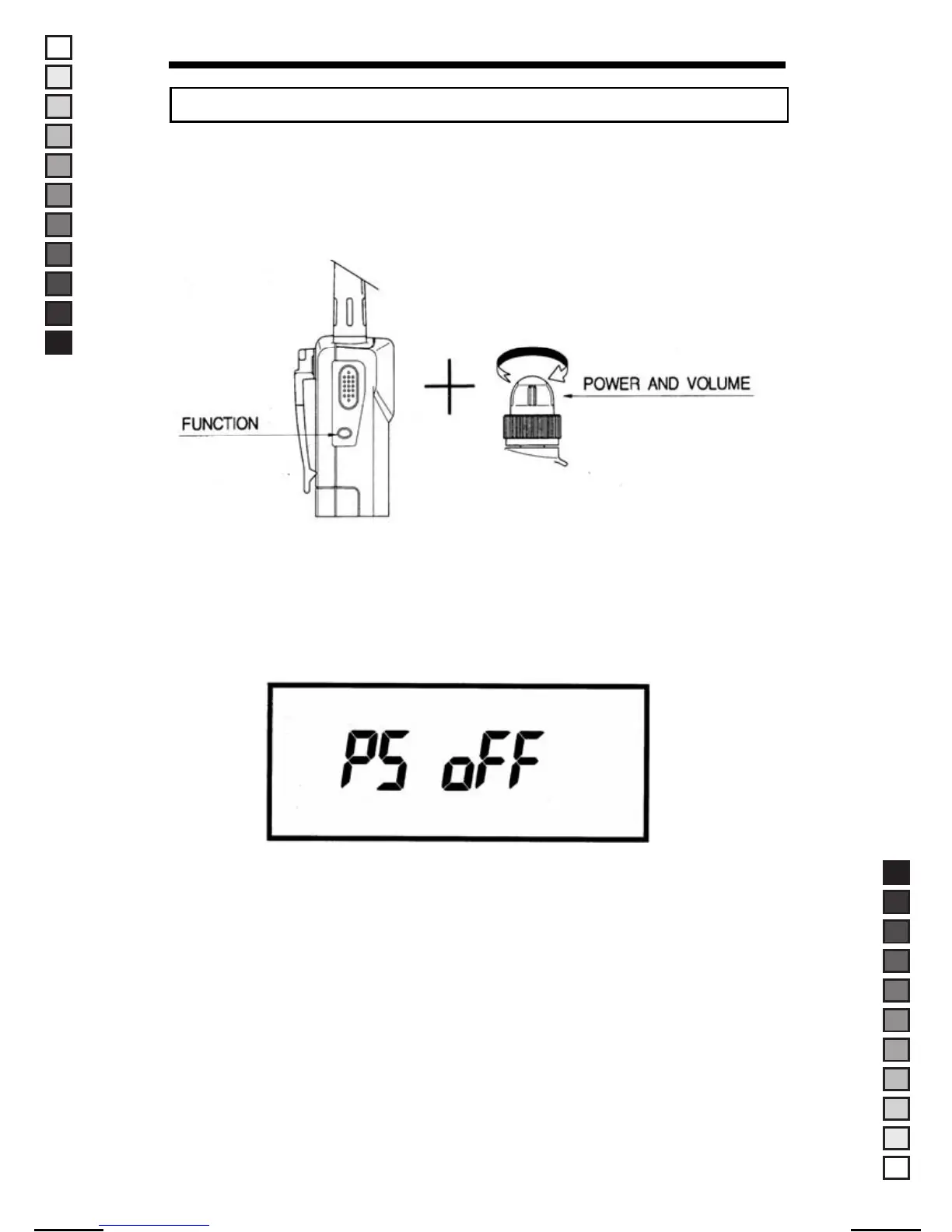
Press and hold "FUNC" button under the condition of Power off, and then
turn on the radio. To enter each option setting mode, press "FUNC + ▲ or ▼
" button.
1. Setting of Power Save mode
This feature allows you to increase the useful life of your battery
significantly.
▶ Display of Operating Power save On/Off setting Mode.
If you press the "▲ or ▼" button in this setting mode, power save
On/Off will toggle on the LCD.
2. SCAN Delay Time
To select SCAN Delay Time, press "FUNC" and "▲" button in Power Save
mode. The Scan Delay feature allows the scanning process to stop for
the fixed time when a signal is received at the radio. After this time, the
scanning process will continue.
15
■ OPTION SETTING MODE
MANUAL-USER / ERP CODE: 66000444 / English / MAYCOM EUROPE VERSION
MANUAL SIZE: 110 X 190 mm / MATERIAL: ART PAPER(W/O COATING



 To Next Page