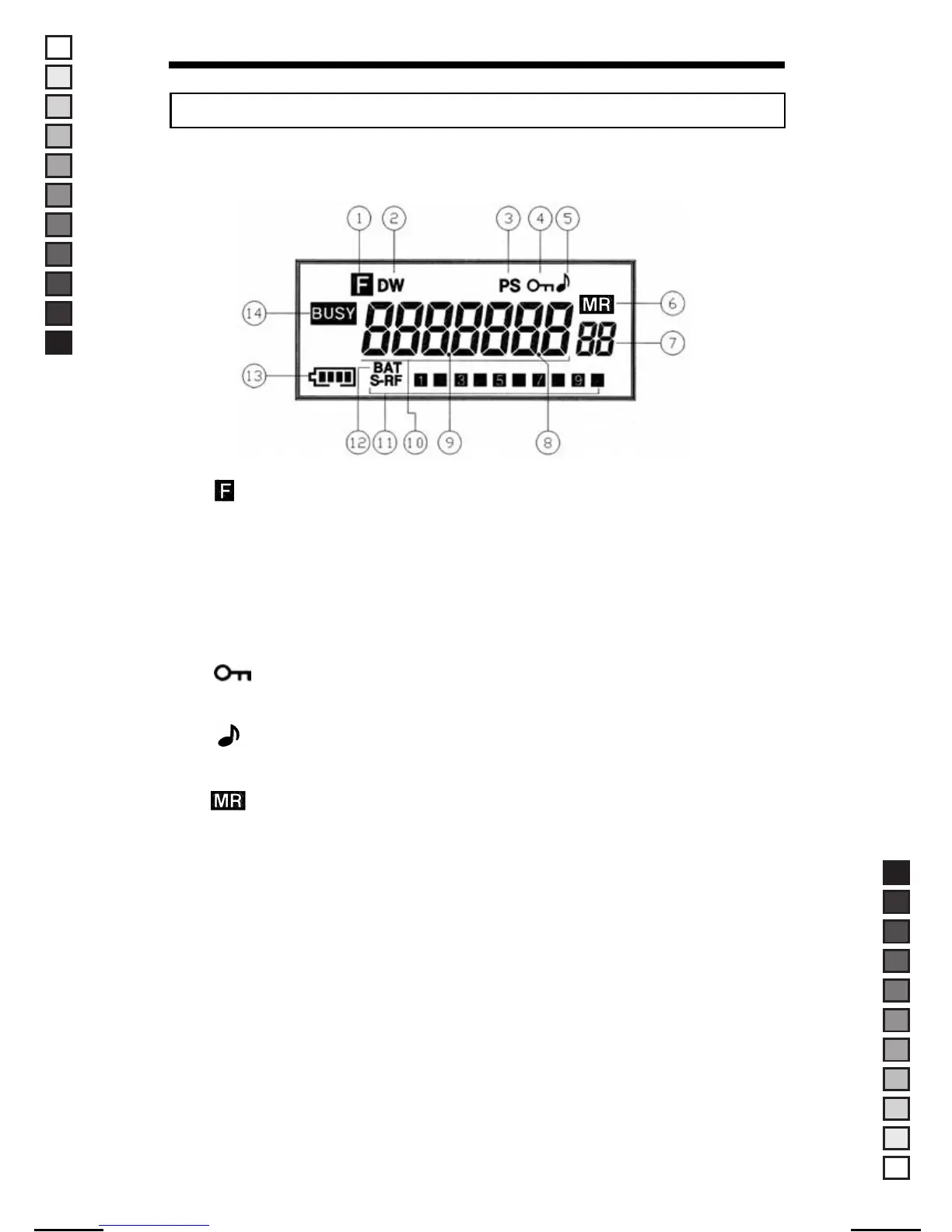
● Display Panel Features
1. " " (Function Mode)
Indicates the "FUNC" button has been selected.
2. " DW " (Dual Watch)
Indicates that the "Dual Watch" feature has been activated.
3. " PS " (Power Save)
Indicates that the radio is in the "Battery Save" or "Power Save" mode.
4. " " (Key Lock)
Indicates the "Key Lock" feature has been activated.
5. " " (Beep)
Indicates that "Beep" tone confirmation is on.
6. " " (Memory Mode)
Indicates that Memory Mode operation.
7. Memory channel indicator
Displays the memory channel number (99 memories available).
8. Dot No. 2
Not Used
9. Dot No. 1
This dot is used to display the RX Frequency (Unit : MHz).
10. Channel (Frequency) indicator
Displays Frequency Number.
4
■ DESCRIPTION OF FEATURES
MANUAL-USER / ERP CODE: 66000444 / English / MAYCOM EUROPE VERSION
MANUAL SIZE: 110 X 190 mm / MATERIAL: ART PAPER(W/O COATING



 To Next Page