Home
MAYFLOWER ELECTRONICS
Amplifier
ARC
Page 2 (Quick Start Guide)
MAYFLOWER ELECTRONICS ARC - Quick Start Guide
13 pages
Manual
Save Page as PDF
To Next Page
To Next Page
To Previous Page
To Previous Page
Loading...
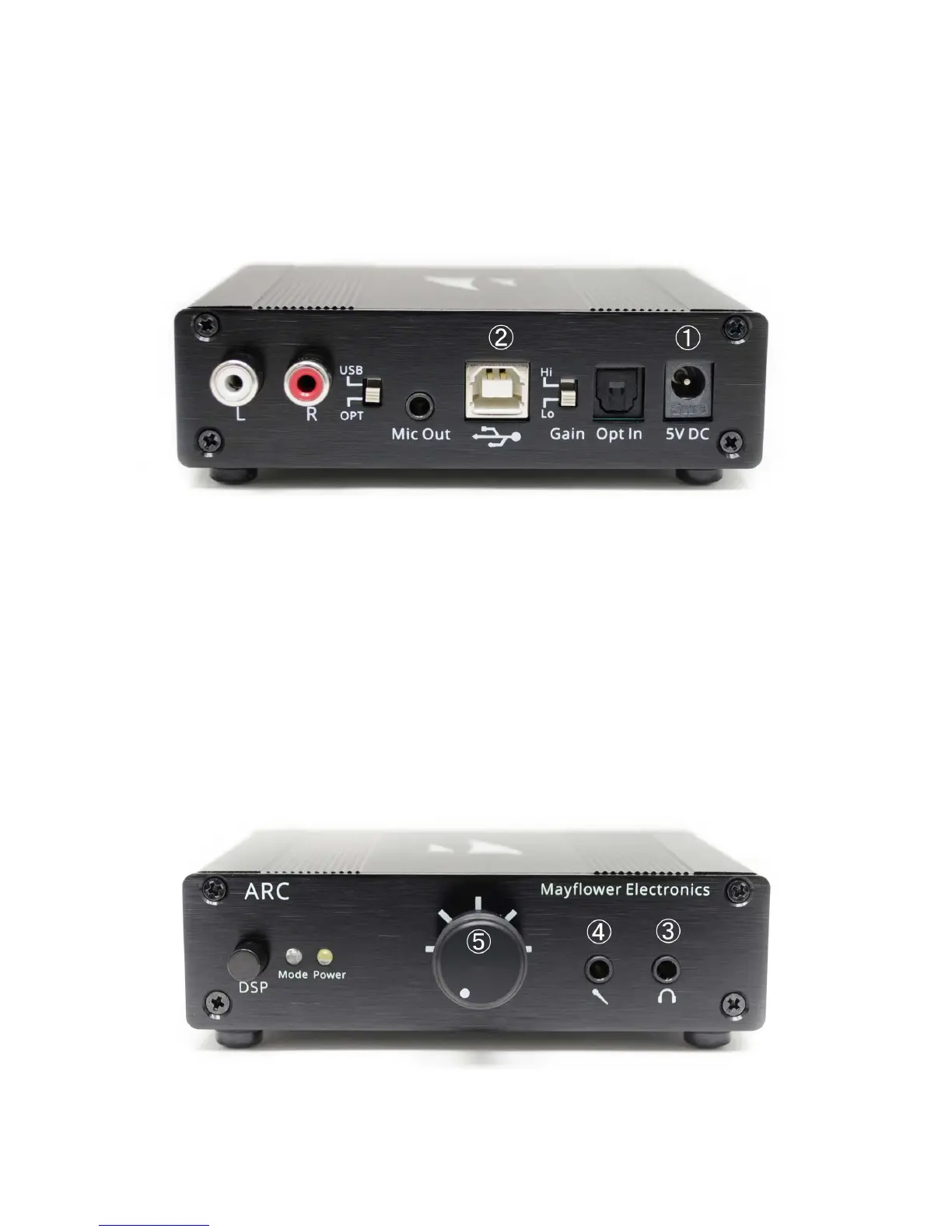
Quick Start
1. Connect pow
er adapter t
o
①
2. Plug USB cable in
to PC, Mac
, or PS4
and insert USB ca
ble into
②
3. Plug headphones in
to
③
4.
Optional: Plug microphone in
to
④
5. T
urn on power and set v
olume
⑤
Pg. 2
1
3
Table of Contents
Main Page
Quick Start
2
Table of Contents
3
Introduction
4
Features
4
Safety Precautions
5
Unpacking + Contents
5
Connections + Controls
6
Operation
7
Xbox One Settings
9
PS4 Settings
9
Troubleshooting
10
Specifications
13
Warranty
13
Related product manuals
MAYFLOWER ELECTRONICS ARC MK2
14 pages


 To Next Page