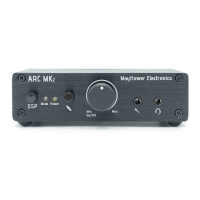
Operation
In most circumstances, the ARC will only need to be connected to a power source and an available
USB port on your system. Refer to the illustrations in the Connections + Controls section to locate the
items described below:
1. Ensure that the volume + power knob ④ is in the Off position (all the way counter-clockwise).
2. Remove the twist tie from the power adapter and connect it to the ARC ⑬.
3. Plug the power adapter into a 100-240vAC, 50-60hz power source. A plug adapter will be
needed if using an outlet other than a North American outlet.
4. Remove the twist tie from the included USB cable and connect it between your system and the
ARC ⑩.
5. Connect your headphones to the headphone output jack ⑥.
6. Optional: Connect your microphone to the mic input jack ⑤.
7. Power the ARC on by turning the volume + power knob ④ clockwise past the point where a
click is felt.
Your system should recognize the ARC and begin sending all audio processing through the ARC,
bypassing the internal sound card. If your system does not recognize the ARC, see the Troubleshooting
section.
8. Put on your headphones and adjust the volume to a comfortable level. The volume knob
rotates nearly 360 degrees, and it is normal to turn the volume past 12 O’clock to achieve
typical listening levels. If the level is not sufficient, switch the output gain selector ⑪ to the Hi
position. For most headphones, the Lo gain setting is adequate.
9. Optional: Test your microphone and adjust the software microphone volume on your system to
an optimal level.
Connecting the ARC to your home audio system or Xbox:
Instead of using the USB input, connect the ARC's optical input ⑫ to your receiver, pre-amp, or Xbox
using a TOSLINK cable (not included). Move the input selector switch ⑧ to the optical position.
If you would like to use the microphone with your Xbox, you'll need to connect a standard 3.5mm to
3.5mm aux cable between ⑨ and the 3.5mm jack on the Xbox controller.
Pg. 7


 To Next Page