Sound mode options:
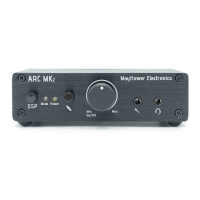
The Mode button ① allows for the selection of two DSP audio enhancement modes to complement
your gaming environment. When the ARC is first powered on, the default mode is selected, which
does not alter the sound and the mode LED is turned off.
Pressing the mode button will cycle through the DSP modes, changing the color of the mode LED ②.
Continue to press the button until the desired mode is selected:
When the mode LED is blue, Dynamic Bass mode is selected, which evenly and smoothly transitions to
a more powerful deep bass response. This mode may improve sound quality depending on your
preferences, your headphones, and the quality of the input source.
When the mode LED is red, the Gaming Surround mode is activated, which provides wider spatial
separation of the left and right channels. This can be useful in a gaming environment to help localize
sounds, making it easier to distinguish how far a particular sound is coming from the left or right.
Microphone Options:
The built-in microphone connection provides a sophisticated line filter to eliminates noise, distortion,
and clipping. If your teammates are having trouble hearing you, you may need to adjust the
microphone volume on your system.
An analog microphone output ⑨ has been provided for connection to custom mixing equipment.
This can be useful when capturing a game's video and audio for later viewing, or otherwise creating a
custom audio feed (such as a team music play list). Simply use a 3.5mm cable (not supplied) to
connect to your mixer or podcasting equipment.
Speaker Options:
A pair of RCA pre-outs ⑦ are supplied to connect powered speakers for use when headphones are
not connected. The ARC will automatically disable the speakers when headphones are connected.
When the RCA pre-outs are in use, volume is controlled using your speaker system’s volume
adjustment.
Pg. 8


 To Next Page