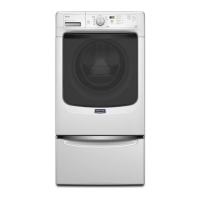
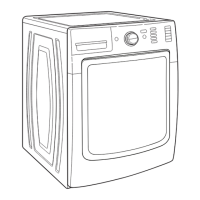
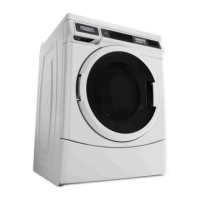
The device described in the manual is the Maytag MHN33PR Energy Advantage™ Front-Load Washer, a commercial laundry machine designed for efficiency and durability.
Function Description
The MHN33PR is a front-load washing machine primarily intended for commercial use, specifically in self-service laundries or similar environments. It offers two operational modes: a "Free Cycle" where no payment is required, suitable for typical laundry shop setups, and a "Debit Card" mode that integrates with a card reader system for paid usage. The machine is designed to handle various wash programs including Normal, Delicates, and Power Wash, with adjustable parameters for wash length, pre-wash length, and final spin length. It also includes extra cycle settings for rinse and wash temperature.
Important Technical Specifications
- Model: MHN33PR
- Capacity: 10.5 Kg (Feature Definition) / 11kg (Technical Specifications)
- Dimensions (HWD): 961 x 686 x 732 mm
- Motor: Variable-speed, reversible, thermo-protected, high-efficiency, controlled induction.
- Extract Speed:
- Maximum RPM: 1,000
- Maximum g-force: 300
- Breaker/Fuse Min. Requirements: 15A
- Water Pressure: 20-100 psi (137.9-689.6 kPa)
- Water Flow Rate: 1L/10sec or 1.5L/15sec
- Pre-installation Requirements:
- Faucet with thread (3/4)
- Standing Pipe: 30-39 inches in height, 2 inches in diameter
- Key Technologies:
- Advance Spin Technology
- Duracore Drive System
- Intelligent Controls
- M-series Technology
- Energy-efficient Cleaning
- Clothespin™ App By Maytag Compatible
Usage Features
The MHN33PR offers a user-friendly interface with distinct buttons for "POWER WASH," "NORMAL," "DELICATES," "TEMPERATURE," "EXTRA RINSE," and "START."
Programming Procedure:
The machine initially displays a price of "0.00" as it's set up for self-service laundry. It must be set to a free cycle before operation. There are two ways to enter Setup Mode:
- Keypad Sequence: Press the upper left, lower right, upper right, then lower left keypads.
- Reset Switch: Press or toggle the reset switch (if installed) at the back of the unit.
Once in Setup Mode, "6 07" appears on the screen, representing the Set-up Code. The Set-up Code Value (0-99) can be adjusted using the buttons:
- A (Upper Left): Increments the parameter value.
- B (Lower Left): Decreases the parameter value.
- C (Lower Right): Advances to the next available set-up code.
- D (Upper Right): Selects or deselects options.
Commonly Used Parameters:
- Cycle Price: Set to "0" for Free Cycle for Normal, Delicates, and Power Wash programs (e.g., "6 04").
- Wash Length: (9-17 minutes) (e.g., "7 11")
- Pre-Wash Length: (2-7 minutes) (e.g., "A1.03")
- Final Spin Length: (3-8 minutes) (e.g., "A2.03")
- Extra Cycle Settings: Parameters A3.02 (Normal), A4.00 (Delicates), A5.0F (Power Wash) allow setting Extra Rinse, Prewash, and Wash Temperature (Cold, Warm, Hot) based on a provided table.
Debit Card Setup:
For paid operation, a card reader is attached to the front panel and connected to the AA3/Card Reader slot of the UI Board. A programmed Setup Card with a matching site code is inserted into the card reader. The display will show "SU" then "donE" when the setup is complete. The machine will then display its programmed pricing (e.g., "1.00" or "1.75").
Loading and Adding Detergents:
- Do not overload the washer; ensure about 5 inches of space at the top. Close the door securely.
- The detergent dispenser has compartments for Liquid Bleach (only liquid bleach), Detergent (pre-measure, use 1/4 recommended amount for non-HE detergents), and Fabric Softener.
- Do not open the dispenser drawer when the machine is in use. Too much detergent can leave residue and cause malfunction.
Customer Usable Codes:
- Error Code Reset (P-01): Used to restore the unit after an error. Involves pressing the reset switch or pulling out the AA1 service switch, or using a Service Diagnostic Code, then pressing and holding the UPPER RIGHT button until P-01 is displayed, waiting for the door to unlock, and finally depressing the reset switch.
- Cycle Credit (P-02): Applicable for debit card setups, used as a free cycle if a paid cycle was interrupted by an error. Involves a sequence of reset switch/AA1 service switch, setup code "6 00", pressing UPPER RIGHT until P-01, then LOWER MIDDLE until P-02, then START for "CC" display, and finally depressing the service switch for "SELECT CYCLE".
- Drain and Spin Cycle (P-06): Used as a touch-up cycle if clothes are still wet or water remains after a wash. Involves a sequence of reset switch/AA1 service switch, setup code "6 00", pressing UPPER RIGHT until P-01, then LOWER MIDDLE until P-06, and finally START to begin the cycle.
Maintenance Features
Washer Care:
Diagnostic Codes (for Service Technicians):
- P-03 Quick Overview Test: Verifies cold/hot water valves, pump motor, door lock, drain, and spin operations.
- P-04 Manual Overview Test: Provides a more thorough analysis including full length fills, tumbles, drains, actuator dispenser movement, and pressure switch behavior.
- P-05 Button Test: Determines faulty buttons and missing LCD segments.
- P-07 UI Diagnostics: Similar to P-05, for UI diagnostics.
- P-09 Factory Reset: Resets machine memory, useful for intermittent operation. Involves activating service switch, pressing DELICATES (P-01), then EXTRA RINSE (P-09), then START (HHHH), then TEMPERATURE (1C.03), then TEMPERATURE and START simultaneously, then unplugging/replugging, and finally deactivating service switch.
Error Codes:
- F01 (CCU ERROR): Communication error within Central Control Unit (CCU), pump drive failure, or main relay failure. Possible causes: power surge/drop, reversed polarity, mis-wire, open ground switches.
- F11 (MCU ERROR): Motor Control Unit (MCU) failure. Possible cause: repeating under or overvoltage condition.
- F20 (NO WATER DETECTED ENTERING WASHER): Washer attempts to lock door, prompts customer to open/clear/shut door, and reselect cycle. Repeats twice before vend loss and reset. F22 appears if door lock fails twice. Possible causes: misaligned/broken door latch, damaged electrical connections to door lock, misaligned/broken/overtightened door hook.
Help Codes:
These codes provide information on various aspects of the washer's operation and history, useful for troubleshooting. They can be accessed by pressing the reset switch or pulling out the AA1 service switch, then pressing the LOWER MIDDLE key until "2.XX" appears, and then the LOWER LEFT key for "1h.00". Further presses of the LOWER MIDDLE key cycle through other help options.
- 1h.XX, 2h.XX, 3h.XX: General help codes.
- 1.X##, 2.X##, 3.X##, 4.X##: Error history codes.
- hE.ES: Energy Saving Mode status.
- hF.LL: Wash Water Level Selection.
- SC.XX: CCU software revision.
- EC.XX: CCU EEPROM revision.
- SU.XX: UI software revision.
- EU.XX: UI EEPROM revision.
- SPIN XXX: Current drum speed in rpm.
Purpose of Help Mode:
- Verify washer behavior and customer cycle operation.
- Verify current status of switches, actuators, valves, and relays.
- Report drum speed, unbalance value, and power used by MCU.
- Record error history for diagnosis.
- Increase wash water level.
- Provide software version information.
Warranty:
Maytag and Whirlpool Commercial Warranty for Washers and Dryers (Philippine Use Only) includes a 3-YEAR LIMITED WARRANTY.

 Need help?


 To Next Page
 General