
 Need help?
Do you have a question about the Maytronics CLASSIC 8+ and is the answer not in the manual?
Welcome message and highlights of the robotic pool cleaner's benefits for pool hygiene.
Technical details of the robot and power supply, including IP ratings and connectivity.
Critical safety warnings and instructions to be strictly followed during operation and maintenance.
Essential precautions to ensure safe operation, including handling and placement of equipment.
Step-by-step guide for the initial setup and preparation of the pool cleaner.
Instructions on how to adjust and lock the handle for optimal cleaning performance.
Procedure for correctly placing the pool cleaner into the water for cleaning.
Information on compatible devices and initial setup requirements for the mobile app.
Steps to prepare the pool cleaner for a successful connection to the mobile app.
Instructions for activating the pool cleaner using your mobile smart device.
Explanation of the different LED light indicators on the power supply unit.
Initial steps to turn on and begin operating the pool cleaner with the remote control.
Details on Delayed Operation and Weekly Scheduling modes for automatic cleaning.
Instructions for manually navigating and controlling the robot's movement.
Safe and correct procedure for removing the pool cleaner from the pool.
Essential maintenance tasks to ensure the pool cleaner's optimal performance.
Step-by-step guide for cleaning the filter cartridges.
Instructions for disassembling and cleaning the impeller for maintenance.
Guidelines for proper storage of the pool cleaner during periods of non-use.
Common operational issues and their corrective actions for the pool cleaner.
Solutions for common problems encountered with the MyDolphin Plus mobile application.
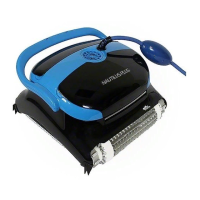
The Maytronics Dolphin robotic pool cleaner, specifically the CLASSIC 8+ / TOP 8 model, is designed to provide reliable, convenient, and cost-effective pool cleaning. This robotic cleaner ensures maximum pool hygiene through its efficient filtration system, active brushing capabilities, and all-surface climbing brush. It is suitable for use in permanently installed pools and offers various features to simplify the cleaning process.
The primary function of the Maytronics Dolphin robotic pool cleaner is to autonomously clean swimming pools. It is equipped with a motor protection system and is designed to operate within specific depth ranges. The cleaner utilizes a digital switch-mode power supply for efficient operation. Its advanced connectivity features, including Bluetooth® and Wi-Fi®, allow for remote control and monitoring via the MyDolphin™ Plus IoT mobile app. The app provides real-time connectivity, enabling users to control the cleaner from anywhere at any time.
The cleaner offers different cleaning modes, including floor-only cleaning, floor, walls, and waterline cleaning, and an ultra-clean mode. Users can also set the duration of the cleaning cycle to short, default, or long. For scheduled cleaning, the device supports options to clean every 2nd day or every 3rd day, making it convenient for routine maintenance.
Setting up the Maytronics Dolphin robotic pool cleaner is straightforward. Before the first use, users need to unwind the blue cable completely to avoid kinks and remove any plastic coverings from the brushes. The floating cable is then attached to the power supply by aligning the notch on the connector with the groove in the socket and turning clockwise. The power supply should be positioned at least 3.5m/12ft away from the pool edge and at least 11cm/4in above the ground.
The robot's handle angle can be adjusted diagonally to ensure optimal cleaning results and to control the speed at which the robot moves along the waterline. If the cleaner is equipped with sponge brushes, they should be dipped in water and squeezed to absorb water before placing the cleaner in the pool. Once in the water, the cleaner should be released to sink to the floor, ensuring the blue cable is free of obstructions and enough slack is provided for the cleaner to reach all corners of the pool. After turning the power supply ON, the cleaner will operate until its cleaning cycle is complete.
The MyDolphin™ Plus IoT mobile app enhances the user experience by providing advanced control options. Compatible with Apple (iOS 10 and up) and Android (version 5 and up) devices, the app requires the mobile device to be connected to the home/pool Wi-Fi® network, with Bluetooth® enabled. Android users also need to ensure GPS and Location Services are ON. The setup process involves connecting the cleaner to the power supply, placing it in the water, and pressing the ON button. Users then activate the MyDolphin™ Plus app, agree to permissions, sign up, and scan the QR code on the power supply or manually search for the robot to pair. The app guides users through connecting to their home Wi-Fi® network, after which the power supply's LED light will indicate successful connection.
For models equipped with a remote control unit, users can operate the cleaner in two modes: Automatic Mode and Manual Drive Mode. In Automatic Mode, cleaning parameters can be changed. This includes Delayed Operation, where the cleaner starts cleaning after one hour, and Weekly Scheduling, allowing users to set cleaning intervals for every two or three days. In Manual Drive Mode, users can control the robot's movement around the pool using direction control arrows on the remote. The remote control unit also displays the signal strength, filter indicator (blinking when the filter needs cleaning), battery level, and technician mode status.
Removing the pool cleaner from the water involves turning off the power supply, using the blue cable to bring the cleaner to the pool edge, and then using the handle to lift it out. It is crucial to allow the water to drain out before storing the cleaner.
Routine maintenance is essential for the longevity and optimal performance of the Maytronics Dolphin robotic pool cleaner. The primary maintenance task involves cleaning the cartridge filters. Before any servicing activity, the power supply must be unplugged. It is important not to let the cartridge filters dry out before cleaning.
To clean the filters, users need to open the filter covers and remove the cartridges from both sides of the robot. The clips on the cartridges are then opened to remove the filters, which should be cleaned thoroughly with a hose. After cleaning, the filter elements are reassembled by inserting the locating tabs at the bottom of the filter element into their grooves on the base frame. The filter basket should also be cleaned with a hose. It is important not to force the filters into place during reassembly.
Another maintenance task is dismantling and cleaning the impeller. Again, the power supply must be unplugged before performing this task. Users need to dismantle the impeller cover, clean around the impeller housing, and then reassemble it. A Phillips screwdriver should be used for this task, not an electric screwdriver.
For off-season storage, if the pool cleaner will not be in use for an extended period, several steps should be followed. First, ensure no water is left in the pool cleaner. Second, thoroughly clean the filters of the cartridges and insert them back in place. Third, roll up the cable without kinks and place it on the Caddy. Finally, store the pool cleaner upright on the Caddy in a protected area, away from direct sun, rain, or frost, at a temperature between 5°-45°C / 41°-113°F.
The manual also provides a comprehensive troubleshooting guide for common issues, such as the power supply not working, the pool cleaner not moving or moving in circles, not cleaning the pool effectively, or the remote control not working. For connectivity issues with the MyDolphin™ Plus app, specific troubleshooting steps are provided, including checking internet signal strength, re-pairing the robot, and resolving issues related to router changes or power supply replacement. In case these solutions do not resolve the problem, users are advised to contact Maytronics Customer Care.
 General
| Pool Type | In-ground |
|---|---|
| Weight | 16.5 lbs |
| Pool Size | Up to 50 ft |
| Cable Length | 60 ft |
| Type | Robotic |

 To Next Page
