5
–
88
Interior Features
Interior Equipment
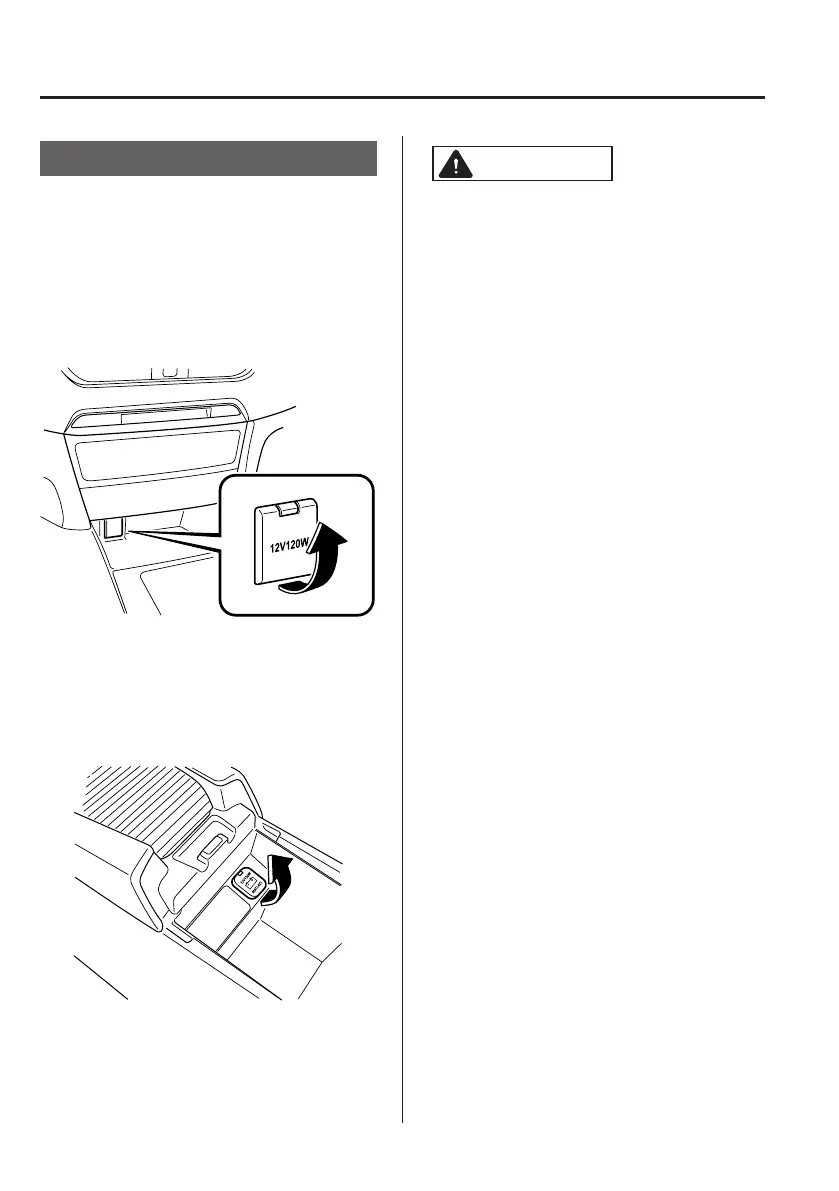
Accessory Sockets
Only use genuine Mazda accessories or
the equivalent requiring no greater than
120 W (DC 12 V, 10 A).
Front
The ignition must be switched to ACC or
ON.
Center
The accessory sockets can be used
regardless of whether the ignition is on or
off.
CAUTION
To prevent accessory socket damage or
electrical failure, pay attention to the
following:
Do not use accessories that require
more than 120 W (DC 12 V, 10 A).
Do not use accessories that are not
genuine Mazda accessories or the
equivalent.
Close the cover when the accessory
socket is not in use to prevent foreign
objects and liquids from getting into
the accessory socket.
Correctly insert the plug into the
accessory socket.
Do not insert the cigarette lighter into
the accessory socket.
Noise may occur on the audio playback
depending on the device connected to
the accessory socket.
Depending on the device connected
to the accessory socket, the vehicle's
electrical system may be aected,
which could cause the warning light to
illuminate. Disconnect the connected
device and make sure that the problem
is resolved. If the problem is resolved,
disconnect the device from the socket
and switch the ignition o. If the
problem is not resolved, consult an
Authorized Mazda Dealer.
NOTE
To prevent discharging of the battery, do
not use the socket for long periods with the
engine off or idling.
Mazda6_8FH2-EA-16F_Edition1.indb 88 2016/05/10 19:24:27



 To Next Page