6
–
18
Maintenance and Care
Scheduled Maintenance
Maintenance Monitor
Maintenance Monitor
1. Select the icon on the home screen to display the “Applications” screen.
2. Select “Maintenance” to display the maintenance list screen.
3. Switch the tab and select the setting item you want to change.
You can customize settings in the setup display as follows:
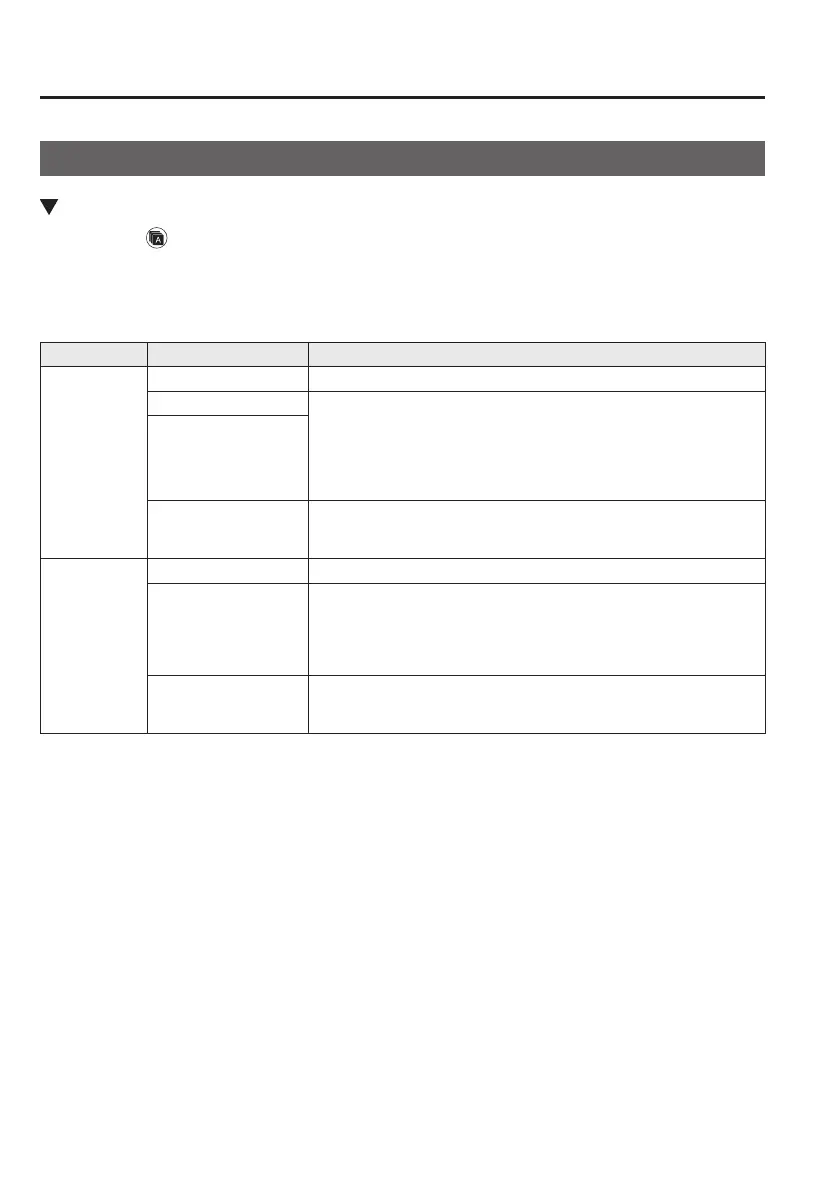
Tab Item Explanation
Scheduled
Setting Notication can be switched on/off.
Time (months) Displays the time or distance until maintenance is due.
Select this item to set the maintenance period.
“Scheduled Due!” is displayed in red and the wrench indicator light in
the instrument cluster will be illuminated when the remaining distance
is less than 500 km or 250 mile, or the remaining number of days is
less than 15 (whichever comes rst).
Distance (mile or km)
Reset
Resets the time and distance to the initial values.
Once the system turns on, it needs to be reset whenever carrying out
maintenance.
Tire Rotation
Setting Notication can be switched on/off.
Distance (mile or km)
Displays the distance until tire rotation is due.
Select this item to set the tire rotation distance.
“Tire Rotation Due!” is displayed in red and the wrench indicator
light in the instrument cluster will be illuminated when the remaining
distance is less than 500 km or 250 mile.
Reset
Resets the remaining distance to the initial value.
Once the system turns on, it needs to be reset whenever rotating the
tires.
Mazda6_8FH2-EA-16F_Edition1.indb 18 2016/05/10 19:24:30



 To Next Page