4. Instrument cluster
5. Basic display
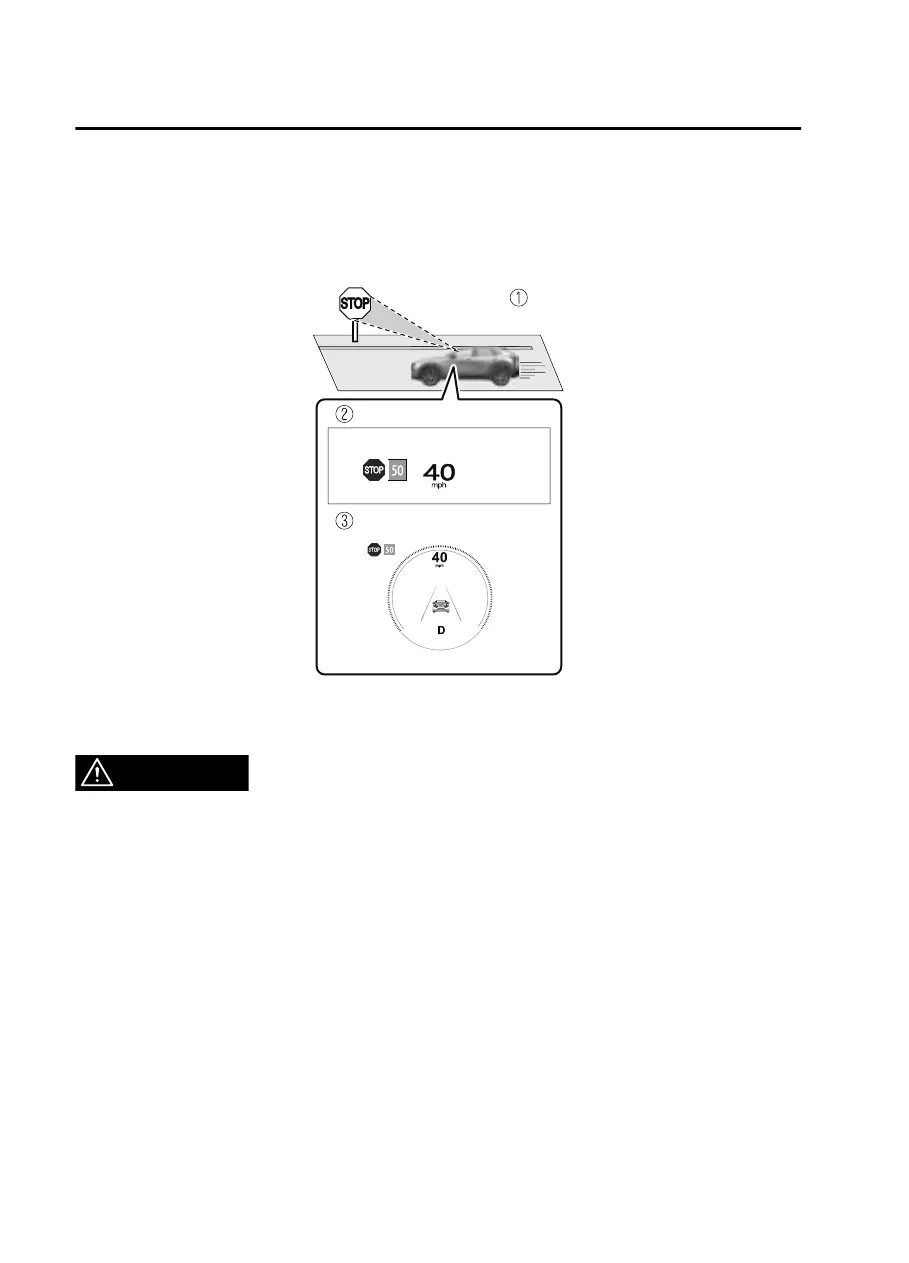
6. i-ACTIVSENSE display
7. Recognized speed limit indication color changes.
Stop sign
1. Sign recognized and displayed at same time
2. Active driving display indication
3. Instrument cluster
WARNING
Always check the trac signs visually while driving:
The TSR helps prevent the driver from overlooking trac signs and provides support
for safer driving. Depending on the weather conditions or problems with trac
signs, a trac sign may not be recognized or a trac sign dierent from the actual
trac sign may be displayed. Always make it your responsibility as a driver to check
the actual trac signs. Otherwise, it could result in an accident.
NOTE
The TSR is not supported in some countries or regions. For information concerning
the supported countries or regions, consult an Authorized Mazda Dealer.
The TSR operates only if the navigation system SD card (Mazda genuine) is
inserted in the SD card slot. Consult an Authorized Mazda Dealer for details.
The TSR does not operate if there is a malfunction in the Forward Sensing Camera
(FSC).
Under the following conditions, the TSR may not operate normally.
When Driving
i-ACTIVSENSE
4-102
CX30_8JP5-EA20K_Edition1_new 2020-7-22 15:50:09



 To Next Page